The JBL Cove M1 is the entry point to JBL’s new whole-home speaker line. The Cove series is aimed squarely at Sonos, which leads the multi-room market.
You can use it on its own, pair it with a second M1 for stereo, or add it as a rear surround speaker alongside JBL’s Bar MK2 soundbars. Alexa is built in, and it also works with the Google Home network. The smartphone app is well designed too.
The Cove M1 costs $229.95. That puts it up against the Sonos Era 100, the Denon Home 150, and the Apple HomePod mini. So does JBL have a speaker that should worry Sonos? I tested the Cove M1 to find out.
JBL Cove M1 Full Specs
JBL Cove M1 Design
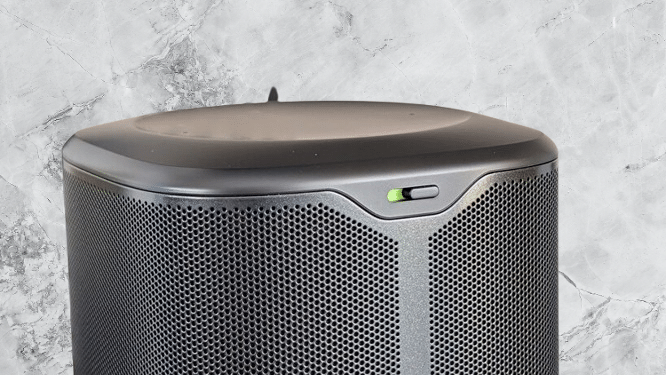
The JBL Cove M1 and the rest of the Cove range drop the party-speaker look you may know from JBL. You get no flashing lights, no loud colors, and not even the brand’s famous orange logo.
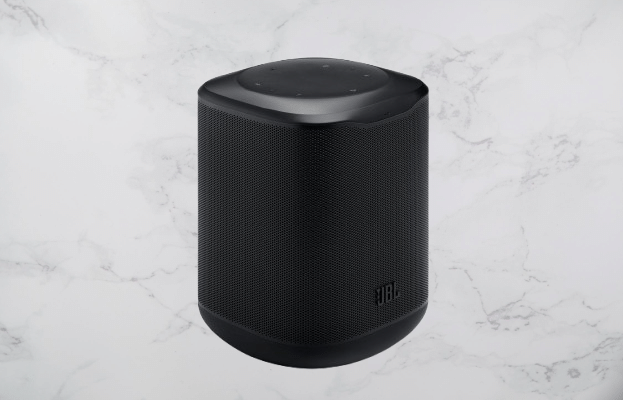
JBL chose a quiet design on purpose. The goal is a speaker that blends into your home instead of standing out. The M1 is an all-black cylinder, and an all-white version is also available online. A fabric grille wraps almost all the way around its four sides with barely a break.
You may also like: Tribit Stormbox Micro 3 Review: A Worthy Sequel
The JBL logo sits on the front, but it is small. From across my lounge, I could not read what the logo said, so the speaker is even more low-key than it looks in photos.
The M1 is the smallest speaker in the Cove line. Its squarish body stands 18.4cm tall and 12.5cm wide, so it fits on a shelf, a side table, or a TV unit without drawing attention.
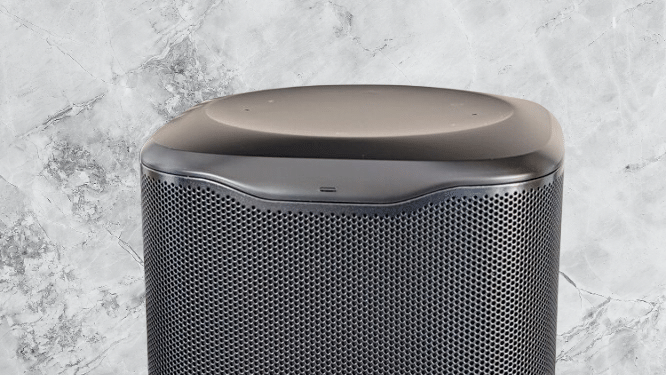
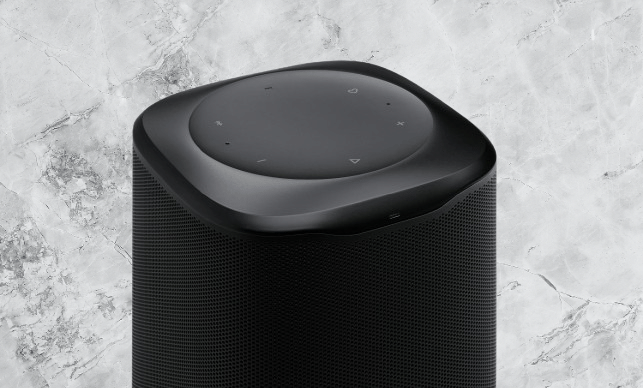
The touch controls sit in a concave dip on the top. They cover volume up and down, play and pause, Bluetooth pairing, and a heart-shaped Moment button. That button has a couple of useful tricks, which I cover in the next section.
In good light, the buttons are easy to find and respond to a light tap. There is no backlight, though. In a dim room, you may struggle to tell the buttons apart if you cannot see the icons. The microphones sit along the top edge of the speaker.
On the back, a small sliding switch lets you mute or unmute the microphones. That decides whether Alexa can listen for your voice.
The physical connections are minimal. You get the power cable in the box, and that is it. There is a USB port, but on UK and European models it is for servicing only. You cannot plug in a device to play audio through it. The Cove M1 only plays audio wirelessly, over Wi-Fi or Bluetooth.
The speaker has no battery, so you need to place it near a mains outlet or run an extension cable. The power cable is under two meters long, which limits where you can put it.
If you want more flexibility, the larger JBL Cove P1 runs on both mains power and a battery.
You may also like: JBL Go 5 Review: AirTouch Stereo, USB-C Audio and IP68 Tested
A small light sits on the front edge of the speaker. You will not notice it when the speaker is idle. It only lights up when you wake Alexa, showing that the speaker has heard you and Alexa is listening or thinking.
JBL Cove M1 Features
Setup is one of the main selling points of the new Cove series. JBL puts a lot of emphasis on how easy its app makes pairing, connecting, and playing, and in my testing it delivers.
Download the free JBL One app from your phone’s app store, plug the speaker into the mains, and you can start setting it up right away.
Most apps today make you create an account first. JBL does not. You can create one or sign in if you already have one, but you do not have to.
Once you open the app, it automatically detects the Cove M1. Tap the prompt on the screen, follow the instructions, and press the Moment button on top of the speaker. That is all it takes. The whole process is simple and quick.
During setup, the Cove M1 tunes itself. It uses its speakers and microphones to work out where it sits in your room, then adjusts the sound to match. This room tuning takes about a second, and it helps the speaker fill the space well. The result is very good.
Once the speaker is running, the app gives you more options. You can link streaming services for quick playback. Amazon Music, Calm Radio, iHeartRadio, Qobuz, Spotify, Tidal, and TuneIn are supported. After you link a service, the Moment button gains a new job.
You may also like: Amazon Echo Studio Drops to $174.99 for Prime Day, Lowest Price Yet
Walk up to the speaker and tap Moment, and music starts from the service you picked. I linked my Spotify account in the JBL One app, and one tap started playback. If you were listening to something earlier, it picks up where you left off.
It is a handy feature. You can get music going without reaching for your phone.
The JBL Cove M1 does more than play music. Amazon’s Alexa voice assistant is built in. Sign in to your Amazon account through the JBL One app, and you can wake the assistant by saying “Alexa.”
You can use Alexa to adjust the volume, skip tracks, and pause playback. You can also ask it questions and give it commands, the same way you would on any other smart speaker.
The speaker supports Google Cast, and you can add it to your Google Home setup. I did this successfully. Google’s Gemini assistant is not available on it, though.
Connection options are plentiful. The M1 supports Bluetooth, AirPlay 2, Roon Ready, and Spotify, Tidal, and Qobuz Connect. Auracast is built in too, so you can play audio in sync with other JBL hardware.
To get the most from the M1, you will want more than one. You can buy a second unit, add one of JBL’s other Cove speakers (the P1 and X1), or pair it with a MK2 soundbar.
If you own two M1 speakers, you can set them up as a stereo pair in the app. That gives you true left and right channels, which works well when you place them on opposite sides of a room.
If you have Cove speakers in several rooms, you can group them. JBL soundbars and other supported products can join the group too, which gives you a whole-home audio setup.
Multiple rooms also give the Moment button another job. Say music is playing on an M1 in your lounge. Walk into the kitchen where a second M1 sits and hold the Moment button for about a second. The music moves over from the other room and starts playing in the kitchen as well.
You may also like: CMF Speaker S and Speaker M: Price, Specs, and Features
You do not need to carry your phone around the house to manage playback across speakers. I saw this work at a demo event. JBL sent me only one M1 for review, so I could not fully test this or the stereo pairing.
JBL Cove M1 Sound Quality
Even though it is small, the JBL Cove M1 holds three separate 0.75-inch tweeters. One faces the front, one faces left, and one faces right. A 4-inch ABR woofer sits at the back. Together they give the M1 close to 100 Watts of total output.
The result is big sound from a small body, with more width than you would expect at this size. The single M1 I tested filled my open-plan living space easily, and I did not have to push the volume high.
Out of the box, the equaliser in the app is set to JBL Signature. It sounds balanced, with a bit of extra weight in the bass. The bass never gets strong enough to cover the midrange or vocals.
If you just want to plug in and play, the default setting covers most of what you will listen to. If you like to tweak your sound, the app gives you plenty of controls.
JBL has made a few other presets for quick changes. Vocal pushes singing forward. Energetic gives you a fuller sound that suits a party. Chill reduces the bass for more relaxed listening.
There is also a fully adjustable equaliser if you want to shape the M1’s sound to your own ear.
I played Inner Light by Elderbrook to test it. The vocals came through clearly. When the bass dropped in, the low tones filled the room with warmth, and the vocals and mids stayed clean. The speaker hits with enough punch without overpowering the rest of the mix.
With Raven by GoGo Penguin, the Cove M1 separates the nonstop piano lines from the rapid drumming without much trouble. Timing is not perfect, and the sound gets a little foggy. For a speaker this size, it is still easy to enjoy.
You may also like: Marshall Expands Jimi Hendrix 60th Anniversary Lineup
Massive Attack’s Angel shows what JBL’s AI Sound Boost does. I pushed the volume past 70%, and the bass stayed strong without distorting or taking over the song. Fade by Takuya Kuroda gave a similar result, as the vocals did not disappear under the lower mids.
The M1 gives you a wider sweet spot than a speaker this small should. The low end hits hard, and the vocals stay clean in the midrange. You will not find much to complain about at this size.
One limit is height. The M1 cannot reproduce the overhead effect of Dolby Atmos tracks. If you want that, look at the larger and more expensive Cove P1 or Cove X1.
JBL Cove M1 Verdict
JBL’s entry-level multi-room speaker gives you strong sound that never feels too much. The app is simple to use, and you get plenty of ways to stream. Overall, it gives JBL a solid base for an ecosystem that can compete with Sonos.
Pros | Cons |
| Sleek, modern, discreet design | Buttons could do with illumination |
| Room-filling sound with powerful bass | No physical input ports |
| Versatile ecosystem integration | Mains powered only |
Final thoughts
Does the JBL Cove M1 give Sonos, the multi-room leader, something to worry about? Not by itself. Once you connect it to JBL’s wider lineup of Cove speakers and MK2 soundbars, though, and add the strong app, it has a lot going for it.
The M1 gives JBL a solid base for its multi-room platform. With the Cove P1 and X1 on the way, Sonos has a serious rival.
If you rely on physical inputs, this speaker is not for you. If you want a compact streaming speaker with plenty of volume and Alexa built in, the Cove M1 delivers.