Samsung’s Ultra tablets have long blurred the line between tablet and laptop, and the Galaxy Tab S12 Ultra pushes that concept as far as it can.
A massive 14.6-inch AMOLED display, desktop-style DeX mode, and an included S Pen make this one of the most capable productivity-focused Android tablets you can buy, especially with the upgraded Pro Keyboard.
Under the hood, you get some genuine upgrades, including the MediaTek Dimensity 9500 chip and One UI 9. That said, much of the hardware carries over unchanged from last year’s model. Design, display, and battery are essentially identical to the Tab S11 Ultra, and the newer chipset is already a generation behind what MediaTek currently offers.
That makes the $200 price increase a tough pill to swallow, with the tablet now starting at $1,399 before you even add the $399 keyboard. The Tab S12 Ultra remains genuinely impressive hardware, but the real question is whether it meaningfully improves on its predecessor. I’ve spent the past couple of weeks using it to find out.
Samsung Galaxy Tab S12 Ultra Full Specs
Samsung Galaxy Tab S12 Ultra Design and Accessories
The Samsung Galaxy Tab S12 Ultra looks nearly identical to last year’s Tab S11 Ultra, with Samsung sticking firmly to the same sleek, understated design language. Some might find that disappointing, especially since the Tab S11 Ultra already looked remarkably similar to the Tab S10 Ultra before it, but this remains one of the best-designed large-screen tablets you can buy.
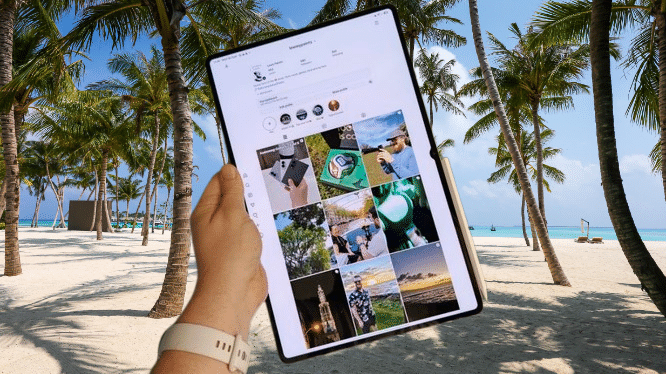
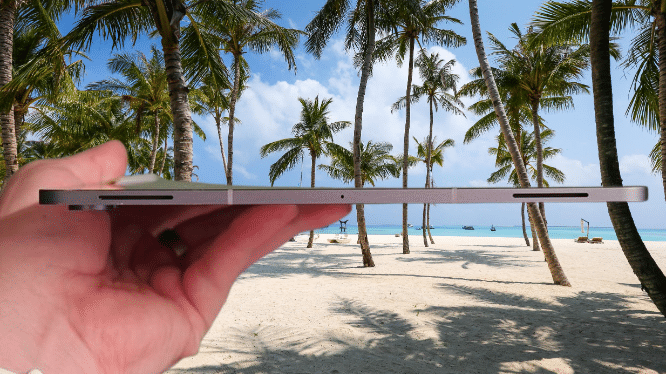
The tablet itself stays impressively thin at just 5.1mm, matching Apple’s iPad Pro M5, though trailing Honor’s 4.8mm MagicPad 4, and weighs a relatively light 692g. That’s genuinely impressive given its massive 14.6-inch display, though this remains a large tablet that needs two hands for comfortable use, making it less than ideal for commuters wanting something compact for the train.
You may also like: Lenovo Yoga Tab Review: Worth Buying in 2026?
Samsung continues offering IP68 dust and water resistance here too, something you won’t find on Apple’s competing iPads or practically any other Android tablet on the market. The familiar grey and silver color options aren’t particularly adventurous, but both finishes complement the tablet’s minimalist, premium aesthetic well.
The S Pen still ships in the box, magnetically attaching to the tablet’s long edge for charging and storage, rather than awkwardly sitting on the back as older models did. This approach works much better in practice, whether you’re holding the tablet or sliding it into a bag.
The stylus keeps the hexagonal, pencil-like shape introduced with last year’s Tab S11 Ultra, featuring a cone-shaped tip and an impressively lightweight build that makes it comfortable for doodling or handwritten notes.
That said, the glass display still feels noticeably slippery compared to the paper-like texture you get on devices like the Remarkable Paper Pro or Kindle Scribe, so it doesn’t quite replicate genuine pen-and-paper writing.
One thing that is not included standard is the Pro Keyboard, an upgraded keyboard cover originally built for the Tab S11 Ultra and now compatible with the S12 Ultra as well. Samsung quietly teased it at MWC earlier this year before releasing it a month later.
It uses a similar keyboard layout to the cheaper Book Cover Keyboard, offering a genuinely decent typing experience with dedicated app shortcuts, tablet controls, and an AI button, plus a full trackpad built in underneath.
One of my biggest gripes with last year’s accessory was missing that trackpad to properly recreate a laptop feel, and having it here makes a real difference, especially paired with the desktop-style DeX experience; more on that shortly.
It attaches using built-in magnets, and the hold feels surprisingly strong, staying firmly in place even as you open and close it like a laptop. There’s also a small kickstand that unfolds behind the tablet when the case opens, helping balance the weight properly.
You may also like: Best Tablets for Kids in 2026: Top Picks for Every Age
That said, this accessory isn’t cheap at $399, and combined with the S12 Ultra’s $1,399 price tag, you’re looking at spending enough that a convertible laptop starts to seem like the more sensible purchase.
Samsung Galaxy Tab S12 Ultra Screen
The massive screen remains one of the biggest reasons to choose the Tab S12 Ultra over any other Android tablet, though if you’d prefer something more manageable, the slightly smaller Tab S12 Plus with its 12.6-inch panel is always an option.
That said, nothing’s really changed here compared to last year’s Tab S11 Ultra. You’re still getting the same expansive 14.6-inch AMOLED panel with a 16:10 aspect ratio, a smooth 120Hz refresh rate, and peak brightness hitting 1600 nits.
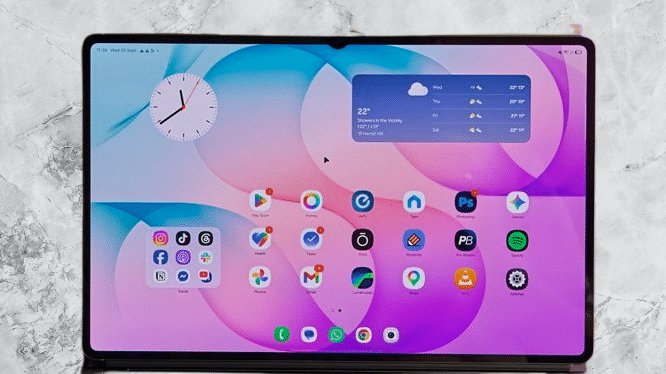
That’s not necessarily a problem, though, since it remains among the best displays available on any tablet. Blacks run deep, colors pop vibrantly, and motion feels genuinely smooth, whether I’m scrolling through apps, watching movies, or gaming.
Some apps do look comically oversized on a screen this large, using TikTok or Instagram in full-screen mode is quite the experience, but there’s more going on here than just raw size.
The 16:10 aspect ratio suits widescreen movies particularly well, resulting in smaller black bars than the squarer displays Apple and Honor use. Combined with the panel’s sheer scale and Samsung’s desktop-style DeX experience, this remains one of the few tablet screens that genuinely works equally well for entertainment and serious multitasking.
Bezels stay impressively thin at 5.2mm, creating that immersive look while still leaving enough space to hold the tablet without accidentally tapping the screen. The small selfie camera notch remains too, though it’s easy to ignore during everyday use, especially since Samsung trimmed the camera count down from two to one.
That 1600-nit peak brightness, combined with an anti-reflective coating, keeps the display readable outdoors without much trouble. It’s also one of the few tablets featuring an under-display fingerprint sensor, positioned near the bottom of the panel in portrait orientation, most competitors opt for side-mounted sensors instead.
You may also like: Lenovo Legion 7 With Nvidia N1X Chip Accidentally Confirmed
I would have liked to see Samsung bring over the privacy screen technology from the Galaxy S26 Ultra here, it would genuinely make sense on a screen this large and visible, protecting documents or browsing sessions far more effectively than it would on a smartphone. Unfortunately, that didn’t happen this time around. Maybe next year.
Even so, unchanged as it is from its predecessor, the Tab S12 Ultra’s expansive AMOLED display remains one of the best in the business.
Samsung Galaxy Tab S12 Ultra Performance
Performance is one area Samsung genuinely improved this year, though given that $200 price increase, you might expect a bigger leap.
Samsung continues its pattern of using MediaTek chips in the Galaxy Tab Ultra line, rather than the Snapdragon chips found in its flagship Galaxy S Ultra phones. That’s not inherently a problem; Dimensity chips tend to trail Snapdragon slightly in benchmarks, but real-world performance differences rarely feel significant.
The S12 Ultra runs on the year-old MediaTek Dimensity 9500, a solid flagship-level chip in its own right. My issue is that performance gains over the Dimensity 9400 Plus powering last year’s Tab S11 Ultra feel modest.
Samsung claims a 19% CPU improvement and 17% on the GPU side, though NPU performance jumps a more substantial 61%, which should speed up AI-related tasks noticeably.
Part of that smaller gap comes down to MediaTek skipping a boosted Plus variant for the Dimensity 9500 this time, narrowing the usual generational leap in Samsung’s flagship tablet chips. MediaTek has already announced the newer Dimensity 9600 Pro, though, expected to power flagship devices going forward.
It does feel a bit strange that Samsung’s top-tier, feature-packed tablet skips the newest processor, especially at this price point. Maybe it’s a cost-saving decision given rising component prices, or maybe it’s simply unfortunate timing on Samsung’s part. Hard to say for certain.
Regardless, the Tab S12 Ultra still feels genuinely flagship in everyday use. Paired with 12GB of RAM in my review unit, it’s snappy, apps open instantly, and it handles running multiple apps simultaneously in desktop-style DeX mode without any stuttering; more on those software features shortly.
You may also like: Samsung Pro Keyboard for Galaxy Tab S11 Ultra: What We know
Productivity is clearly the priority here, but gaming performance holds up just as well, and gaming on that massive 14.6-inch panel is quite the experience. The tablet’s large chassis manages heat remarkably well too, letting me run demanding games at high graphics settings without complaint. Even after 30-plus minutes of testing, I didn’t notice much slowdown.
Benchmark results back this up, showing a genuinely capable tablet across CPU, GPU, and NPU performance, with a healthy, if not groundbreaking, improvement over the S11 Ultra. That said, with the newer Dimensity chip and competing Snapdragon options already on the market, it’s hard to say how long this performance edge will stay competitive.
Samsung Galaxy Tab S12 Ultra Software
Samsung keeps refining the tablet software experience, and the Tab S12 Ultra runs One UI 9 built on Android 17.
DeX mode remains the centerpiece of the Galaxy Tab experience, letting you run apps in resizable windows similar to a PC or Mac, which genuinely beats standard split-screen multitasking, though that option still exists if you’d rather use it.
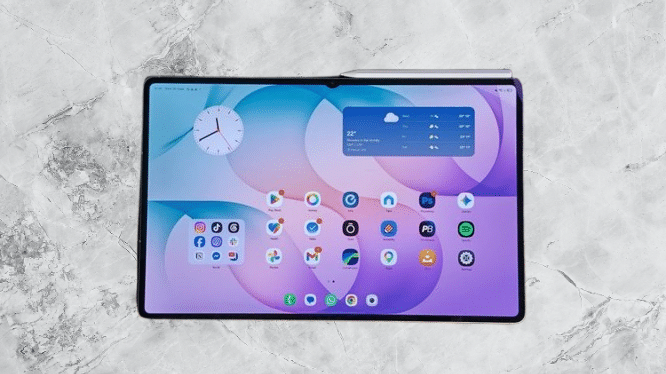
I’ve spent most of this review period using the tablet in DeX mode, and it works impressively well paired with the Keyboard Pro and its trackpad, essentially transforming the tablet into a capable laptop replacement.
It even includes desktop-style perks like multi-monitor support through the USB-C port, which made writing this very review simple. I had my notes and review draft open in Docs, with Spotify and Slack running as smaller background windows I could check when needed, basically mirroring my normal laptop workflow.
There’s a collection of pre-installed apps optimized for Samsung’s large-screen tablets too, including Notability, GoodNotes, and LumaFusion. These aren’t free, though; tapping any of them just takes you to the Samsung Store to purchase, which makes the inclusion feel less generous than it first appears.
One genuinely new addition is Photoshop, built for the bigger screen with S Pen support. It’s not quite full desktop Photoshop, more an expanded version of the mobile app with AI features baked in, but you do get four months of free access included.
Galaxy AI makes a strong showing here too, bringing the same suite of tools found on the Galaxy S26 Ultra and Galaxy Z Fold 8, including a text-based photo editor that works surprisingly well, along with other photo editing and productivity tools.
I’ll admit I don’t use most of these regularly; they tend to serve pretty specific use cases, but they’re there if you want to explore them, alongside both Gemini and Bixby running simultaneously. Samsung still won’t let that virtual assistant go, for whatever reason.
You may also like: iPad Air M4: Price, Specs, and Release Date
The usual complaints about One UI persist too. It remains packed with Samsung’s own alternatives to standard Google apps, most of which I personally never touch, and I still prefer GBoard over the pre-installed Microsoft SwiftKey. These are minor gripes, though, in what remains one of the most polished tablet software experiences on Android.
And consistent with recent generations, Samsung is promising seven years of OS upgrades and security patches for the S12 Ultra, which should eventually take it all the way to what I’d guess will be One UI 16 running on Android 24.
Samsung Galaxy Tab S12 Ultra Cameras
The dual rear camera setup on the Samsung Galaxy Tab S12 Ultra might suggest it outshines the rest of the tablet competition in photography, but that’s not really accurate. Tablets have never been great cameras, especially compared to the phone already in my pocket, and the S12 Ultra doesn’t change that reality, though it does at least give me some flexibility for quick shots when needed.
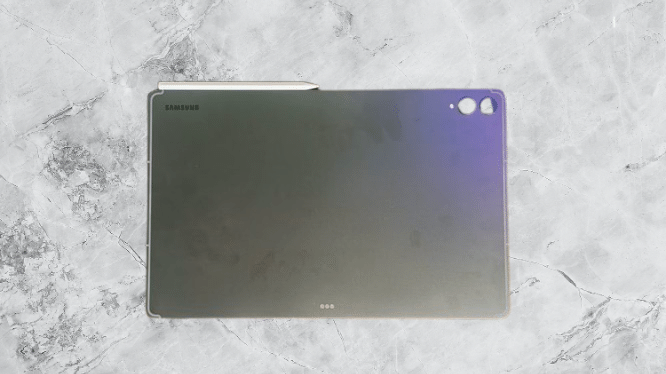
Just like last year, I get a 13MP main sensor paired with an 8MP ultrawide. Both work fine for the occasional impromptu photo, say, my dog doing something adorable while I was watching Netflix on the big screen, but they’re really better suited to productivity tasks like scanning documents or using the ultrawide during video call presentations.
Image quality here is more than adequate for those purposes, just don’t expect highly detailed shots, particularly in anything less than good lighting. A similar story plays out up front, where a 12MP selfie camera focuses almost entirely on video calls rather than capturing content you’d want to share on social media.
None of this counts against Samsung specifically, though; it’s simply the reality of tablet cameras in general.
Samsung Galaxy Tab S12 Ultra Battery Life
I remember being surprised by the battery size in last year’s Tab S11 Ultra. Despite its slim profile, it still had a sizeable 14.6-inch chassis to work with, yet its 11,600mAh battery actually trailed smaller Android tablets like the OnePlus Pad 3’s 12,140mAh cell.
It would’ve been an easy opportunity for Samsung to bump things up this year, especially since battery components haven’t been among the parts skyrocketing in price during the current AI-driven component boom. Instead, the Tab S12 Ultra ships with that same 11,600mAh battery unchanged.
That’s not leaving me wanting more exactly; it comfortably gets through a full day of multi-app DeX work, and lighter, more sporadic use stretches battery life across several days. Still, it’s not the longest-lasting battery I’ve encountered on an Android tablet either.
You may also like: 11-Inch iPad A16 Deal: $299 for 128GB Model, $50 Off Regular Price
Charging follows a similar pattern. The 45W wired charging gets you to roughly 40% in half an hour, with a full charge taking about 90 minutes. If you’re using the tablet as a desktop replacement, bypass charging is available too.
Given this year’s price increase, any improvement here would’ve been genuinely welcome, but what Samsung delivers is still a perfectly solid experience overall.
Samsung Galaxy Tab S12 Ultra Verdict
The Samsung Galaxy Tab S12 Ultra stands out as an outstanding large-screen Android tablet, combining a gorgeous 14.6-inch AMOLED display with smooth performance, excellent S Pen support, and a polished DeX experience.
That said, the modest upgrades paired with a higher starting price make it a harder sell over the nearly identical, and cheaper, Tab S11 Ultra, especially once you factor in the keyboard accessory needed to unlock its full laptop-replacement potential.
Pros |
Cons |
| Slim and relatively light for its size | Nearly identical to Tab S11 Ultra |
| Phenomenal 14.6-inch screen with excellent performance across the board | $200 more expensive and year-old chipset |
| DeX allows for a laptop-like app experience | Pro Keyboard is an expensive accessory |
Final Thoughts
The Samsung Galaxy Tab S12 Ultra remains one of the most capable Android tablets on the market, with its massive 14.6-inch AMOLED display, polished DeX experience, and included S Pen making it particularly suited to creative work and serious multitasking on a big screen.
Performance stays consistently snappy, battery life comfortably covers a full working day, and Samsung’s seven years of promised software support should keep this feeling relevant for years to come.
The real issue is that very little has genuinely changed from the Tab S11 Ultra, despite that $200 price increase.
Design, display, and battery are essentially identical to last year, the year-old Dimensity 9500 already trails newer flagship chips on the market, and the $399 Pro Keyboard pushes the total cost uncomfortably close to premium convertible laptop territory.
This remains a genuinely excellent tablet if you specifically want the biggest, most productivity-focused Android slate available, but the $1,399 starting price makes it a tough recommendation for most people.
Current Tab S11 Ultra owners have little reason to upgrade here, and anyone considering buying new should seriously weigh picking up last year’s model instead, assuming it’s available at a meaningful discount.