The iPad Air is a great tablet, no question. But if that price tag gives you pause, the Lenovo Yoga Tab deserves a serious look.
Lenovo does something most brands don’t bother with: they actually build tablets for different kinds of buyers. Not just one or two models, but a full range that covers entry-level budgets all the way up to premium space. Apple and Samsung get most of the attention, but Lenovo’s lineup is wider than people give it credit for.
The standard Lenovo Yoga Tab sits a step below the Yoga Tab Plus in the lineup, but it still packs a good feature set. Starting at $549.99, it undercuts both the iPad Air M4 and the Samsung Galaxy Tab S10 FE, which already puts it in an interesting position before you even look at what you’re getting.
A lower price only matters if the product holds up. So the real question is whether the Yoga Tab actually delivers enough to pull buyers away from the more established names.
This was my first time testing a Lenovo tablet, despite having reviewed plenty from other brands over the years. Honestly, that was a mistake on my part. I should have paid more attention to what Lenovo has been putting out, because this thing impressed me more than I expected.
Lenovo Yoga Tab Full Specs
Lenovo Yoga Tab Design
Going in without much knowledge of how Lenovo designs its tablets, I had no real benchmark for what to expect. But from the moment I picked up the Yoga Tab, it left a good impression.
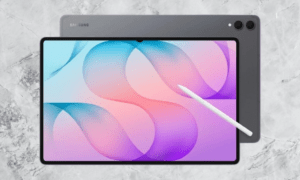
The build feels considered. You get an 11.1-inch display, which is large enough to actually enjoy content on, but the tablet never feels bulky or awkward to hold. That balance is harder to get right than it sounds, and Lenovo nailed it. If you want something you can take with you without it feeling like a burden, this fits that need well.
You may also like: Best Tablets for Kids in 2026: Top Picks for Every Age
At 6.2mm thick and 458g, this tablet is exactly the kind of device I want when I’m on the move.
I recently used the OnePlus Pad Go 2, and while I genuinely liked it for working from home, it’s on the larger side. Packing it for a trip felt like a compromise. The Yoga Tab doesn’t have that problem. It slips into a carry-on without taking up much space or adding noticeable weight.
I used it without a case throughout this review, and even then, it felt fine to handle daily. The good news is that because it’s already so thin, adding a case won’t suddenly make it feel like a chunky device. The portability stays intact either way.
That said, one thing I kept wishing for was a built-in kickstand. Some of Lenovo’s more affordable Idea Tab models have one, and I genuinely missed it here.
I spent a lot of time propping the Yoga Tab against whatever was nearby, and because the back surface doesn’t offer much grip, it slid away more than once. Not a dealbreaker, but an annoyance that adds up.
You may also like: Lenovo Legion 7 With Nvidia N1X Chip Accidentally Confirmed
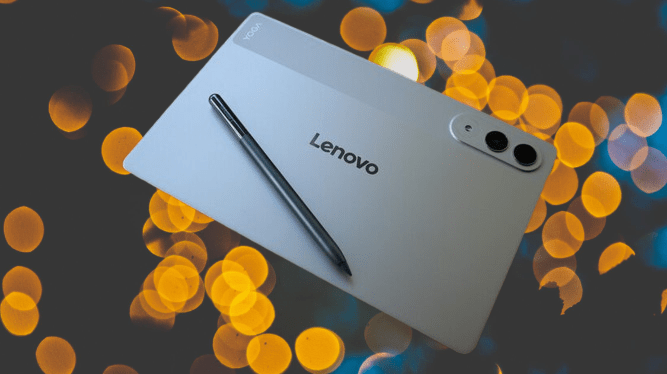
On color options, you get Seashell and Luna Grey. I tested the Seashell version. Both look clean and professional enough to bring into a work meeting without drawing the wrong kind of attention. But neither has much personality. Even the iPad Air M4, which costs more, comes in colors that actually feel like a choice. These two options feel safe to the point of being forgettable.
One practical note: if you plan to use the included Lenovo Tab Pen Pro, go with Luna Grey. The pen is color-matched to that finish, and the two together look like they belong as a set. Seashell and the pen don’t complement each other as well.
Lenovo Yoga Tab Screen
The 11.1-inch screen size continues to be the right call in my opinion. It gives you enough room to actually feel immersed in what you’re watching, without the weight and awkwardness that comes with something like a 13-inch iPad or the Samsung Galaxy Tab S11 Ultra. It’s a size that works whether you’re on a couch or a train seat.
You may also like: Samsung Pro Keyboard for Galaxy Tab S11 Ultra: What We know
The display runs at 3.2K resolution, and sharpness is not an issue. Text looks clean, images hold detail well, and scrolling through streaming apps feels polished. It’s an IPS LCD panel rather than OLED, but that’s expected at this price point. OLED on tablets generally means spending more, so this doesn’t come as a surprise.
Color reproduction is good. I ran through a chunk of Avengers: Infinity War as my usual test, and the screen held my attention the way a good display should. Nothing about it felt flat or dull.
The display also supports a 144Hz refresh rate, which is a genuine plus for anyone who games on their tablet. Running through a few matches of Call of Duty Mobile felt responsive and fluid. Even something lighter like Balatro, which isn’t exactly pushing the hardware, looked noticeably smooth in its animations and card transitions.
Brightness is one area where I wanted a bit more. The panel peaks at 800 nits, which handles most situations fine. But I noticed some dimming toward the edges when browsing pages with white backgrounds, which was slightly distracting.
You may also like: Galaxy Tab S12 Ultra Leak Reveals Design and Chip Details
If you’re coming from an older tablet, you probably won’t notice it. But if you’ve used something like the OnePlus Pad Go 2, which handles brightness better, you might find yourself wishing this display pushed a little harder.
Touch response is another area worth mentioning. Rearranging apps, setting up split-screen layouts, and general navigation all felt immediate and accurate. Nothing lagged or required a second tap.
The same applies to the Pen Pro. Writing and sketching with it felt natural, with barely any delay between the pen tip and what appears on screen. That responsiveness matters when you’re trying to take notes or sketch something quickly, and the Yoga Tab holds up well in those situations.
Lenovo Yoga Tab Cameras
Tablet cameras are something I rarely prioritize, and I’d still say you shouldn’t pick a tablet based on its cameras. But if you occasionally need one for practical tasks, the Yoga Tab won’t leave you stuck.
The rear camera is 13MP with a wide-angle lens. Casual shots come out acceptable for reference purposes, but zoom in, and the detail breaks down quickly. It’s not a camera you’d want to rely on for anything serious.
You may also like: iPad Air M4: Price, Specs, and Release Date
Where it does earn its place is in document scanning. Even on my poorly lit desk, it picked up text clearly enough to produce a usable scan. You can adjust the image afterward to sharpen the contrast between the text and background, which helps. For that specific use case, it works better than I expected.
What I can’t quite justify is the second camera on the back, a 2MP macro lens that adds very little in practice. It’s the kind of spec that looks fine on a list but doesn’t improve the experience. That space, cost, or engineering effort could have gone toward something more useful, or simply shaved a bit off the price.
The front camera is a different story. At 13MP with an ultra-wide lens, it captures a wide enough frame that multiple people can join a video call without anyone needing to squeeze in or reposition the tablet. For group calls, that wide field of view is genuinely practical.
Lenovo Yoga Tab Performance
The Yoga Tab runs on Qualcomm’s Snapdragon 8 Gen 3, which has been around for a couple of years now but still performs well above what most people need from a tablet. To put it in context, this was the same chip inside the Samsung Galaxy S24 Ultra when it launched, so it’s not exactly entry-level silicon.
Early on, I hit a brief rough patch where the tablet froze for a few seconds while apps were still installing in the background. Once that was settled, the experience smoothed out considerably. Day-to-day use since then has been consistently quick and responsive, with no complaints worth noting.
You may also like: 11-Inch iPad A16 Deal: $299 for 128GB Model, $50 Off Regular Price
The compact size made everyday browsing genuinely enjoyable. Catching up on news, checking the BBC website, jumping between Amazon, Currys, and John Lewis looking for tech deals, all of it felt comfortable and quick. The screen gives you enough room to actually read without squinting, and the size means you’re not hauling around something that feels like a small laptop.
When I wanted something more active, I paired an Xbox controller over Bluetooth and spent some time in Call of Duty: Mobile. Anyone playing against me on touchscreen controls had a rough time. The game ran without any lag or screen tearing throughout, and the 144Hz refresh rate played a clear role in keeping the motion sharp and consistent during fast gameplay.
Multitasking held up better than I anticipated. My usual setup of Google Docs alongside a Chrome browser window ran without any friction. I then pushed it further by running BBC News, an active game of Balatro, and a Disney+ stream in a floating window, all at the same time. The tablet didn’t slow down or show any signs of struggling.
For students, especially, that kind of setup is practical. You can have your notes or study material on one side, a browser for research on the other, and still have something playing in the background to take the edge off a long revision session. The Yoga Tab handles it without breaking a sweat.
You may also like: Lenovo Yoga Tab Plus Gen 2 Launches in US at $999
The one area where the chipset showed its limits was in demanding 3D games. Honkai Star Rail handled exploration sections without much trouble, but during combat, the frame rate dipped occasionally. That said, for a tablet at this price, it’s a minor criticism. Unless you’re regularly playing the most graphically intensive titles available, you’re unlikely to run into that ceiling in normal use.
Now, the speakers. I saved this for last because they genuinely caught me off guard. A tablet this size doesn’t typically promise much in the audio department, so I went in with low expectations. The quad-speaker setup proved me completely wrong.
The sound has real depth and weight to it, and sitting through my usual test streams felt noticeably better than on most tablets I’ve tested. If this tablet is your main source of entertainment while traveling, the audio alone makes that a comfortable situation to be in.
Lenovo Yoga Tab Software
The software side runs on Lenovo ZUI, Lenovo’s own Android skin. This was my first time using it, and while it took a little adjustment, I warmed up to it fairly quickly. It’s not as visually polished as OnePlus’s OxygenOS, but it’s straightforward. Labels are clear, settings are where you’d expect them, and nothing feels buried or confusing.
You may also like: Apple Watch Ultra 2 Deal: $599 (Save $200) on GPS and Cellular Model
Multitasking is built into the interface practically. Tap the three dots at the top of any app, and you get options to split the screen or run several apps in floating windows. It works well for the setups I described earlier.
The one gap is a 90/10 split mode, where a second app stays mostly hidden along the edge of the screen and slides in with a single tap. OnePlus calls their version Open Canvas, and it’s a genuinely useful feature once you get used to it. The Yoga Tab doesn’t offer anything equivalent, so if that kind of workflow matters to you, it’s worth knowing going in.
That same simplicity carries into how the Pen Pro is integrated. From a quick-access menu, you can open a notes page, trigger Google’s Circle to Search, or mark up a screenshot directly.
I don’t usually reach for a stylus, but the way Lenovo has set this up made it feel worth using. The haptic feedback when writing has a satisfying quality to it that I didn’t expect, and I found myself picking up the pen more often than I normally would.
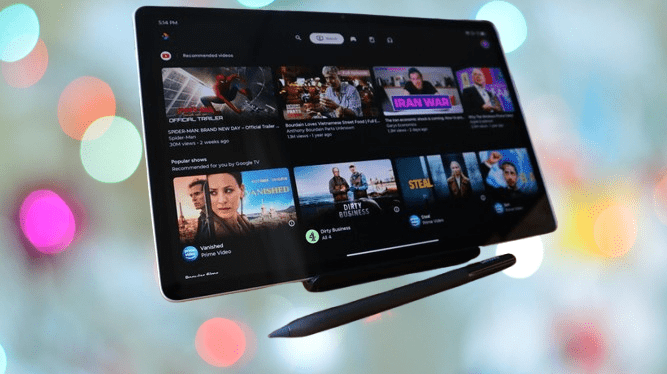
One software detail worth mentioning: swiping right from the home screen doesn’t bring up Google News like on many Android devices. Instead, you get an entertainment hub built around Google services.
The default view is a Google TV dashboard that pulls together your streaming apps in one place. You can also access your Google Play Games library and any books you’ve bought through Google Play from the same panel. It’s a small change from the norm, but it makes the tablet feel more focused on media consumption, which suits the device well.
Personally, I could live without most of what that panel offers, but the Google TV dashboard is worth keeping. Having one place to browse across your streaming services saves the back-and-forth of opening individual apps just to find something to watch.
What I didn’t appreciate was the amount of bloatware sitting on the device before I even started setting it up. Adobe Express, CapCut, and Perplexity were already installed, along with two separate drawing apps, which felt redundant.
Pre-installed apps are something you accept when buying a budget device. But the Yoga Tab starts at $479, which puts it firmly in mid-range territory. At that price, shipping the tablet with unwanted software already taking up space feels like a misstep.
The bloatware is annoying, but it’s not the biggest issue with the Yoga Tab. That title goes to the software update commitment. Lenovo promises only three OS updates from launch, with four years of security patches on top of that.
It sounds acceptable on the surface until you compare it to what Apple and Samsung offer, both of which provide significantly longer support windows. If you’re the type of person who buys a tablet and expects to use it for five or six years without feeling left behind, this is a real limitation worth factoring into your decision.
Lenovo Yoga Tab Battery Life
Battery life is one area where the Yoga Tab gives you very little to worry about. Lenovo fitted an 8860mAh silicon carbon cell into a tablet that’s only 6.2mm thick, which is a genuinely impressive feat. In practice, I went through full days of use without once feeling the need to reach for a charger ahead of schedule.
You may also like: Honor MagicPad 4 Review: Best Android Tablet 2026
If you step up to the Yoga Tab Plus, you get a larger 10200mAh battery. But unless your daily routine involves hours of heavy video editing in something like LumaFusion or CapCut, the standard model’s battery is more than enough for productivity work, studying, streaming, and general use throughout the day.
Charging comes in at 45W, which is a fair speed for this price bracket. It matches the Samsung Galaxy Tab S10 FE, which costs more, so no complaints there. If faster charging is a priority for you, the Xiaomi Pad 8 Pro offers 66W along with a bigger battery, but that’s a different conversation.
Using a 65W charger, which is enough to hit the tablet’s 45W ceiling, a full charge took 1 hour and 28 minutes in my testing. Getting to 50% only required 43 minutes. If you’re heading out and short on time, half an hour on charge gives you enough battery to get through a few hours of use without stressing about it.
Lenovo Yoga Tab Verdict
The Lenovo Yoga Tab is hard to argue with if you want a compact, capable tablet that comes with a stylus included and doesn’t ask flagship prices for the privilege. Students in particular will find a lot to work with here.
Pros |
Cons |
| Great, compact size | Three years of updates |
| Good performance for the price | Bloatware |
| Stylus included |
Final Thoughts
The Yoga Tab fits the student use case better than most tablets I’ve tested at this price. The Snapdragon chip handles multitasking without complaint, which matters when you’re switching between notes, research, and lecture slides all at once.
The included stylus adds another layer of usefulness, particularly for jotting down quick handwritten notes during a group study session or brainstorming on the fly.
When the studying is done, the same device transitions into a solid entertainment option. Quick access to Google TV means finding something to watch doesn’t take long, and the speakers, which are better than anything I expected from a tablet this size, make that downtime genuinely enjoyable.
That said, this isn’t exclusively a student device. Adults will get plenty of use out of it, too. But if you’re looking for one tablet that covers both work and play without needing to spend flagship money, the Yoga Tab makes a strong case for itself.
More than anything else, the size and weight are what make this tablet so easy to live with. You can hold it in one hand without strain, and tossing it in a backpack barely registers. That kind of everyday practicality adds up over time.
The two areas that genuinely hold it back are software support and bloatware. Three OS updates are a short runway, and arriving with unwanted apps already installed chips away at what should feel like a cleaner, more considered experience at this price. The iPad Air M4 and Samsung Galaxy Tab S10 FE Plus both address those concerns, though you’ll pay more for either one.
If your priority is productivity and you want to spend less, the OnePlus Pad Go 2 is worth comparing before you commit. But if the Yoga Tab’s size, speakers, and performance land in the right place for you, those tradeoffs may be ones you can live with.