Screen time is a reality for most kids today. The question is not whether they will use devices, but which ones make sense for their age. If you are thinking about getting your child their first device, a tablet is a good starting point, and picking the right one matters more than most parents realize.
Handing your phone to a child during a meltdown is an easy fix in the moment, but it comes with real risks. Your phone has payment apps, unrestricted browser access, and none of the guardrails a child actually needs.
A tablet built with kids in mind solves those problems from the start. The right one keeps them away from content that is not appropriate for their age, supports learning, and does not give them a back door into your personal accounts.
Tablets work well for kids for a few common reasons. The larger screen is easier for small hands and young eyes to work with, and over the past few years, several brands have built tablets specifically with children in mind. Even options that are not marketed directly to kids tend to come with parental controls that let you decide what your child can and cannot access.
Cost is another factor worth considering. Tablets are generally much cheaper than smartphones, so if one gets dropped, sat on, or left out in the rain, you are not dealing with the same financial hit.
For a first device that a young child will be handling daily, that lower price point makes a lot more sense than handing over something that costs several hundred dollars to replace.
Every tablet on this list was chosen based on hands-on testing, not just specs on a page. Each one earned its spot by holding up well across the things that matter most for kids, such as ease of use, parental controls, durability, and overall value.
They are not all the same, and the right pick will depend on your child’s age and what you need from the device, but any of them is a solid starting point.
Best Small Kids’ Tablet: Amazon Fire 7 Kids Edition
The Amazon Fire HD 10 is already on this list, but the Fire 7 Kids is worth a separate look if you want something smaller and easier to carry around. It also costs noticeably less, which makes it a practical choice if you are buying for a younger child or working with a tighter budget.
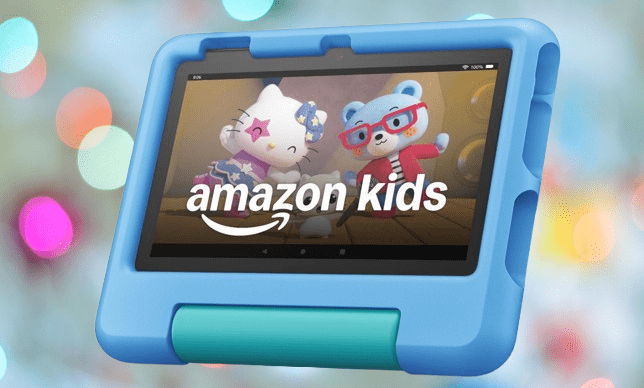
Like the rest of Amazon’s kids tablet lineup, it comes with a bumper case in several color options, a one-year subscription to the Kids Plus service, and a two-year worry-free guarantee. That last part means if your child manages to damage it within two years, Amazon will replace it.
For a device that will spend a lot of time in small, unpredictable hands, that kind of coverage is worth factoring into the price.
You may also like: iPad Air M4: Price, Specs, and Release Date
One reviewer noted that his younger kids actually preferred the Fire 7 Kids over larger tablets when traveling. The smaller size made it easy to slip into a backpack without taking up much space, which is a real advantage on long trips.
The trade-off is the 7-inch screen, which is smaller than what some kids are used to and may feel limiting depending on what they are using it for.
Battery life sits at around 10 hours, which is enough to get through a full travel day without needing a charge. Performance handles the basics without any trouble, and Amazon’s software gives you full control over what your child can watch, play, and access.
It is not the most powerful tablet on this list, but for the price and the age group it targets, it covers what it needs to.
Pros |
Cons |
| Rugged case | Screen protector costs extra |
| Masses of children’s content | Can’t watch videos offline |
| Great no-quibble warranty | Battery life could be better |
Best Small iPad for Kids: Apple iPad Mini 7
For a small tablet that sits between a smartphone and a full-size iPad, the iPad Mini 7 is the one to look at. It fits easily in a small bag but runs the complete iPadOS experience without any cutbacks or limitations.
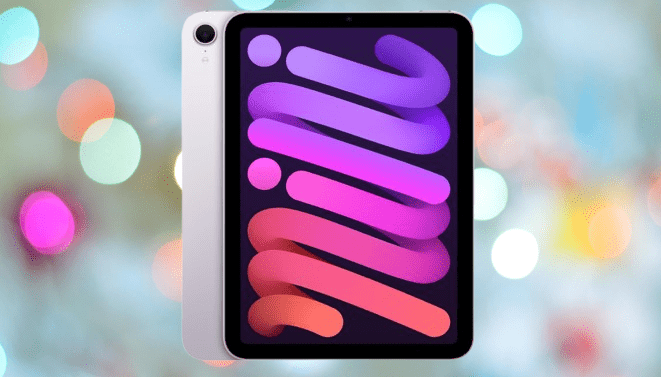
The jump from the iPad Mini 6 is not a complete overhaul, but the changes that did make it in are meaningful. Apple swapped in the A17 Pro chip, which brings a noticeable performance bump, and bumped the base storage from 64GB to 128GB.
That storage change alone makes it more practical for kids who download apps, save videos, or use it for school. You are getting more breathing room from the start without paying extra for a higher storage plan.
The A17 Pro chip does more than just speed things up for everyday tasks. It also brings Apple Intelligence to the iPad Mini 7, which includes writing tools and the Image Playground app. Those are features that younger users can actually get some use out of, whether for school work or just for fun.
You may also like: 11-Inch iPad A16 Deal: $299 for 128GB Model, $50 Off Regular Price
The iPad Mini 7 becomes a different device when you pair it with a compatible Apple Pencil. For kids who like drawing, it turns into a portable sketchpad that goes anywhere. For those who prefer writing by hand over typing, it works just as well as a digital notebook. That flexibility is what makes it stand out from other small tablets in this price range.
The main drawback of the iPad Mini 7 is the price. At $499 to start, it is one of the most expensive options on this list by a clear margin.
Handing that to a young child who is still learning to handle devices carefully is a tough sell for most parents. It makes more sense as a tablet for teenagers, who are generally more responsible with expensive hardware and can take fuller advantage of what it offers.
Pros |
Cons |
| Compact and portable | No change to front camera placement |
| No more 64GB option | No support for certain older accessories |
| A good amount of power |
Best Android Tablet for Older Kids: OnePlus Pad Go
The OnePlus Pad 2 is a strong tablet, but at $549, it is hard to justify as a device for older kids. OnePlus has a better fit for that age group in the Pad Go, which starts at $299 and has been discounted regularly since it launched.

The Pad Go keeps the design qualities that make OnePlus tablets stand out. It has the two-tone finish on the back, a rear camera positioned at the center top, and a slim 6.9mm profile that makes it easy to hold and carry.
That thin build is part of why it suits older kids rather than younger ones. It is not a device built to take rough treatment, so it works better in the hands of someone who will be a little more careful with it.
The 11.3-inch LCD display is bright enough to make watching shows and films a good experience, and the 90Hz refresh rate keeps less demanding games running smoothly.
For kids who mainly use a tablet for entertainment, it covers that well. The built-in blue light reduction is a practical addition too, especially for longer sessions where eye strain can become an issue.
You may also like: Apple Watch Ultra 2 Deal: $599 (Save $200) on GPS and Cellular Model
Performance is where the Pad Go falls short. There is some noticeable stuttering that makes it less ideal for productivity tasks or getting homework done.
If your child needs a tablet that handles both entertainment and schoolwork reliably, that is worth keeping in mind. As a pure entertainment device at this price point, though, it is difficult to find fault with what you are getting.
Pros |
Cons |
| Premium look and feel | Occasional stutter in general use |
| LTE connectivity on a budget | Only two OS upgrades |
| Smooth 90Hz refresh rate | No anti-reflective coating on the screen |
Best iPad for Older Kids: Apple iPad (10th gen)
The iPad 10 has become a stronger buy since its launch, mostly because the price has come down. The 64GB model now sits at $349, which puts it in a much more competitive position against Android tablets at a similar price.
You may also like: Best Foldable Phones 2026: Strong Debut Foldable
The range of color options also helps it stand out, making it more appealing to older kids than most tablets that come in one or two standard finishes.
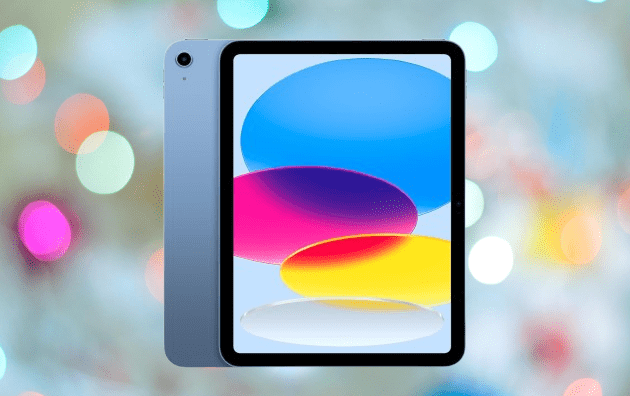
Compared to the iPad 9, the jump here was significant. Apple moved from a 9.7-inch display to a 10.2-inch screen, dropped the front-facing home button, and gave the whole thing a more modern layout.
The bezels are still present enough to hold the tablet comfortably without accidentally triggering the touchscreen, which is actually a practical detail for kids who are still getting used to handling a larger device.
One thing worth noting is that the iPad 10 does not have a 3.5mm headphone jack. If your child wants to use wired headphones, you will need a USB-C to 3.5mm adapter. Wireless headphones side-step that issue entirely, but it is something to factor in before buying.
You may also like: Honor MagicPad 4 Review: Best Android Tablet 2026
The larger screen does make a real difference for homework and schoolwork. There is more room to work across multiple apps without everything feeling cramped or hard to read.
The one feature missing at this price is Apple Intelligence, which Apple reserves for its higher-end iPads. That is a limitation, but it does not take much away from the overall experience. For the price, the iPad 10 still delivers a well-rounded tablet that holds up well for both school and everyday use.
Pros |
Cons |
| The design is a massive upgrade | Huge price jump, especially in Europe, makes its position in Apple’s iPad range confusing |
| USB-C is far more convenient than Lightning | Odd Apple Pencil integration |
| Smart front camera placement and unbeatable tablet apps and software | 64GB isn’t enough (256GB probably too much) |
Best Tablet for Teens: Amazon Fire Max 11
The Amazon Fire Max 11 is Amazon’s most capable Fire tablet, built with productivity in mind. It has a large display, better performance than the lower-end Fire models, and all-day battery life.
You may also like: Huawei MatePad Pro Max Launches in Germany at €1,099
For teenagers who need a budget-friendly tablet for streaming, social media, and gaming, it covers all of that without asking for iPad money.

The design is a step up from the rest of Amazon’s Fire lineup. It has flat edges and proportioned bezels that sit closer to what you would expect from a premium tablet, and it looks noticeably less budget in hand than the smaller Fire models.
Amazon also claims the glass is three times more durable than the iPad 10, which is a meaningful detail for a device that will spend a lot of time being picked up, put down, and carried around.
You may also like: Kindle Scribe Colorsoft Fig Color Launches January 28: Price, Features, and Where to Buy
The 11-inch IPS LCD display runs at 2K resolution, and the sharpness shows. Text is clear, images are detailed, and the contrast holds up well across different types of content.
The wide viewing angle is a practical bonus, making it easy for more than one person to watch something without anyone getting a washed-out view from the side.
The Fire Max 11 also works with Amazon’s keyboard case, which includes both a trackpad and a stylus. In everyday use, the keyboard feels good and responsive. The trackpad supports gesture controls for scrolling, zooming, and switching between apps, which makes the whole setup feel closer to a budget laptop than a basic tablet when you need to get something done.
Under the hood, the Fire Max 11 runs an octa-core processor with 4GB of RAM and up to 128GB of expandable storage. The specs are not going to compete with an iPad or a high-end Android tablet, but for everyday tasks at this price point, the performance is reasonable and gets the job done without too much frustration.
The bigger limitation is the lack of Google services. Amazon runs its own interface, browser, and app store, which means YouTube, Gmail, Google Drive, Docs, and Sheets are not available out of the box. For teenagers who rely on those apps for school or staying connected with friends, that is a real gap worth thinking about before you buy.
You may also like: Samsung Pro Keyboard for Galaxy Tab S11 Ultra: What We know
Amazon’s app store does cover the basics. Popular streaming services, social platforms, and games are available, and Microsoft 365 works on the device as well.
If your teenager needs Google services specifically, the workaround is accessing them through the web browser, which is functional but not as smooth as using dedicated apps.
The Fire Max 11 is a capable budget tablet for streaming, gaming, and social media. Where it falls short is for anyone who depends on Google’s productivity tools on a daily basis. If that is not a concern, it is a solid option at the price. If it is, the other tablets on this list are worth a closer look.
Pros |
Cons |
| Much more premium design than other Fire tablets | Limited app availability |
| Great all-day battery life | Very slow to charge |
| Solid 11-inch 2K display |
Final Thoughts
Finding the right tablet for your child comes down to age, how they plan to use it, and how much you are willing to spend. For younger kids who are still learning to handle devices, the Amazon Fire 7 Kids and Fire HD 10 are the safest bets. They are built to take some abuse, come with parental controls that actually work, and the two-year replacement guarantee means an accidental drop is not the end of the world.
You may also like: Lenovo Yoga Tab Review: Worth Buying in 2026?
For older kids who need something that handles both entertainment and schoolwork, the iPad 10 and Amazon Fire Max 11 are strong choices at their respective price points. The iPad 10 gives you the reliability and software ecosystem that Apple is known for, while the Fire Max 11 keeps costs low and still delivers a sharp display and solid battery life.
Teenagers who are careful with their belongings and need a more capable device will get the most out of the iPad Mini 7 or the OnePlus Pad Go. The iPad Mini 7 is the better all-around performer, but it comes at a price that is hard to justify for everyone. The Pad Go is a reasonable middle ground if you want something slim and well-designed without spending iPad money.
The right pick depends on your child specifically. Think about how they will use it, where they will use it, and how likely it is to end up on the floor. Any tablet on this list is a better starting point than no plan at all.