
Android tablets have never had more competition, even though the iPad is still the first name most people think of.
Honor’s new Pad 20 is a strong 2026 option at $518. That is $231 less than the iPad Air, and on paper it wins in a few areas, including its 12.1-inch 3K LCD screen.
The tablet has an all-metal body, six speakers, and a large battery. Its PC mode works well when you add the optional keyboard, so I could switch from streaming video in the evening to getting work done during the day without much fuss.
If you want one tablet that handles both entertainment and real tasks without feeling slow, the Pad 20 deserves a look. Honor’s software can feel crowded at first, but a little tidying fixes most of that.
Honor Pad 20 Full Specs
Honor Pad 20 Design
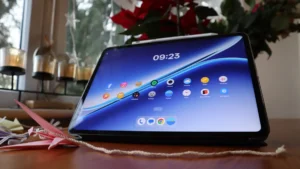
The Honor Pad 20 has a 12.1-inch screen, but it never felt too big to carry or use. It measures 6.39mm thick and weighs 548g, which is light for its size. The wide aspect ratio still means you will want both hands on it.
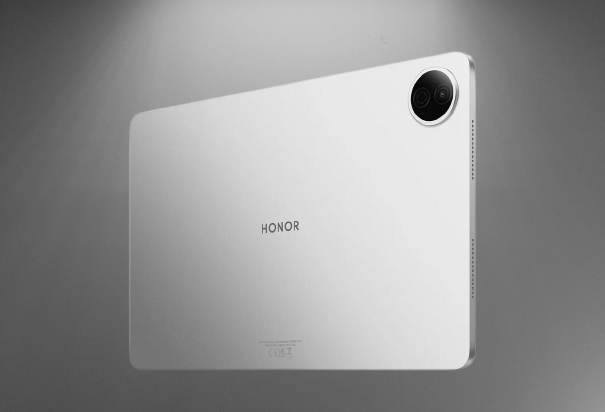
The back and sides share one matte silver finish. A USB-C port and the grilles for six speakers break up the metal, and a black bezel frames the screen. A round module on the back holds a single camera.
There are so many ways to design a slab of screen, and the Pad 20 looks a lot like an iPad. The power button sits on the top edge beside the volume rocker. It has no built-in fingerprint sensor, which is annoying. You can unlock the tablet with face recognition through the selfie camera instead of typing your password each time.
You may also like: Honor MagicPad 4 Review: Best Android Tablet 2026
Much of the Pad 20’s appeal comes from its support for the Honor Smart Keyboard and the Honor Magic Pencil 4s stylus. Neither comes in the box. The keyboard costs $49.99 and the stylus $44.99, which is far cheaper than Apple’s accessories. Still, you will spend about $95 more on top of the tablet’s price to get the full experience.
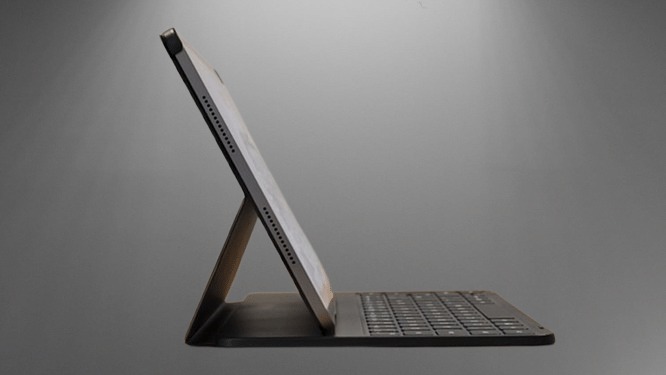
Honor sent me only the keyboard, and I wrote this entire review on it. It is smaller than a full-size keyboard, so I made more typing errors than usual at first. The chiclet keys have decent travel and give good feedback. A clip holds the tablet in place at a single viewing angle. I got used to it quickly, and I enjoyed typing away on it at my dining table, in a coffee shop, and on the train.
The keys have no backlight, which is a pity. The keyboard connects over Bluetooth and charges through USB-C. That means it never drains the tablet’s battery, but it can run out of charge on its own.
One thing annoyed me. On other tablet keyboards I have used, the keys switch off when you fold the case back. Here they stay active. If you fold the keyboard behind the screen and press the keys by accident while holding it, they still register. You have to remember to flip the small power switch off first.
Honor Pad 20 Screen
The Honor Pad 20 has strong screen specs for its price. The 12.1-inch LCD is well calibrated, and its 3K resolution of 3000 x 1872 looks very sharp. Peak brightness reaches 700 nits. That number sounds modest on paper, but I never had trouble seeing the screen. Indoors at full brightness, it is almost too bright to look at.
Touch response is quick for tapping and scrolling, which is the minimum you should expect from a tablet. The 120Hz refresh rate keeps text and apps moving smoothly. This is not an LTPO panel, so the refresh rate can only switch between 60Hz and 120Hz. In daily use, you will not notice or care.
Compare that with the iPad Air. It costs $749 and has only a 60Hz screen. The Air is the more powerful tablet, but Honor gives you better display specs for far less money.
You may also like: OnePlus Pad Go 2 review: Better than all mid-range tablets
Honor also gives you plenty of control over how the screen looks. Circadian Night Display adjusts colour temperature to help you sleep. Defocus Eyecare simulates distance to ease eye strain. A standard blue light filter is there too, and you can adjust it and put it on a timer.
Out of the box, the display looked a bit cold and harsh to me. A few tweaks in the settings fixed most of that, and the screen is good once you do. I would still like automatic warmth adjustment like Apple’s True Tone.
The six speakers are a nice surprise, and they get loud. Netflix shows and YouTube videos sounded good through them. At higher volumes, the sound turns tinny, with too much treble. Music does not sound great either, so you will probably reach for wireless headphones. There is no headphone jack, so Bluetooth is your only option.
Honor Pad 20 Performance
The Pad 20 has mid-range specs, which fit its price, and the power is enough for most people.
I used it with the keyboard attached to write, answer emails, open spreadsheets, watch Netflix and YouTube, and read news and tech sites. There was a little lag now and then when I multitasked, such as switching between full-screen apps or running two apps side by side on the big display. My own tablet needs are light, so those limits never frustrated me.
Inside, you get a Snapdragon 7 Gen 3 chipset and 8GB of RAM. That is enough to run one of the tablet’s best features, a full PC mode.
The 8GB of RAM handles my daily use fine, but it will not handle high-end gaming. Demanding games like Wuthering Waves struggle at top settings after a few minutes of heavy play. The 12.1-inch screen also makes thumb-gaming with two hands awkward, so it is not a natural fit for mobile games anyway.
You may also like: Google Pixel 10a Release Date Leaked: Launching February 17 at Lower Price
You can pair a Bluetooth controller if you want to play seriously. Even then, keep your expectations in check. Minecraft and casual PUBG run fine. Genshin Impact and console-style games run better on pricier Android tablets like the $1179 Oppo Pad 5 Pro. Keep in mind the Pad 20 sells for less than half that price.
The rest of the specs include Wi-Fi 6 and Bluetooth 5.3. It also supports hi-res audio through the aptX HD, aptX Adaptive, and aptX Lossless codecs, which is a welcome surprise. You need compatible headphones and hi-res files or streams to benefit.
Honor Pad 20 Software & AI
The Pad 20 runs Android 16 out of the box, not the newer Android 17, which is a letdown. Honor adds its MagicOS 10 skin on top. The setup screens feel crowded, but I had everything tuned to my liking within a few hours.
The best software feature by far is PC mode. A permanent icon in the dock turns it on and off. One tap switches the Pad 20 from a regular tablet layout to a desktop-style setup with a start bar and proper app windows.
iPadOS can do something similar now, but the Android version feels more open and smooth. It is easy to pick up, and you do not have to put up with full-screen apps or split-screen layouts if you do not want them. You tap a button, and the tablet behaves like a Windows computer. I think it is excellent, and I hit no app compatibility problems, thanks to how flexible Android is.
Honor Pad 20 Cameras
The Pad 20 has two 8MP cameras. One sits on the back. The other is on the top long edge of the front, which is where you want it for video calls. Tablet makers have been moving selfie cameras to this edge because many people hold their tablets in landscape and pair them with a keyboard, just like a laptop.
You may also like: Honor Magic V6 Brings IP69 Protection and a 2,800 MPa Steel Hinge to Take On Samsung’s Fold 7
The front camera is fine for personal and work video calls. It is not good enough for selfies you plan to post online. It also has no autofocus, so you may see some softness if you move around a lot during your weekly Zoom.
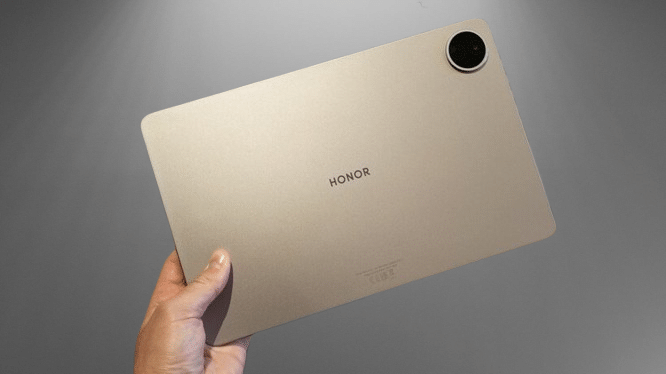
The rear camera is just as basic. I am not sure what most people use a tablet camera for, but this one can handle a quick family photo or a QR code scan. It does have autofocus. Both cameras record 1080p video at 30 frames per second. The quality is average, but it works when you need it.
Honor Pad 20 Battery Life
Honor says the Pad 20 lasts 10 to 12 hours on one charge, and my testing backed that up. The 10,100mAh battery is big enough to cover a full workday. You will still have power left to stream Netflix on the train ride home.
If you mostly use it for watching videos, it can go several days between charges when it sits on standby. Honor also puts a 45W fast charger and cable in the box. More brands skip this every year, so it is nice to see. You get the fastest charging speed without paying extra for an adapter.
Honor Pad 20 Verdict
The Honor Pad 20 costs $231 less than an iPad Air and still delivers solid mid-range performance. Its large screen fits into a body that stays easy to carry. You also get good speakers and a battery that lasts a long time. The software feels cluttered, but that is the main thing holding it back.
Pros | Cons |
| Lightweight and premium metal build with a large hi-res display | Speakers are loud but rather tinny |
| Great PC mode with huge battery and battery life | No fingerprint sensor |
| Gaming chops are not high-end |
Final Thoughts
iPads are good, but their prices have climbed a lot lately. The cheapest model now costs $429, and the iPad Air costs $1179. The Honor Pad 20 is on sale as I write this, and it holds up as a real alternative. It matches the iPad for most everyday tasks. It also handles mid-level gaming and has a strong PC mode that makes it work like a laptop, as long as you add the $49.99 keyboard.
If you use Android and want a large 12.1-inch screen with a high refresh rate, the Pad 20 is a solid pick. You also get PC mode with the optional keyboard and a fast charger in the box.
Laptop and tablet prices keep rising. The Pad 20 gives you fair value and enough performance for most people.