The Lenovo Legion Go 2 was among the first handhelds to ship with AMD’s Ryzen Z2 Extreme chip. Funny enough, it’s also the one I’ve waited the longest to actually review.
That wait finally ended. I’ve had it for a few weeks now, and the spec sheet is genuinely impressive for this generation of handhelds. Beyond the Ryzen Z2E processor, you get 32GB of RAM, a 1TB SSD, and an 8.8-inch OLED screen running at 1920×1200. Lenovo also threw in a few nice extras, like a built-in kickstand and controllers that detach from the unit.
Here’s the catch, though: the price. Lenovo recently raised prices across the board, and now this 32GB/1TB model runs £1620 or $1999. That’s roughly double what you’d pay for the Asus ROG Xbox Ally X or the MSI Claw A8 BZ2EM at launch, and both of those handhelds came out after the Legion Go 2 did.
That price puts it closer to what you’d pay for some of the best gaming laptops around, and it lines up with the expected pricing for the Intel Arc G3 Extreme handhelds coming from MSI and Acer later this year.
To find out if the Legion Go 2 can actually back up that price tag, I spent the last couple of weeks testing it in as many real-world situations as I could.
Lenovo Legion Go 2 Full Specs
Lenovo Legion Go 2 Design
That 8.8-inch screen is a big reason why the Legion Go 2 ends up noticeably larger than what Asus and MSI offer in this space.
Weight is where you’ll really feel the difference, though. At 920g, it’s over 200g heavier than the Asus ROG Xbox Ally X and roughly 150g more than the MSI Claw A8 BZ2EM.
You may also like: Lenovo Legion Go Fold Concept: Foldable Screen, Specs, and Everything We Know So Far
You notice that extra weight fast, especially during longer sessions. The good news is Lenovo built in a sturdy kickstand and detachable controllers, so you can rest the device on a table and take some of that weight off your hands when you need a break.
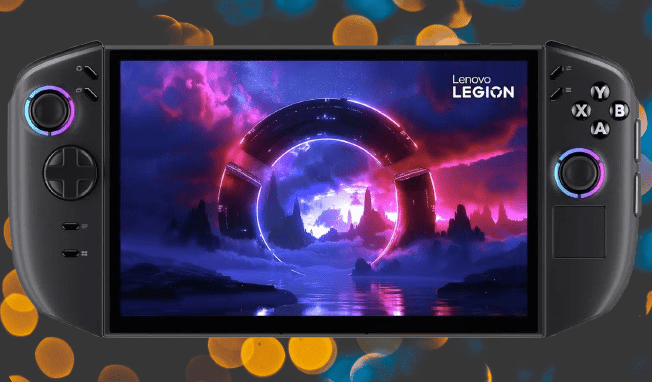
The Legion Go 2 comes in black and only black, with no other color options. The one splash of personality comes from RGB light rings around the thumbsticks, and that’s really the extent of it.
Button layout follows the same formula as an Xbox controller. You get two thumbsticks positioned diagonally on either side of the screen, a D-Pad on the left, and ABXY buttons on the right. There’s also a large touchpad sitting below the right thumbstick, similar to what you’d find on a Steam Deck. That touchpad turns out to be genuinely useful, especially when you need to navigate around Windows 11’s desktop.
You may also like: Cyberpunk 2077 Runs on Android Without Cloud Streaming: Red Magic 11 Pro Test
Lenovo split the two USB4 Type-C ports between the top and bottom of the Legion Go 2, one on each end. Flip it over, and you’ll also find a 3.5mm headphone jack and a microSD card slot on the underside.
It’s not a bad setup, but there’s a catch. If you’re charging through the top port while plugging a storage drive into the bottom one, and the handheld is sitting on its kickstand, keeping it balanced and level gets surprisingly tricky.
Lenovo Legion Go 2 Controls
If you’ve spent any real time with an Xbox controller, the Legion Go 2 will feel instantly familiar. Lenovo basically split a standard controller in half and mounted each side around the 8.8-inch screen. All the essentials are there: ABXY buttons, thumbsticks, D-Pad, nothing missing.
You may also like: Lenovo Legion Go S Drops to $667 in Rare 22% Price Cut
The thumbsticks feel noticeably shorter compared to a standard Xbox Wireless Controller, though the main buttons still have that satisfying, snappy click. Up top, you’ll find shoulder buttons and triggers, but unlike the ROG Xbox Ally X, these aren’t Hall effect. The thumbsticks make up for it, though; they do use Hall effect sensors, which means better accuracy and less wear over time compared to standard sticks.
You also get a trackpad for convenience, along with two buttons flanking the screen that pull up settings, Lenovo’s Legion Space launcher, a pause function, and a window switcher.
Flip the Legion Go 2 over, and you’ll find paddle buttons on the back, though oddly, they’re not arranged the same way on each side. The left has two square buttons, while the right has one square button plus a wider one positioned below it.
Higher up on the right side sits a small scroll wheel. There are also two more buttons tucked on the side of the right controller, tucked away enough that I completely missed them at first glance.
Just like the first-gen model, the controllers here detach, so you can turn this handheld into something closer to a Nintendo Switch setup if that’s your preference. A toggle switch on the back releases them, and reattaching means lining up pogo pins on the side of the main unit, pins that also handle charging. It’s a bit fiddly to line up at first, but it works fine once you get the hang of it.
Lenovo also throws in an adapter that lets you slot one controller in and use it as a mouse, similar to how Joy-Con 2 controllers work in mouse mode on the Nintendo Switch 2.
You may also like: Guerrilla Announces Horizon Hunters Gathering Co-Op Game with February Playtest
I spent time running Hitman World of Assassination through cloud gaming and Forza Horizon 5 natively on the device, and the controls held up well in both cases, no complaints there. Worth mentioning too: the rumble feels genuinely good, and the two 2W speakers handle basic listening fine, though don’t expect much beyond that.
Lenovo Legion Go 2 Display
The screen is where the Legion Go 2 really pulls ahead of the competition. Lenovo swapped out the standard IPS panel for an OLED display instead, and the difference shows.
This also fixes a real problem from the original Legion Go, which shipped with a 2560×1600 panel that its Ryzen Z1 Extreme chip simply couldn’t push hard enough.
The new model drops to a more realistic 1920×1200 resolution, which matches what Asus and MSI offer in detail while being far easier for the hardware to handle. You also get a 144Hz refresh rate with variable refresh support, so screen tearing and judder stay out of the picture.
I ran a colorimeter on the Legion Go 2’s screen, and the numbers back up what your eyes will tell you: this display is bright and sharp. Peak brightness hit 435.6 nits in my testing, and blacks measured an impressively deep 0.03, giving a contrast ratio of 15740:1.
Being OLED, color performance is just as strong. I measured full 100% coverage of both sRGB and DCI-P3, plus 93% of Adobe RGB. That’s more than enough for gaming and everyday productivity, and honestly, accurate enough that you could use it for color-sensitive work too, if you ever needed to.
The 144Hz refresh rate beats the 120Hz you get on other Z2E handhelds, and it’s an even bigger step up from the Steam Deck OLED’s 90Hz. Full HD resolution makes sense too, given how much power the Z2 Extreme chip actually has to work with.
You may also like: Lenovo Legion Go Fold Concept: Foldable Screen, Specs, and Everything We Know So Far
In my testing, the panel delivered sharp detail and noticeably smoother motion in games that could push that high a frame rate. Even outside of gaming, that extra smoothness makes menus and navigation feel snappier overall.
Lenovo Legion Go 2 Performance
The Legion Go 2 isn’t lacking in grunt against its contemporaries, coming packed with the same Ryzen Z2 Extreme chip as its rivals, although it lacks the dedicated NPU you’ll find in Asus and MSI’s options for AI tasks if you want it.
Even without the NPU, the basic formation of the chip is the same – eight Zen 5 cores and 16 threads, plus a 16-core RDNA 3.5-based GPU that’s the same Radeon 890M integrated graphics found in the AMD Ryzen AI 9 HX 370 laptop processor. It is a small but important step up from the Ryzen Z1 Extreme found in the Asus ROG Ally X, too.
Alongside this grunt in a processing sense, Lenovo has opted to go for 32GB of fast LPDDR5X RAM running at 8000MT/s in this handheld, plus a 1TB internal SSD for storage. In theory, this might seem like enough storage, but with a couple of bigger games installed, that’s a fair amount of storage eaten up.
Just like with the other two handhelds, I put the Legion Go 2 through our full benchmark suite to get real numbers on how it handles both gaming and general computing tasks.
On Geekbench 6, the Ryzen Z2 Extreme landed close to the laptop-grade Ryzen AI 9 HX 370, especially once I let the handheld run in full Performance mode, which pulls between 30W and 35W.
The Radeon 890M graphics turned in a decent score on 3DMark Time Spy, but that number, along with the gaming benchmarks, tells a bigger story. Even this new Ryzen Z2 Extreme chip falls well short of the newer Strix Halo APUs, like the one in the Asus ROG Flow Z13 (2025), and it also trails the Arc B390 integrated graphics I tested in recent Intel Panther Lake laptops, including the Asus Zenbook Duo (2026).
For comparison, the Radeon 8050S inside the ROG Flow Z13 (2025) has double the compute units and far more bandwidth, giving it a real edge in raw power.
For actual gaming tests, I ran everything plugged in with the Legion Go 2 set to its Performance preset, then tested again unplugged in Balanced mode, which caps power at 15W. The results lined up closely with the other two handhelds I tested.
Plugged in, Cyberpunk 2077 hit 27.09fps at 1080p on Ultra settings. Returnal landed at 24fps. Both numbers sit slightly below what Asus and MSI managed, but the gap is small enough to fall within normal testing variance.
These aren’t going to blow anyone away, sure. But dial in the settings and turn on upscaling, and the numbers climb fast. Cyberpunk jumped to 42.06fps using FSR 2.1 in Performance mode at 1080p, and Returnal reached 35fps under the same approach.
Running on battery alone, the Legion Go 2 hit the mid-20fps range at max settings in both games I tested, close enough to the other two devices that the difference falls within the margin of error.
Lighter, competitive titles tell a different story, though. Rainbow Six Extraction ran at 66fps plugged in on default highest settings with dynamic resolution and no upscaling, and 64fps unplugged. That means with a few settings turned down, getting closer to that 120Hz refresh rate is realistic. As proof, dropping resolution to 720p at Ultra settings pushed frame rate up to 96fps.
Forza Horizon 5 threw up some strange results during testing, especially once I unplugged the device. At 1080p on High settings, it averaged 73fps, matching both the Asus and MSI handhelds. But running on battery alone, that number dropped as low as 48fps.
Switch down to 720p on Medium settings, though, and Performance mode pushes it up to 102fps, getting close to that 144Hz refresh rate the screen is capable of.
You may also like: Steam Machine Price Increase Expected Due to Memory Shortage in 2026
Storage performance told a similar story. The 1TB SSD slows down noticeably on battery power compared to when it’s plugged in, which is pretty typical for handhelds like this. Even so, it still beats both the Asus and the MSI in raw numbers.
On battery, you’re looking at 3538.75 MB/s reads and 3500.82 MB/s writes. Plug it in, and those numbers jump to 6607.20 MB/s reads and 5856.49 MB/s writes.
Lenovo Legion Go 2 Battery Life
Battery capacity on the Legion Go 2 doesn’t quite match some rivals, though the 74Whr cell is still respectable on paper.
The real numbers tell a different story, though. With brightness set to our standard 150 nits and the device running in 15W Balanced mode, our PCMark 10 Modern Office battery test clocked just four hours and six minutes. That’s a disappointing result, especially next to other Z2E handhelds that lasted almost four times as long in the same test. Even the base Asus ROG Xbox Ally nearly doubled that runtime.
Gaming naturally hits the battery harder, and that showed up clearly in testing. The PCMark 10 Gaming benchmark drained the Legion Go 2 in just two hours and six minutes. That’s an hour less than the ROG Xbox Ally X managed, and about 40 minutes behind the MSI Claw A8, even though both machines use the same Ryzen Z2 Extreme chip.
On the plus side, charging is quick. The included 65W brick got the device to 50% in around 40 minutes, and a full charge took about 90 minutes total.
Lenovo Legion Go 2 Games & Software
Under the hood, the Legion Go 2 runs full desktop Windows 11, and you can layer different launchers on top to make it feel less like a Windows PC and more like an actual handheld console.
Microsoft recently added Xbox FSE directly into Windows 11, and the Legion Go 2 was among the first handhelds to support it. That said, I expected the device to boot straight into Xbox FSE, but it didn’t. Instead, you’re stuck navigating regular desktop Windows 11 on a touchscreen at first, which gets frustrating fast without a keyboard and mouse nearby. The trackpad does help take some of the edge off during initial setup, at least.
Once everything was set up, Xbox Full Screen Experience worked exactly as you’d expect. You get a clean, console-style interface that pulls every installed game into one list, no matter where it came from, whether that’s the Xbox app itself, Steam, or Ubisoft Connect. Launching a game just means clicking it. Everything else happens automatically in the background.
Lenovo also gives you the option to use Legion Space instead, though it competes with the Xbox app if you’ve set that as your default launcher. Legion Space does something similar: it pulls your library together from different sources, but it also lets you adjust system settings directly, things like power modes and controller button mapping. Much like Asus does with ROG Armoury Crate on its Xbox Ally handhelds, Lenovo gave Legion Space its own dedicated button on the left controller.
Lenovo Legion Go 2 Verdict
The Lenovo Legion Go 2 is a genuinely capable Windows gaming handheld. It has a gorgeous OLED screen, strong internals, and a few clever touches you won’t find on rival devices. That said, the much higher price is a tough pill to swallow. Windows 11 still brings its usual software headaches, and its battery life falls short of what competitors offer.
Pros | Cons |
| Solid performance from Ryzen Z2 Extreme | Horrendously expensive |
| Lovely OLED screen | Poor battery life |
| Versatile with kickstand and removable controllers |
Final Thoughts
The Lenovo Legion Go 2 delivers where it counts most: a genuinely great OLED screen, strong internals, and a few clever extras you won’t find on other handhelds. But that higher price stings, and it’s hard to ignore. You’re also still dealing with some Windows 11 quirks, and battery life falls short compared to the competition.
That said, the sturdy kickstand and detachable controllers give it an edge in versatility over both the Asus ROG Xbox Ally X and the MSI Claw A8 BZ2EM. Even so, the steep price and disappointing battery life are two issues I can’t overlook.