There was a time when a mechanical keyboard loaded with real enthusiast features came with a price tag that made you wince. The new Ducky OK-M-98 shows that’s no longer the case.
I first tried the Ducky OK-M lineup at Computex 2026 a couple of weeks back, where we handed it a Best In Show award. I called it one of the quiet standouts of the whole show, a week that was mostly dominated by big, expensive, flashy hardware announcements.
On paper, the OK-M-98 looks like it could shake up the budget mechanical keyboard scene. You get hot-swappable switches, gasket mounting, PBT keycaps, and dual wireless connectivity, all for £69.95 or $89 in the configuration I tested.
That kind of feature list makes it worth comparing against pricier rivals like the Lemokey P1 Pro or the Cherry KC 200 MX, just to see if Ducky’s budget option can actually compete with keyboards that cost more. I spent the last couple of weeks typing and gaming on it daily to find out if it deserves a spot among the best mechanical keyboards we’ve tested.
Ducky OK-M-98 Full Specs
Ducky’s OK-M lineup comes in three sizes. You can get a 65% layout, which drops the function row and arrow keys, a 75% layout, which keeps the function row and arrow keys but shrinks the nav cluster, or a 98% layout, which is basically a squeezed full-size board. My review unit came in that last option.
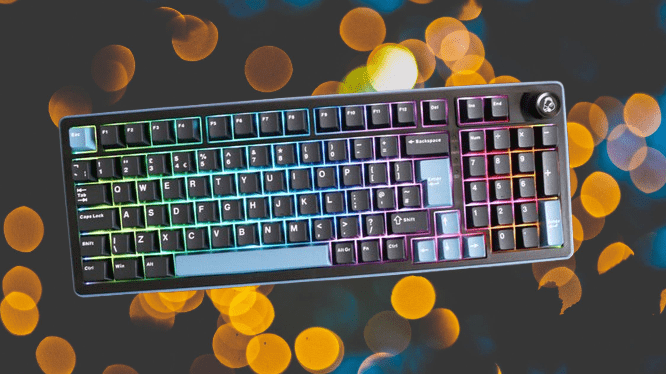
The 98% layout gives you nearly everything a full-size keyboard offers, but it saves space by tucking some nav cluster keys above the number pad. This layout has picked up a following as more keyboard enthusiasts have entered the space.
You may also like: Best Acoustic Keyboards in 2026: Top Picks for That Perfect Thock Sound
It used to show up only on a handful of niche boards from established brands, and before that, on a batch of Cherry keyboards, which is actually where its nickname comes from: the “1800” layout.
I like the two-tone blue and black look of the OK-M-98, and the matte finish on the casing adds a nice touch. The doubleshot PBT keycaps carry that same quality feel, which is impressive for a keyboard at this price point. Ducky put the blue accent color on keys like Esc, Enter, and the arrow keys, giving the board some visual character.
That said, the main chassis doesn’t quite match the keycaps in build quality. It feels a bit plastic in hand, something I noticed back when I first tried the range at Computex, and that impression hasn’t changed. Press down near the corners, and you’ll feel some flex. The center of the board holds up better and feels more solid.
Ducky has built a name for keyboards solid enough to double as a blunt weapon, so it’s a bit of a letdown that this one feels cheaper in hand.
That said, the rest of the design shows real thought. Flip it over, and you’ll find sturdy two-stage feet with a solid hinge, plus a useful control panel on the back. You get two toggle switches there, one to switch operating systems and another to switch connectivity modes. There’s also a slot to tuck away the USB-A receiver and a USB-C port for wired use or charging.
Ducky OK-M-98 Performance
Inside the OK-M-98, you get a choice between two KTT switches: linear Wine Red or tactile Baby Blue. I hadn’t heard of KTT before this review, but the brand has apparently built a name for itself, making budget-friendly switches for enthusiast keyboards.
You may also like: Cherry XTRFY K63W Pro Compact: UWB Wireless Gaming Keyboard
My unit came with the Wine Red linears, rated at 45g of force with standard 4mm travel and factory lubrication already applied. After typing thousands of words a day for reviews, they hold up well.
The lubrication gives them a smooth enough feel, and the force stays consistent from key to key. That said, they don’t quite match the smoothness of other switch clones or genuine MX Reds in terms of consistency.
Press a switch down partway and let it go, and you’ll feel a bit of roughness in the movement. The stems also wobble more than you’d want, a telltale sign these are budget switches.
The good news: you’re not stuck with the KTT Wine Reds if you don’t like them. The OK-M-98 supports hot-swapping, so you can pull switches out and drop in new ones without any soldering.
Swapping switches is genuinely easy here, as long as you have a keycap and a switch puller nearby. Ducky actually includes a combo puller in the box, along with a small brush that has a duck design on the handle. The keyboard works with both 3-pin and 5-pin switches, so you’re not locked into one type.
The process itself takes seconds: pull off the keycap, remove the old switch, line up the pins on your new switch, and press it down until it clicks into place.
Sound-wise, the OK-M-98 delivers more than you’d expect. The switches come pre-lubed, and a five-layer dampening system sits inside the case, so you get a brighter, cleaner sound with almost no rattle from the stabilizers or case. The gasket mount adds a slight bounce to every keystroke, which makes typing feel a bit softer under your fingers.
You get three ways to connect this keyboard: Bluetooth, a 2.4GHz wireless dongle, or a wired USB-C connection. Bluetooth handles up to three devices at once, and the dongle gives you a fourth channel on top of that. Switching between them takes two seconds; just hold Fn and tap the number for whichever device you want.
You may also like: Best Mechanical Keyboards for Gaming and Work in 2026
It also works fine on both Windows and Mac. One odd detail, though: the keycaps don’t have dual legends for Mac shortcuts, and the switch on the back is labeled “iOS” instead of “macOS,” which feels like a small oversight.
Battery life should be strong on paper. Ducky fit a 4000mAh battery into this larger board. In real use, with RGB turned on the whole time, I got a few solid working days before needing to recharge. That’s decent, though not amazing. Some keyboards stretch battery life to weeks if you turn off the lighting and go easy on usage.
Ducky OK-M-98 Software and Lighting
Ducky skipped building its own software for the OK-M-98. Instead, it relies on VIA, a well-known third-party app used for keyboard programming. This is a common move for smaller brands. Keychron has done the same thing before with solid results.
You can run VIA as a standalone app or straight in your browser. Load up the keyboard’s JSON file, and you’re set to remap any key, tweak the RGB lighting, or build custom macros. It’s not flashy, but it does exactly what it needs to do without any hassle.
You may also like: Asus ROG Falchion Ace 75 HE Review: Nearly Perfect
The RGB on the OK-M-98 leans more toward underglow than a full rainbow light show. That’s because the keycaps are solid, not translucent, so the light glows around the edges instead of shining through. Honestly, I think it gives the board a cleaner, more grown-up look if that’s the style you’re after.
Ducky OK-M-98 Verdict
The Ducky OK-M-98 packs in a lot for the price. You get smart software, bright RGB, flexible wireless options, and enough enthusiast-grade features to keep hobbyists happy, all at a genuinely affordable cost. It’s a strong package overall.
That said, the budget does show in a couple of spots. The frame feels plasticky in hand, and the stock switches are pretty basic compared to what you’d swap in later.
Pros |
Cons |
| Feature-rich for an affordable price | The chassis feels a little flimsy |
| Versatile connectivity | Cheaper feeling default switches |
| Clever software |
Final Thoughts
The Ducky OK-M-98 packs in a lot for the price. Smart software, bright RGB, flexible wireless options, and enough features to keep enthusiasts happy. It’s a genuinely good keyboard for the money. That said, the budget does show in a few spots, mainly the plastic frame and the basic stock switches.
Spend a bit more and step up to the Lemokey P1 Pro or Cherry KC 200 MX, and you get an aluminum chassis along with better switches out of the box.
The Cherry board skips hot-swap capability and wireless entirely; it’s wired only, but its MX2A switches are noticeably better than what ships with the Ducky. The Lemokey goes a different route with a smaller footprint, but its machined frame feels far sturdier and adds real heft in hand.
Even so, the OK-M-98 earns my respect at this price point. It checks nearly every box a budget-minded enthusiast would want. If you want to compare more options, check out our list of the best mechanical keyboards we’ve tested.