If your keyboard feels sluggish or worn out, replacing it is one of the easiest wins for your desk setup. And if you type a lot or game regularly, a mechanical keyboard is worth serious consideration.
Here is what sets mechanical keyboards apart from standard ones: each key has its own individual switch. Regular keyboards, including most laptop keyboards, use a membrane layer underneath all the keys. That membrane registers your keystrokes, but it wears out over time and gives you less tactile response.
Mechanical keyboards feel more precise because each switch responds independently. You know exactly when a key registers. That matters when you are typing fast or need split-second accuracy in games.
One honest downside: they are louder. Each keypress produces an audible click or thud, depending on the switch type. If you share an office or work in a quiet space, that noise can be a problem for the people around you. But if you work alone or at home, the sound is mostly a non-issue.
The keys on a mechanical keyboard have a firmer, more defined feel compared to the soft, mushy press of a membrane keyboard. That firmness translates directly into faster typing. When you spend hours writing in Word or Google Docs, that speed adds up in a real way over a full workday.
But typing speed is just one part of the story. Where mechanical keyboards really prove their value is in gaming.
Fast-paced games like Counter-Strike 2 or Rainbow Six Siege demand quick, accurate inputs. A fraction of a second is often the difference between winning and losing a fight. Mechanical switches register your keypresses faster and give you immediate physical feedback, so you always know your input went through.
With a membrane keyboard, that feedback is vague. You press a key and hope it registers. In casual games, that might not matter much. In competitive ones, it absolutely does.
If you play games where reaction time is critical, a mechanical keyboard is not a luxury. It is a practical tool that directly affects how you perform.
Best Mechanical Keyboard: Keychron K4 HE
Most keyboard makers have been shrinking their products down to compact layouts, which works well for people who travel a lot. But that trend has come at a cost. Smaller keyboards drop the number pad, sometimes the function row too, and that forces you to work around missing keys constantly.
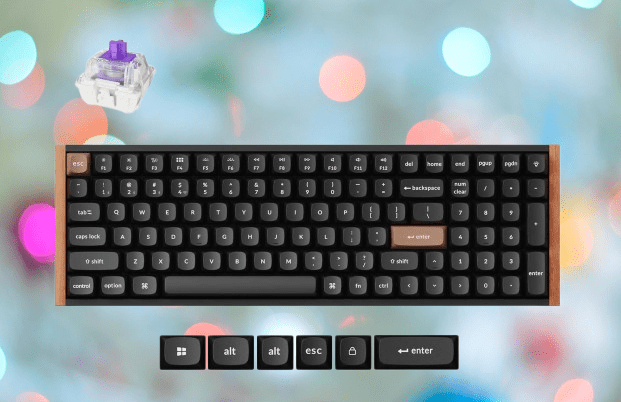
The Keychron K4 HE takes the opposite approach. It keeps everything. You get a full-function row across the top and a number pad on the right side. That makes it genuinely useful for spreadsheet work, accounting tasks, or games that need a wide range of inputs.
The size does not hurt the look either. Rosewood accents run along both sides of the keyboard, and the Esc and Enter keys come in a light brown color that stands out against the rest of the board. It is a clean, distinct design that does not try too hard.
You may also like: Best Acoustic Keyboards in 2026: Top Picks for That Perfect Thock Sound
On the performance side, the K4 HE uses hall effect switches, which are clicky and satisfying to type on. The bigger advantage is rapid trigger support. Normally, a key has to travel back up to a fixed reset point before it can register again.
With a rapid trigger, that reset happens almost immediately after you release the key. For fast typists, that means no missed keystrokes and no waiting between presses. If you type quickly and want a full-sized keyboard that keeps up with you, the K4 HE handles it well.
If you regularly switch between devices, the K4 HE handles that without any hassle. It connects to up to four devices at once, so moving between your laptop, tablet, and phone takes seconds. You get both Bluetooth and a 2.4GHz wireless receiver, giving you options depending on what you are connecting to and how you prefer to work.
Battery life is one of the strongest selling points here. A single charge gives you 110 hours of use. For context, that covers several full workdays without needing to plug in. If you travel for work, you can leave the charging cable at home for the duration of a short trip and not worry about it dying on you mid-meeting.
You may also like: Cherry XTRFY K63W Pro Compact: UWB Wireless Gaming Keyboard
The keyboard also supports RGB lighting, which you can adjust through Keychron’s own launcher software. You can set it to match your preferences or just leave it at the default. It is a small addition, but it gives the keyboard a bit of personality that a plain backlit board does not.
Taken together, the multi-device support, long battery life, and customizable lighting make the K4 HE a practical choice for anyone who wants a full-sized mechanical keyboard that fits into a flexible, modern work setup.
Best for RGB Lighting: Gravastar Mercury V60 Pro
Gravastar builds products with a very specific look in mind, and the Mercury V60 Pro is no different. It has a sci-fi-inspired design that will not appeal to everyone. If your desk doubles as a work setup during the day, it might feel like an odd fit.
But if you want a mechanical keyboard that looks unlike anything else on the market, this one delivers on that front.
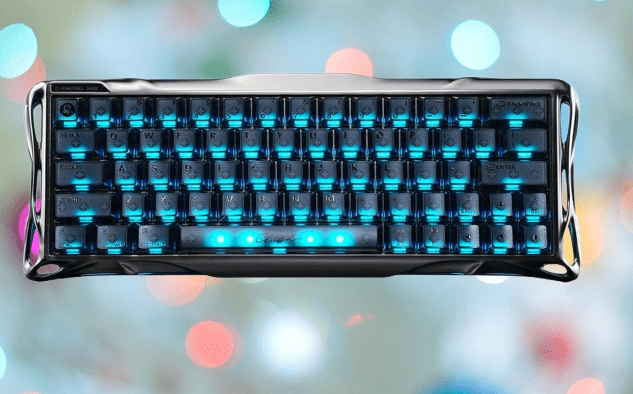
The frame is made from aluminum and features lights along the side panel. It is a bold visual choice, but the build quality backs it up. The keyboard feels solid and sturdy under your hands. You can type hard and fast without any flex or wobble. That kind of rigidity matters when you are pushing for speed or gaming for long sessions.
You may also like: Asus ROG Zephyrus Duo: Dual-Screen Gaming Laptop 2026
Despite the aggressive styling, the V60 Pro uses a compact 65% layout. That means no number pad and no function row, which keeps the footprint small. If you are working with limited desk space, the size works in your favor. You get more room for your mouse without giving up a quality typing experience.
The switches are hall effect, which means they are built to last well beyond the lifespan of standard mechanical switches. Over time, traditional switches can wear down and become inconsistent. Hall effect switches use magnets instead of physical contact points, so they hold up much longer. For the price, that kind of longevity adds real value.
The V60 Pro lets you adjust the actuation point on each key, meaning you can control exactly how far down a key needs to travel before it registers. If you want the lightest possible press for faster inputs, you can set it that way. Competitive players who need to minimize the time between pressing a key and seeing the action on screen will appreciate having that level of control.
The polling rate runs at 8000Hz. To put that simply, the keyboard sends data to your PC 8,000 times per second. At that speed, there is no noticeable delay between your keypress and what happens in the game. For fast-paced competitive play, that responsiveness is a genuine advantage.
You may also like: Ducky OK-M-98 Review: Budget Mechanical Keyboard Done Right
The one area where the V60 Pro falls short is the software. Gravastar’s companion app gives you access to a wide range of settings, but the layout is cluttered and harder to navigate than it should be.
Finding a specific option takes more time than it ought to. It is not a dealbreaker, but it is worth knowing before you buy, especially if you plan to spend time tweaking your settings regularly.
Best Wired Mechanical Keyboard: Sony Inzone KBD-H75
Sony is not the first brand that comes to mind when you think about PC gaming peripherals. Most people associate them with PlayStation hardware. But Sony has been quietly building out a PC gaming line under the Inzone brand, and the KBD-H75 keyboard is one of the more compelling options in that lineup.
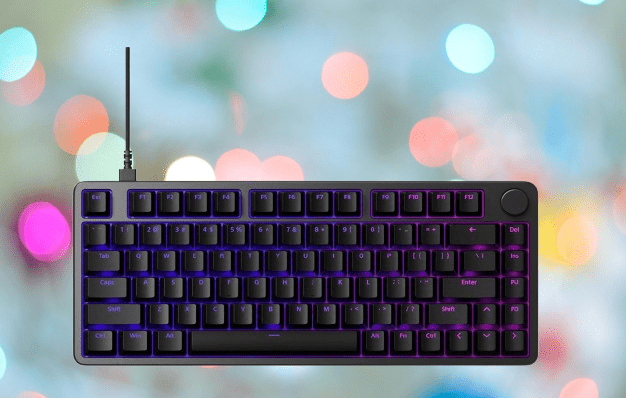
One thing to know upfront: this is a wired keyboard. If you were hoping for wireless, the KBD-H75 is not it. But the wired connection is exactly what makes it worth considering for competitive gaming.
It runs at an 8000Hz polling rate, which means it sends input data to your PC 8,000 times per second. The result is near-zero delay between your keypress and what happens on screen. For players where reaction time is everything, that matters.
You may also like: CRKD ATOM+: The Best Pocket Controller for Just $29.99
The build quality is another strong point. The chassis is made from aluminum, which gives it the kind of sturdiness that holds up to daily use and the occasional bump during transport. The keycaps are made from PBT plastic, which is a step above the ABS keycaps you find on most standard keyboards. ABS keycaps wear down quickly and develop a shiny, greasy look over time.
PBT is denser and more resistant to that kind of wear, so the keycaps stay looking and feeling clean for much longer. Both of these material choices point to a keyboard built to last, not just to look good on a spec sheet.
The KBD-H75 uses a 75% layout, which sits between a compact keyboard and a full-sized one. You keep the function row and most of the keys you use daily, but without the number pad. It is a practical middle ground, though if you prefer the smallest possible footprint on your desk, this might still feel a bit wide for your taste.
One addition that stands out on this layout is the volume dial. It sits within easy reach and has a satisfying, precise feel when you turn it. Adjusting volume mid-game or during a call without tabbing out is a small convenience that adds up over time.
Pricing is where the KBD-H75 asks a lot of you. At $278, it sits well above what most mechanical keyboards cost. Part of what you are paying for is the Sony name, and that does carry weight in terms of building confidence and after-sales support. But the price is not just brand premium.
You may also like: Lenovo Legion R7 RT75 and Y7MG: Specs, Price, Release Date
The aluminum build, PBT keycaps, 8000Hz polling rate, and overall fit and finish are all genuinely high quality. If you are comparing it to other keyboards at similar price points, it holds up well. Whether that total package justifies the cost comes down to your budget, but you are not overpaying for a mediocre product.
Most Eye-catching Mechanical Keyboard: Gravastar Mercury V75 Pro
Gravastar already has a reputation for bold designs, but the Mercury V75 Pro takes that further than anything they have released before. The sides and front of the keyboard have RGB lighting, which is familiar territory for Gravastar.
What sets the V75 Pro apart is the top panel. It looks like someone took paint of multiple colors and let it spread across the surface in all directions. There is no clean pattern or symmetry to it. It is intentionally chaotic, and it works.
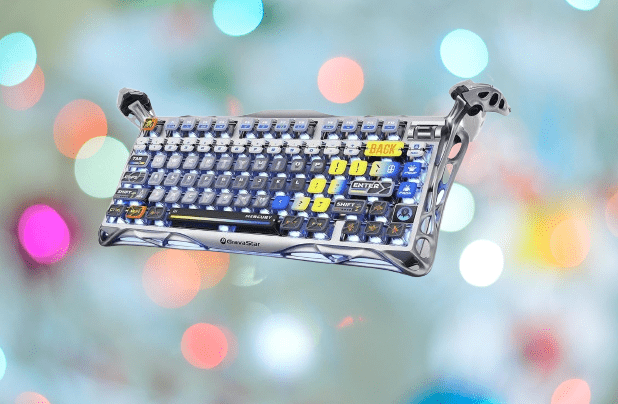
That kind of design is not going to appeal to everyone. If you prefer a clean, minimal setup, this keyboard will look out of place on your desk.
But after spending time reviewing products that all look nearly identical, something this visually distinct is worth acknowledging. It proves that tech hardware does not have to follow the same safe, boring template that most manufacturers default to.
On the performance side, the V75 Pro and the V60 Pro are closely matched. Both run at an 8000Hz polling rate, which puts them among the most responsive keyboards available. For competitive gaming, that polling rate means your inputs register with almost no delay.
If you are already considering the V60 Pro for its performance, the V75 Pro gives you the same core specs. The main difference between the two comes down to size and how much you want your keyboard to stand out visually.
You may also like: Logitech G PRO X Superlight 2 Drops to $119.99 on Amazon
Both the V75 Pro and the V60 Pro use hall effect switches. These switches use magnets to detect keypresses rather than physical contact points, which means they wear down far more slowly than traditional mechanical switches. They also tend to register inputs faster, which is a direct advantage in competitive gaming.
On top of that, both keyboards let you adjust the actuation point on each key. You can set a key to register with the lightest possible press, cutting down the time between your input and the action on screen. For games where speed is the deciding factor, that adjustment can give you a real edge.
Where the two keyboards part ways is in layout and connectivity. The V75 Pro is larger, using a 75% layout that includes a volume rocker for quick audio adjustments without leaving your game.
It is also a wired keyboard, while the V60 Pro connects wirelessly. For competitive play, wired is generally the preferred choice since it removes any chance of wireless interference or input lag.
The V75 Pro is priced at $239.95, which puts it slightly above the V60 Pro. But given the larger layout, the wired connection, and a design that genuinely stands apart from everything else in this price range, the extra cost is easy to justify if the look speaks to you.
Best Keyboard for Work: Keychron Q60 Max
The Keychron Q60 Max has the look of a keyboard from an older era, but everything about how it is built and priced puts it firmly in the premium category. At $199.99, it is a significant spend.
If you are working with a tight budget, this one is not for you. But if you can save up for it, it is the kind of keyboard you buy once and use for years.
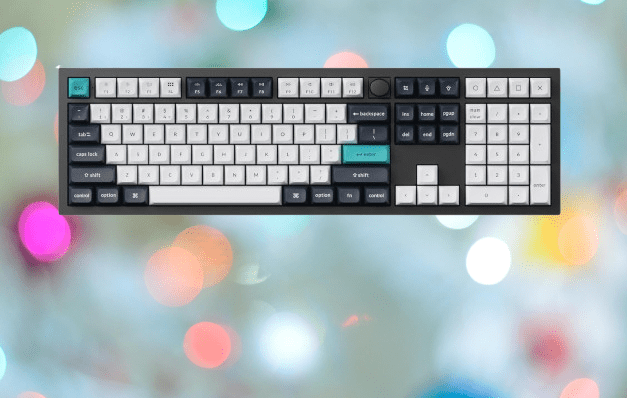
The Q60 Max uses a 60% layout, which makes it one of the smallest options in the mechanical keyboard space. That small size comes from the HHKB layout, a typing system that rearranges certain keys to help you type faster with less hand movement.
The most notable change is the Caps Lock key. On a standard keyboard, that key sits on the left side of the home row. On the Q60 Max, the Ctrl key takes that spot instead. For people who type all day, that placement reduces the stretching and repositioning that their hands normally need to do.
The layout takes adjustment time. Your muscle memory from years of standard keyboards will work against you at first, and that can feel frustrating. But most people who push through that initial period find that the layout genuinely improves their workflow.
One thing to know going in: there are no dedicated arrow keys. Keychron designed this keyboard with productivity in mind, not gaming. That said, gaming on it is still possible. The absence of arrow keys is more of an inconvenience for certain games than a hard limitation, and with some remapping, it becomes manageable.
You may also like: Samsung Pro Keyboard for Galaxy Tab S11 Ultra: What We know
If you game after work, the Q60 Max still holds up well for that purpose. The keyboard uses a gasket-mounted construction, which means the internal plate sits on rubber gaskets rather than being screwed directly into the case.
That design gives the keyboard a slight bounce when you press keys, making long typing or gaming sessions more comfortable on your fingers. It is a subtle difference from a rigid board, but once you feel it, standard mounting feels stiff by comparison.
The switches are also hot-swappable, meaning you can pull out any key switch and replace it with a different one without soldering.
If you want a lighter press, a heavier click, or a completely different feel, you can swap the switches out yourself in minutes. That flexibility lets you change the feel of the keyboard over time without buying an entirely new board.
Connectivity is where the Q60 Max separates itself from most competitors. You get three options: a 2.4GHz wireless receiver for low-latency wireless use, Bluetooth for connecting to up to four devices at once, and a wired USB-C connection for zero-lag input.
The ability to switch between devices over Bluetooth is useful if you move between a laptop, tablet, or phone throughout the day. When you sit down to game and need the fastest possible response, plugging in the USB-C cable takes care of that without any fuss.
Best Keyboard for Gaming: Asus ROG Falchion Ace HFX
Asus has built a strong reputation in PC gaming over many years, and that reputation carries real weight when you are deciding where to spend your money. The ROG Falchion Ace HFX lives up to that standard. It covers the features you expect from a high-end gaming keyboard without cutting corners.
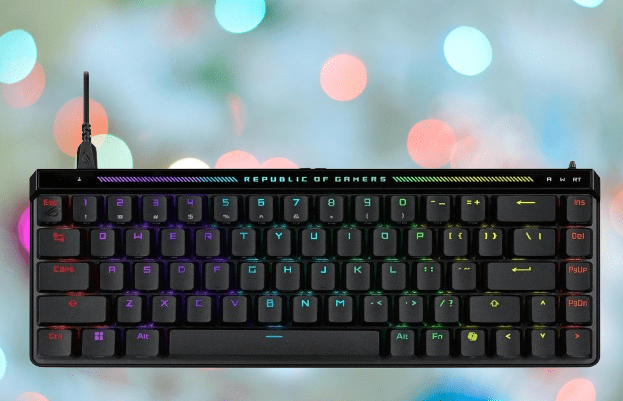
The design is one of its strongest qualities, and for a specific reason. A lot of gaming keyboards announce themselves loudly with aggressive styling that looks odd on a work desk during the day.
The Ace HFX takes a different approach. It uses a compact 65% layout with a clean, restrained look. Turn off the RGB lighting, and it could pass for a premium productivity keyboard. That makes it genuinely versatile, able to fit into a professional setting during work hours and a gaming setup when the workday ends.
When you do use it for gaming, the hardware backs up the clean exterior. The Ace HFX uses hall effect switches, which register inputs faster than standard mechanical switches and last significantly longer due to their magnetic design. The keycaps are made from PBT plastic, which resists the wear and shine that cheaper ABS keycaps develop over time.
You can also adjust the actuation point on each switch, setting exactly how far down a key needs to travel before it registers. If you want a hair-trigger response for fast-paced games, you can dial it in to match how you play. That level of customization gives you direct control over how the keyboard performs rather than accepting a one-size-fits-all default.
Adjusting the actuation point means you can set keys like reload or crouch to register with the shortest possible press. In fast-paced games, shaving even a small amount of time off those inputs makes a difference. The Ace HFX gives you that control directly, so you can fine-tune each key to match how aggressively or lightly you press during play.
The customization extends to the software side as well. Asus’ Armory Crate application lets you configure the RGB lighting to your preference, whether that is a single static color, a pattern, or something more elaborate. The software is more intuitive than what you get with some competitors, which makes the setup process straightforward rather than frustrating.
Along the top of the keyboard sits a touch bar that handles brightness and volume adjustments. It responds to swipes and taps, giving you quick access to those controls without interrupting what you are doing. The keyboard also runs at an 8000Hz polling rate, sending input data to your PC 8,000 times per second. At that speed, there is no detectable delay between pressing a key and seeing the result on screen.
The price is the one area that gives pause. At $199.99, it costs more than most keyboards in this category. But the hall effect switches, PBT keycaps, touch bar, polling rate, and overall build quality all justify that number. If you want a keyboard that performs at a high level and fits into both a work and gaming environment without compromise, the Ace HFX is worth the investment.
Best Value Mechanical Keyboard: SteelSeries Apex Pro Mini Gen 3
SteelSeries has earned its place as one of the more trusted names in PC gaming peripherals. Their headsets consistently rank among the best available, and that same attention to what gamers actually need carries through to the Apex Pro Mini Gen 3.
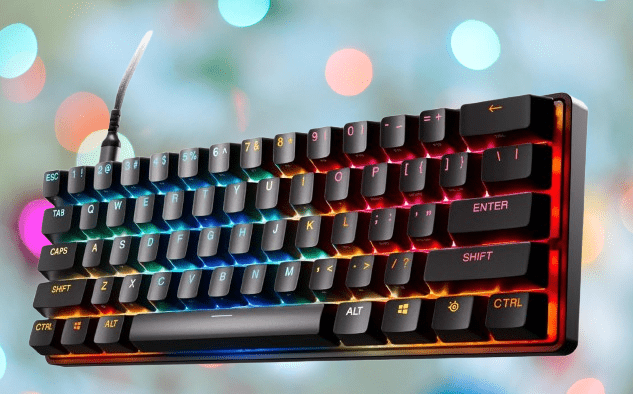
The name tells you exactly what this keyboard is about. It is small by design. The 60% layout strips the keyboard down to the keys you use most, removing the number pad, function row, and navigation cluster.
For FPS gaming, none of those keys factor into your play anyway. What you are left with is a tight, focused layout that leaves plenty of room on your desk for mouse movement. It also fits easily into a bag, making it a practical option if you take your setup to a friend’s place, a tournament, or while traveling.
The switches are SteelSeries’ OmniPoint 3.0, which is their own version of hall effect technology. Like other hall effect switches, they use magnets instead of physical contact points to register keypresses. That means faster actuation and a much longer lifespan compared to standard mechanical switches.
In practice, the typing feel is sharp and responsive. Each keypress has a clean, immediate feedback that makes both gaming and everyday typing feel noticeably better than a standard keyboard.
If you spend your day writing documents or working through emails before switching to gaming in the evening, the Apex Pro Mini Gen 3 handles both well. The compact size is the main tradeoff, and whether that works for you depends on how much you rely on those missing keys.
The ability to adjust actuation points on the OmniPoint 3.0 switches is what makes the Apex Pro Mini Gen 3 stand out for serious gamers. You can set specific keys to register with the lightest possible press, which directly affects how fast certain actions happen in-game.
Crouching to dodge incoming fire or reloading between fights are actions where a faster key response gives you a measurable advantage. Instead of accepting a fixed actuation depth across all keys, you set each one to fit exactly how you play.
The SteelSeries GG software adds another layer of control on top of that. It is a full customization platform where you can adjust switch settings, configure key bindings, and manage RGB lighting.
One feature worth highlighting for streamers is the ability to set the RGB lighting to change automatically depending on which game you launch.
Each game gets its own lighting profile, so when you switch titles, the keyboard updates its look without any manual input. It is a small detail, but for anyone who streams regularly, it adds a visual consistency to your content that looks intentional rather than accidental.
The software also comes with presets if you would rather skip the manual configuration and start with a solid baseline.
You can apply a preset and adjust from there, which saves time compared to building everything from scratch. Taken together, the adjustable switches and GG software give you a level of control over your setup that most keyboards at this price point do not offer.
Best Keyboard for Streaming: Mountain Everest Max
If you stream on Twitch, a standard keyboard covers the basics but leaves gaps in what you can do while live. The Mountain Everest Max was built with that problem in mind. Its modular design lets you add and remove components depending on what your stream needs.
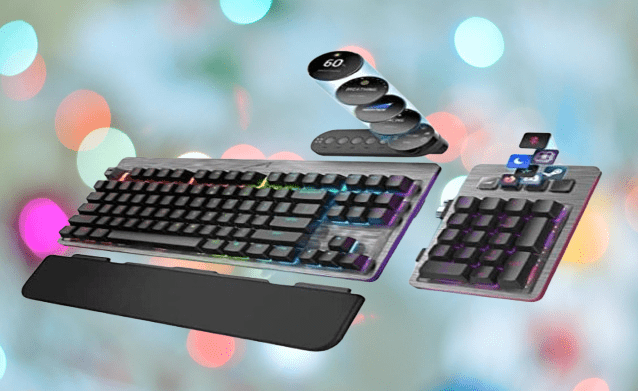
The keyboard has proprietary ports on both sides, which means you can attach a number pad to either the left or the right, depending on your desk layout and personal preference. Along the top of the number pad sits a row of shortcut buttons that you can assign to apps, websites, or actions you access frequently during a stream.
It works similarly to an Elgato Stream Deck, giving you dedicated buttons for quick actions without having to alt-tab or fumble through menus on screen. The key difference is that it is built into your keyboard setup rather than being a separate device sitting alongside it.
There is also a media dock that attaches along the top of the keyboard. It gives you physical controls for volume and playback, so you can make audio adjustments mid-stream without interrupting your focus.
The dock includes a small display that shows real-time information, including your CPU performance and which keyboard profile is currently active. That last feature is more useful than it sounds.
The Everest Max supports multiple profiles, so you can have one configured for FPS games, another for RPGs, and switch between them as needed. Seeing the active profile at a glance on the dock means you always know which setup you are working with.
At its core, the Everest Max uses Cherry MX switches, which are among the most well-regarded switches in the mechanical keyboard space. They require a light touch to activate, so your fingers do not fatigue as quickly during long sessions.
The sound they produce has a consistent, even quality to it rather than the harsh clack you get from cheaper switches. More importantly, they are fast and accurate. Inputs register cleanly without any hesitation, which keeps your gameplay and your stream running without interruption.
For streamers specifically, the software integration is a standout feature. Mountain’s Base Camp software connects directly with OBS Studio, the recording and streaming tool most content creators use. That connection lets you trigger recordings, switch scenes, and manage transitions from the keyboard itself without switching windows or clicking through menus.
For anyone who manages a live stream solo, having those controls mapped to physical keys makes the whole process noticeably smoother.
The one genuine criticism is the keycaps. At $249.99, the Everest Max sits at a premium price point, and at that price, you would reasonably expect PBT keycaps. Instead, it ships with ABS keycaps, which wear down faster and develop a shiny surface over time with regular use.
It is not a reason to avoid the keyboard, but it is a corner that did not need to be cut at this price. Everything else, the modular design, Cherry MX switches, media dock, and OBS integration, makes a strong case for the asking price, regardless.
Best Keyboard Tenkeyless: Logitech G Pro X TKL Rapid
If you want a gaming keyboard that types well, covers all the important features, and does not ask too much of your budget, the Logitech G Pro X TKL Rapid is worth a close look. The name is a mouthful, but the keyboard itself is simple and well-executed.
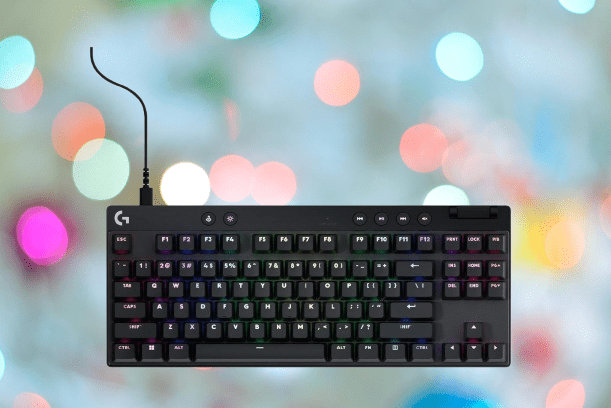
The switches use hall effect technology, which means magnets handle the actuation rather than physical contact points. That design allows you to adjust exactly how far each key needs to travel before it registers.
Set the actuation point shallow enough, and actions like crouching, opening team chat, or swapping weapons happen faster than they would on a standard switch. In competitive games, those fractions of a second matter more than most people realize until they experience the difference firsthand.
The TKL in the name stands for tenkeyless, which means the number pad is not included. For gaming, that is rarely a loss. Removing the number pad makes the keyboard more compact and keeps your hands closer together, which reduces the distance your right hand has to travel between the keyboard and your mouse.
Less movement means faster repositioning during play. It also clears up desk space, which is a practical benefit whether you are gaming or working. The keys that remain are the ones you actually use, and having fewer visual distractions on the board helps you stay focused during a session.
The TKL layout is not the smallest option available, but that extra size serves a purpose. Logitech used the additional space to fit a dedicated row of media controls along the top of the keyboard.
If you listen to music while you work or game, having physical keys for volume, play, pause, and track skipping means you never have to alt-tab or reach for your phone to manage your audio. It is a small addition that proves useful dozens of times throughout a typical day.
The one limitation worth knowing upfront is that the TKL Rapid is wired only. There is no Bluetooth or wireless receiver option. If you prefer the freedom of a cable-free desk, this keyboard will not give you that. For most people sitting at a fixed desk setup, a wired connection is not a problem and actually removes any concern about battery life or wireless interference.
Given the price, the wired-only design is a fair tradeoff. What you do get in return is a keyboard built with PBT keycaps, which are denser and more durable than the ABS keycaps found on many competitors at similar or higher price points. PBT resists the worn, greasy look that cheaper keycaps develop after months of daily use.
The legends printed on the keys stay sharp longer, and the surface texture holds up well over time. For a keyboard you plan to use every day for years, that durability matters more than it might seem at the point of purchase.
Best Value Keyboard: Keychron Q1 HE
If you work at a desk all day and then game in the evenings, the Keychron Q1 HE is built for exactly that routine. It handles both without forcing you to compromise on either end.
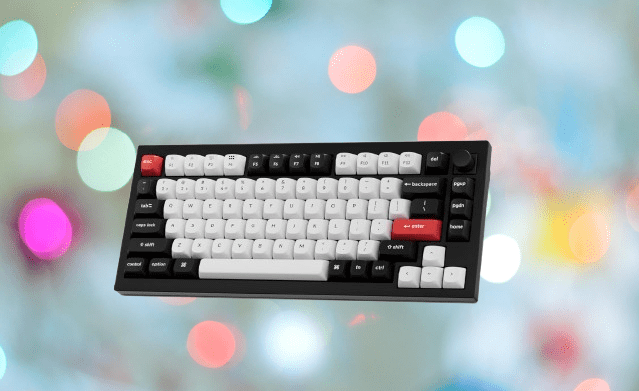
The design strikes a balance that most gaming keyboards do not. The Q1 HE uses a white and black color scheme with a few red accent keycaps placed at specific points across the board. The result is a keyboard that looks considered and clean rather than loud.
It stands out enough to be interesting without looking out of place on a professional desk. If you share an office or work in a client-facing environment, this is the kind of keyboard that does not invite unwanted comments.
The layout is another practical strength. The 75% size keeps the footprint compact while retaining the keys that actually matter for daily work. You get a full-function row across the top, dedicated arrow keys, and page up and page down keys.
Those last two are easy to overlook until you spend a day scrolling through long documents or spreadsheets without them. Having them as dedicated keys rather than accessed through a function layer saves real time and reduces friction throughout the workday.
The Q1 HE also adapts to the devices you already use, which matters if your setup involves more than one machine. Whether you are switching between a desktop and a laptop or jumping over to a tablet, the keyboard is ready to accommodate that without requiring a complicated reconfiguration each time.
The Q1 HE gives you three ways to connect, depending on what you are using it with. The included 2.4GHz dongle handles the connection for your PC or laptop, giving you a low-latency wireless experience for both work and gaming.
Switch to Bluetooth when you want to type on a tablet or phone. And if you are in a competitive gaming session where you want the fastest possible response, plugging in via USB-C removes any wireless variable from the equation entirely.
That flexibility with wired connectivity feeds directly into the gaming side of the Q1 HE. Through Keychron’s software, you can adjust the actuation point on each switch, setting how light or deep a press needs to be before the key registers.
In a game like Counter-Strike 2, where the gap between winning and losing a fight often comes down to who acts first, trimming even a small amount of input delay gives you a real edge.
Battery life sits at 100 hours on a single charge, which covers several full workdays without needing to plug in. That is a solid number by most standards. The one caveat is that other Keychron keyboards push beyond that figure, some reaching well past 100 hours.
If maximum battery life is your top priority, it is worth browsing the wider Keychron lineup before committing. But for most people, 100 hours between charges is more than enough to avoid the keyboard becoming a battery management task.
Final Thoughts
Choosing the right mechanical keyboard comes down to what you actually need from it.
If you game competitively, prioritize hall effect switches and a high polling rate. If you split your time between work and gaming, look for a layout that keeps the keys you use daily without cluttering your desk. If you stream, modular features and software integration will serve you better than raw performance specs alone.
Every keyboard on this list does something well. The Keychron Q1 HE and Q60 Max suit people who type heavily throughout the day. The Gravastar options cater to gamers who want performance and a distinct look. The Logitech G Pro X TKL Rapid and SteelSeries Apex Pro Mini Gen 3 hit a strong balance of price and features. The Sony Inzone KBD-H75 and Asus ROG Falchion Ace HFX justify their higher prices with build quality that lasts.
Set your budget first, then match the keyboard to how you actually spend your time at the desk. Any of these options will be a noticeable step up from a standard membrane keyboard.