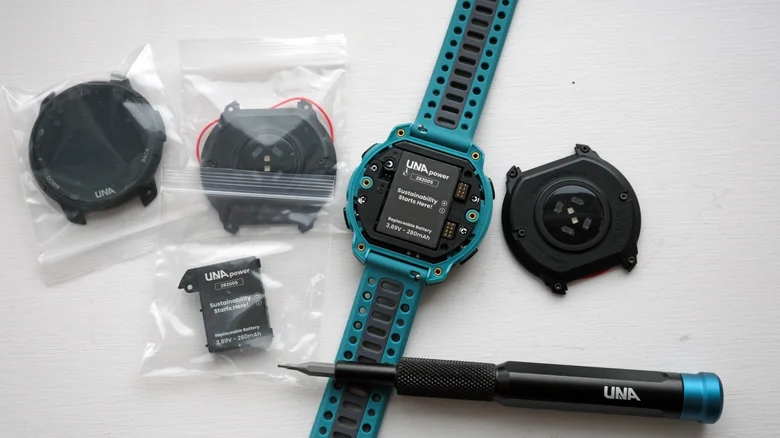
The Una Watch wants to fix the wasteful side of smartwatch ownership. Instead of pushing you toward a new purchase every year, it comes with the tools needed to upgrade it yourself. Swap the battery, replace the display, even change out each sensor; it’s all designed to be user-serviceable.
The startup behind it also went with an open-source approach for the software, meaning developers can build their own apps to expand what the Una Watch can do over time.
This isn’t the first attempt at a modular smartwatch built to challenge how long these devices should realistically last. Previous efforts in this space haven’t stuck around. The question is whether the Una Watch breaks that pattern. I’ve spent time wearing it to find out.
Una Watch Full Specs
Una Watch Design
My first impression of the Una Watch is that it feels like stepping back in time to pick up an old Garmin. Between the mostly black design and that transflective, memory-in-pixel display, everything about it reads a bit old-school.
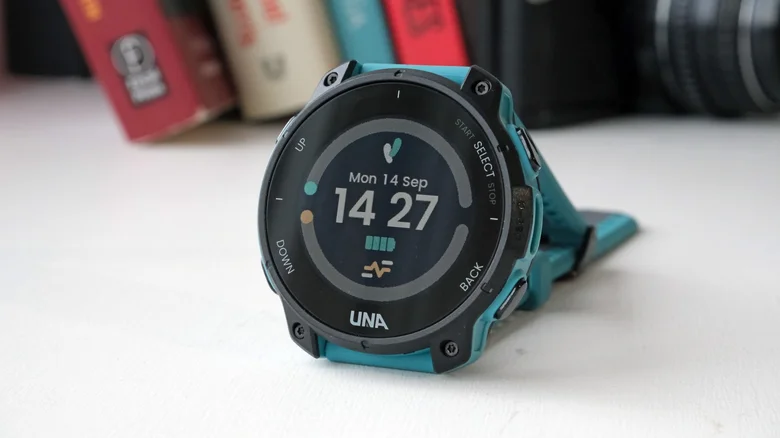
If you were hoping to swim with this thing, you’re out of luck. It carries an IPX5 rating, which handles splashes and a shower just fine, but nothing beyond that.
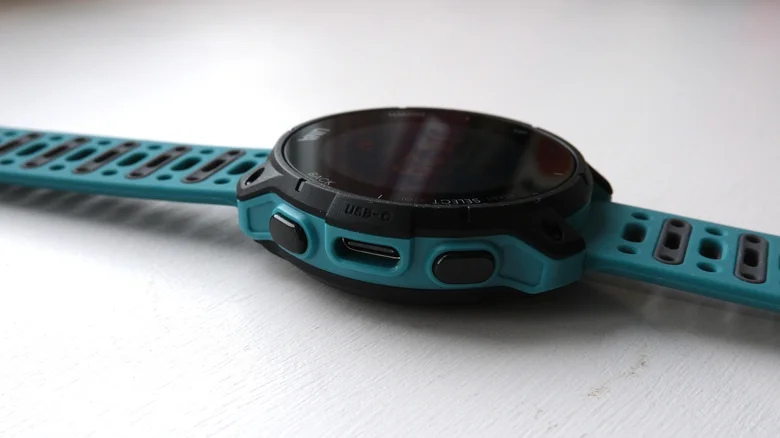
What you do get are four physical buttons spaced comfortably around a modestly sized 40mm case. A side-mounted USB-C port handles charging, likely one reason this watch skips full waterproofing. The 20mm removable strap has a nice bit of stretch to it and secures with a traditional buckle rather than anything fancier.
You may also like: Pixel Watch 5 vs Galaxy Watch 8: Which Should You Buy?
The memory-in-pixel display measures 1.2 inches at a 240 x 240 resolution, similar screen tech to what you’d find on something like the Garmin Forerunner 245, a watch that launched over five years ago. Mineral glass protects against scratches, and an LED backlight kicks in for low-light situations.
It’s not the brightest or sharpest memory-in-pixel display out there, but it’s worked fine for nighttime use and early morning outings. I would’ve appreciated slimmer bezels, though, since they eat into usable screen space more than I’d like.
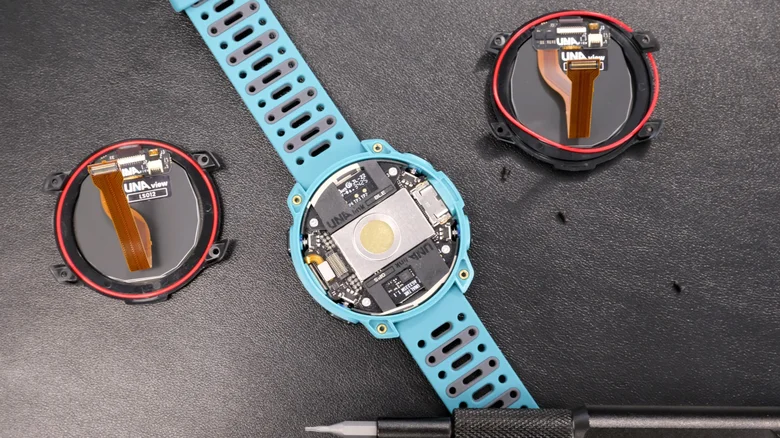
Flip it over, and you’ll find the optical sensor array handling heart rate tracking, along with a series of small black screws. Those screws are your gateway into the watch’s internals, which Una says are designed to be user-replaceable.
Popping the case off doesn’t take long using the included Torx tool. I lifted the battery out without any trouble or fuss. After putting it back and screwing everything shut again, the watch reset its date and time, though syncing it back to the app fixed that right away.
The obvious question is where you actually source replacement parts. Right now, Una sells some of them directly.
A replacement display runs $30, and a new battery costs $20, both considerably cheaper than buying an entirely new watch. Una doesn’t yet offer other components beyond the display and battery, so repairing anything else will likely require some digging on your part until that changes.
Una Watch Software and Features
The Una Watch runs on an open-source platform built around a FreeRTOS-based operating system, the kind of highly power-efficient software you’d typically expect from budget smartwatches.
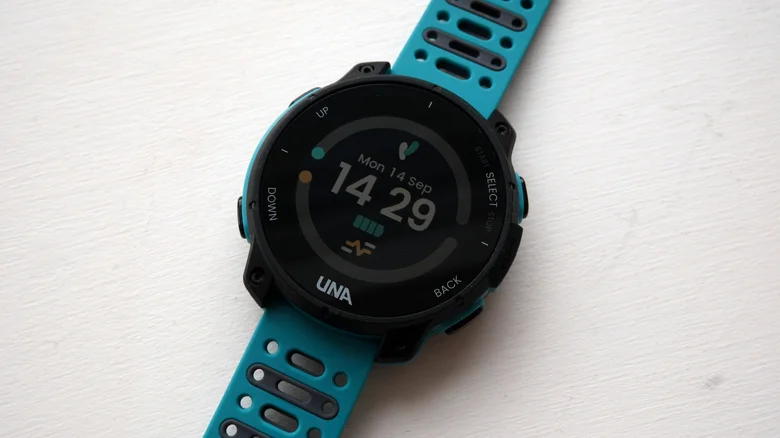
Behind that software sits an ultra-low-power Cortex-M33 microcontroller, paired with 4GB of storage and just 2.5MB of RAM. Most smartwatches ship with gigabytes of RAM rather than megabytes, and that gap likely explains some noticeable lag when navigating between screens on the watch.
You may also like: Galaxy Watch 9 vs Apple Watch Series 11: Full Comparison
As for the interface itself, Una does a reasonably good job. I wouldn’t call it the slickest or cleanest interface around, but it gets you where you need to go without much hassle.
From the main watch face, scrolling down brings up widget glances, a very Garmin-inspired approach to surfacing things like notifications, real-time heart rate, or daily step counts.
Holding down the bottom button opens media controls, while the top-right button takes you into workout tracking. Again, the overall approach feels distinctly Garmin-influenced throughout.
Una’s companion smartphone app, which is well put together, houses its own app store, accessible only through the app itself. That store stays open to developers who want to build apps, watch faces, and add-ons, making the whole ecosystem feel reminiscent of Garmin’s Connect IQ Store.
You may also like: Samsung Galaxy Watch 9 Review: Refined Health Tracking, Weak Battery
At the time of testing, I counted just under 40 downloadable items, all free. You can load up a Parkrun barcode or even play a small game on the watch, though it’s clear the storefront is still in its early days.
Beyond tracking features, the watch handles phone notifications and basic music playback control. It’s a stripped-down, no-frills approach that plenty of people will likely find perfectly satisfying. Just don’t expect it to match the feature depth of other smartwatches at a similar price point.
Una Watch Health and Fitness Tracking
The Una Watch keeps activity tracking fairly limited. You get profiles for indoor and outdoor runs, walks, hikes, cycling, and a general workout mode covering everything else. Worth repeating: that waterproofing level rules out swimming entirely.
Standard sensors handle the actual tracking work here. That includes a 6-axis accelerometer and gyroscope for motion, a barometric altimeter for elevation data, and an optical sensor on the case back continuously monitoring heart rate, workouts included. You can also pair external heart rate monitors if you prefer, and I had no trouble connecting sensors from both Garmin and Polar.
You may also like: Whoop vs Garmin Smartwatch: Screen, GPS, and Tracking Accuracy Compared
Dual-frequency GPS makes the cut too, putting it in the same category as Apple, Garmin, Samsung, and plenty of other smartwatch brands. That setup mainly helps accuracy in tricky environments, think tall buildings, bad weather, or dense tree cover on off-road routes, where single-frequency GPS tends to struggle.
I’ve mostly used the Una Watch for running, wearing it alongside devices with comparable sensors like the Apple Watch and various Garmin models. GPS tracks have generally looked good, closely matching the routes recorded by both Garmin and Apple.
Real-time data showed a bit more inconsistency though, particularly pace readings. Heart rate tracking matched chest strap averages and max readings reasonably well on some runs, but on other, fairly easy outings, it posted noticeably higher max readings than expected.
Outside of workout tracking, this watch covers daily steps and floors climbed, and that’s really the extent of it. There’s no access to training plans, and the interval training mode feels noticeably more basic compared to what competing smartwatches offer.
Route guidance does appear to be in development though, which would add some navigation capability, so Una is clearly still building out new features over time.
Una Watch Battery Life
On battery life, the Una Watch packs a 280mAh battery rated for 7 to 10 days per charge. For comparison, similar watches under $200 like the Amazfit Active 3 Premium stretch to 12 days, and the Garmin Forerunner 70 claims up to 13 days, so Una sits reasonably in line with the competition here.
Skipping an AMOLED display and keeping features relatively basic helps conserve power day to day, well below what a typical sports watch would drain. Expect it to comfortably last a week, longer still if you’re only using GPS tracking occasionally.
You may also like: Google Pixel Watch 5 Review: Refined, Not Reinvented
When you actually use GPS for outdoor tracking, battery life tops out around 20 hours, a few hours behind rival watches at this price. Still reasonable on paper, though in practice, an hour of GPS-tracked running drained 20% of the battery, suggesting real-world drain runs a bit faster than advertised.
Charging is more convenient than most smartwatches offer. A USB-C port sits right on the side of the case, letting you charge with any standard USB-C cable. Charging speed impressed me too; going from empty to full took about an hour.
Amazfit Active 3 Premium Verdict
The Una Watch stands out for being genuinely repairable, though a dated design and sluggish software performance hold it back from reaching its full potential.
Pros |
Cons |
| Capable of good general sports tracking | Laggy software |
| App store can help bring new features | The design isn’t sleek |
| Una makes it easy to replace components and charges via USB-C | You can’t use it for swimming |
Final Thoughts
The Una Watch succeeds at what it set out to build. Even someone nervous about tinkering with internals should feel confident upgrading this watch once they see how simple the process actually is.
Going open-source also feels like a smart move, giving Una a real shot at building a Pebble-style community that could make the watch genuinely more useful over time.
The problem lies elsewhere. The design doesn’t quite measure up to similarly priced competitors, and performance, along with the software, just doesn’t feel fully polished in its current state. Still, this is clearly a smartwatch with real promise behind it.