Good news if you’re shopping for tablets in 2026. Phone prices keep climbing, but you can still land a good Android tablet for around $539.
Take the Oppo Pad 5. You get a 12.1-inch screen, four speakers, and battery life that holds up, all starting at $510. I tested the 5G version, which costs $618.
Here’s the thing though: this tablet is basically a rerun of the OnePlus Pad Go 2 from late 2025. Normally that would raise eyebrows, but OnePlus is on its way out of Europe and the US, so the overlap matters less than it would have a year ago.
Worth noting that the older model actually beat this one on paper. It launched with 5G built in and double the storage, all for $538.
Either way, Oppo isn’t just competing with a fading rival anymore. This market has gotten crowded, and standing out takes more than a decent spec sheet.
Oppo Pad 5 Full Specs
Oppo Pad 5 Design
Most tablet makers stopped trying to beat Apple a while ago. They just copy the iPad instead. Oppo follows the same script here.
The Pad 5 has that same flat-edge, rounded-corner look you’ve seen a hundred times, just with a slightly wider 7:5 screen than the usual iPad ratio.
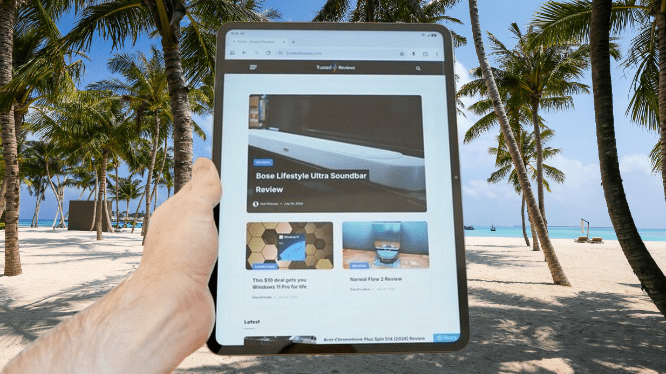
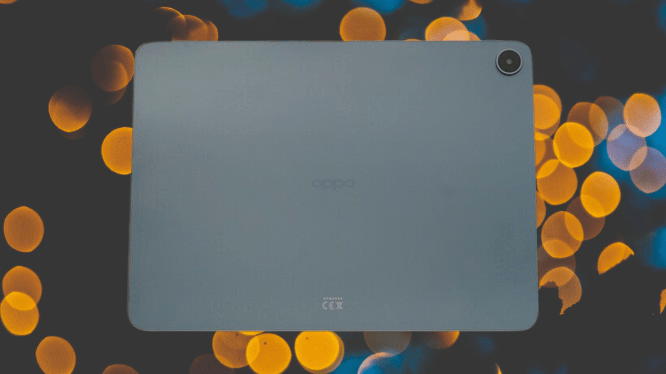
It doesn’t feel like a premium device, even by the standards of $539 tablets. The frame is metal, sure, but the back is plastic, and it’s the kind of matte plastic that picks up fingerprints fast.
You may also like: Huawei MatePad Pro Max Launches in Germany at €1,099
Here’s what’s odd: for a tablet with this much plastic in the build, it’s surprisingly heavy. The dimensions are reasonable for a 12-inch tablet at 266.01 x 192.77 x 6.83mm, but it comes in at 597g. That’s a lot to hold for long reading sessions.
Compare that to the Xiaomi Pad 8, which weighs just 485g despite having a full metal unibody. Yes, its screen is a touch smaller at 11.2 inches, but that’s still a big weight gap for a similar-sized device. The Lenovo IdeaTab Pro 2 lands around the same weight as the Oppo, but it also uses metal throughout and has a bigger display to show for it.
One more thing that caught me off guard is that Oppo mentions a matching Pencil 2R stylus in the Pad 5’s marketing, but at the time I’m writing this, you can’t actually buy it on the UK site. And older Oppo styluses won’t work with it either, which makes the omission sting more.
You may also like: Lenovo Yoga Tab Review: Worth Buying in 2026?
If a bundled stylus matters to you at this price point, you’ve got better options. The Samsung Galaxy Tab S10 Lite includes one, and so does the Lenovo IdeaTab Pro. Xiaomi takes a different approach with the Pad 8, selling its Focus Pen Pro separately, but at least it exists, and you can buy it.
Oppo Pad 5 Screen
The screen is where the Oppo Pad 5 earns its keep, same as its predecessor, the OnePlus Pad Go 2. Size is the main selling point here: a 12.1-inch display with that 7:5 shape, plenty of room for whatever you’re watching or reading.
You won’t find OLED at this price, and you don’t. Instead you get an LCD panel, but it’s punchier than expected. Punchy enough, actually, that I went into Settings and switched the color mode from Vivid to Natural, because the default felt like too much.
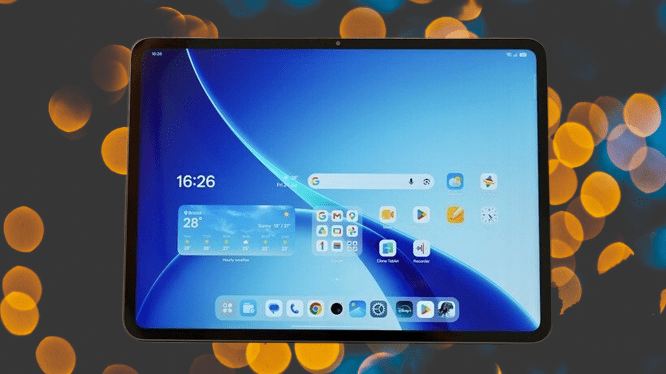
Resolution sits at 2800 x 1980, or 2.8K, and it looks sharp in daily use. That said, both the Xiaomi Pad 8 and the Lenovo IdeaTab Pro beat it here with 3.2K screens.
You may also like: Oppo Pad Mini: The Best Android Mini Tablet
Refresh rate tells a similar story. The Oppo tops out at 120Hz, while the Xiaomi and Lenovo hit 144Hz. In real-world use, though, 120Hz does the job fine. You’re not pushing high frame rates in demanding 3D games on a tablet like this anyway. Brightness peaks at 900 nits, which is enough to keep things clear indoors.
The quad speakers back this up nicely, with good clarity and a sense of space between channels. If there’s one thing the Oppo Pad 5 does well without hesitation, it’s playing video.
Oppo Pad 5 Performance
Under the hood, Oppo went with a MediaTek Dimensity 7300-Ultra and 8GB of RAM. That’s the same chip found in the Redmi Note 14 Pro, a $404 phone.
That chip did the job fine in a budget phone released at the start of 2025. In a $539 tablet released over a year later, it feels dated.
It’ll handle Wuthering Waves, a notoriously demanding game, but only if you drop the graphics down to Performance mode, which is really just Low with a nicer name.
You might assume $539 tablets can’t do much better than this. The Xiaomi Pad 8 and Lenovo IdeaTab Pro 2 prove otherwise, both running the much stronger Snapdragon 8s Gen 4.
You may also like: iPad Air M4: Price, Specs, and Release Date
The numbers back this up. Xiaomi’s tablet scores roughly double the Oppo Pad 5 on Geekbench 6, for both single and multi-core CPU tests. I couldn’t compare graphics benchmarks directly, since the Oppo Pad 5 refused to run 3DMark’s Wild Life Extreme test. Odd, considering the nearly identical OnePlus Pad Go 2 handled it without issue.
Even the older Lenovo IdeaTab Pro, the model this new one replaced, used a stronger MediaTek Dimensity 8300 chip.
Oppo Pad 5 handles the basics and daily tasks fine. Switching between home screens and menus feels smooth. But heavier web pages take noticeably longer to load than on faster hardware, and jumping quickly between several open apps tends to trip it up.
Storage comes in at 128GB as standard, which is about average for this price these days. It’s a shame Oppo doesn’t offer a higher-capacity option.
Oppo Pad 5 Software and AI
On the software side, you’re looking at ColorOS 16.1 sitting on top of Android 16.
Credit where it’s due is that Oppo’s software tends to run faster and smoother than most custom Android skins out there. As I mentioned, general navigation and light app use feel calm and controlled even though the hardware itself isn’t pushing any limits.

There are the occasional tiny stutters, but based on how Oppo’s software performs on better hardware, that comes down to the chipset, not sloppy optimization.
Looks-wise, it’s not my favorite version of Android, but it’s nowhere near the bottom either. The icons look clean, the Settings menu is easy enough to find your way around, and Oppo keeps the Google Feed exactly where you’d expect it, one swipe to the left of the home screen.
You may also like: 11-Inch iPad A16 Deal: $299 for 128GB Model, $50 Off Regular Price
My one gripe is the default home screen layout. Out of the box, you get two separate weather widgets plus the weather app icon, all at once. You can delete the extras in seconds, sure, but it shouldn’t ship that cluttered in the first place.
One thing I’ll actually praise Oppo for is that bloatware isn’t a big problem here. You get three preloaded third-party apps such as Netflix, WPS Office, and LinkedIn. No junky games, no Booking.com app hiding in a folder somewhere.
Most of what’s on the device is either Google’s apps or Oppo’s own tools. And on that front, Oppo deserves credit for not cramming in its own browser. It just lets Chrome handle that job, which is the right call.
The AI features stay in the background for the most part. You get the standard stuff: transcription, translation, note cleanup. Nothing pushy.
There’s also an AI Studio app that turns photos of people you know into anime characters or paintings. You’ll need enough “star balance” to use it, though, and once you upload a photo, you get a message, easy to miss, saying the feature has actually moved to something called Oppo AI PlayLab.
From there, there’s no clear way to track what happens to your upload. Turns out you need to download a completely separate Oppo app from the Play Store just to follow through.
You may also like: Oppo Reno 16 Review: Great Cameras, Middling Battery
On updates, Oppo promises security patches until May 2032, six years of coverage. That sounds good on paper. But from what I can tell, you’re only getting two major Android version upgrades in that time.
Oppo Pad 5 Camera
Cameras barely matter on tablets, even expensive ones. On a budget model like this, they matter even less. So let’s not waste much time here.
The single 8MP rear camera isn’t good. That’s true of nearly every cheap tablet camera, not just Oppo’s, but it’s worth saying plainly.
Even in good natural light, shots come out washed out and flat. And when it’s not underexposing a scene, it swings the other way. In one of my harbor test shots, the sunlight bouncing off white buildings in the background blows out completely.
None of that really matters, though. This camera isn’t for photography. It works fine as a document scanner, as long as you bring your own light source, since there’s no flash here.
The 8MP front camera follows the same pattern. You can take a selfie with it if you want, though I can’t think of a situation where that beats just grabbing the phone in your pocket. Either way, expect mediocre results.
You may also like: Samsung Pro Keyboard for Galaxy Tab S11 Ultra: What We know
Front cameras on tablets exist for video calls, and that’s what this one is built for. It handles that task well enough, but again, only with plenty of light in the room. Skimp on that and the grain shows up fast.
Oppo Pad 5 Battery Life
Battery life is a strong point. Oppo packed in a 10,050mAh cell that easily covers a full week of light, occasional use, which is exactly how most people use a budget tablet like this.
Push it harder with regular productivity work, email, browsing, word processing, and it still gets you through a full day without trouble. I also ran 30 minutes of light gaming and only lost 4% of the battery, a solid number by any measure.
Heavier games and tasks will drain it faster, sure, but as covered earlier, this isn’t really the tablet for that kind of use anyway.
You may also like: Hisense A10 Ultra: A Phone With a Removable E Ink Screen
Charging speed is where it falls behind. It supports Oppo’s 33W SuperVOOC standard, and that’s about as fast as it goes.
I charged it with an Oppo charger I had lying around, since one isn’t included in the box. It climbed at a steady 1% per minute up until the hour mark, at which point it sat around 60%, and the speed dropped off after that. Getting from empty to full took 1 hour and 52 minutes in total.
Oppo Pad 5 Verdict
Just like its near-twin, the OnePlus Pad Go 2, the Oppo Pad 5 delivers a decent media experience without a big price tag. But it’s slow, it’s heavy, and you can find better value elsewhere for roughly the same cash.
Pros |
Cons |
| Big, vibrant display | Poor performance |
| Relatively clean software | Very heavy |
| Quad speakers | No stylus design |
Final Thoughts
The Oppo Pad 5 lands right in the middle of a crowded field. It’s not a bad tablet, but it doesn’t give you much reason to pick it over the alternatives either.
The display is big and vibrant, which counts for something. But the design feels heavy in hand, and performance falls short even by the standards of other $539 tablets.
Battery life is genuinely good, and the software is mostly clean. Those are real positives. But when you add it all up, there are better options for the same money.
The Xiaomi Pad 8 beats it in several areas, and so does the Lenovo IdeaTab Pro along with its successor.