If you are using the Asus ROG Falchion Ace 75 HE, you get a sense that Asus tried to cover every base gamers care about in 2026.
The switches are Hall-effect, and they’re lighter and quicker than the ones on previous Falchion models. The software has moved to a browser-based setup instead of a separate app. Build quality feels good, with small design touches that show real care went into it. Put it all together, and this keyboard earns a real place among the premium options on the market right now.
That premium price, though, £214.99/$219.99, puts it up against some tough competition. The Wooting 60HE+, the SteelSeries Apex Pro Mini Gen 3, and the Sony Inzone KBD-H75 are all fighting for the same buyers.
There’s no shortage of options in this space. The question is whether Asus brought enough to the table to land a spot among the best keyboards we’ve reviewed.
Asus ROG Falchion Ace 75 HE Full Specs
Asus ROG Falchion Ace 75 HE Design
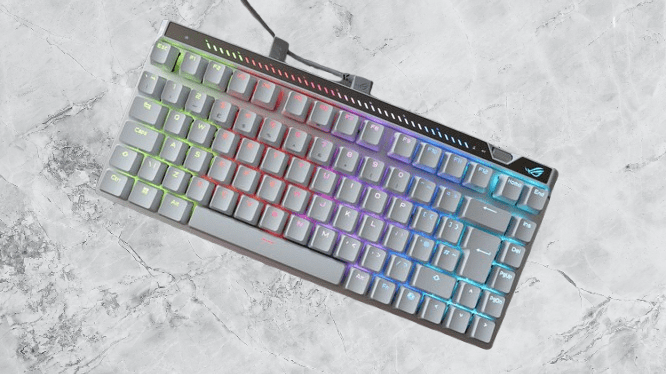
Asus went with a noticeably different design this time around compared to older Falchion keyboards. The switch to a 75% layout is the biggest change, bringing back a function row and a single-column nav cluster that the brand’s usual 65% layout skipped.
You end up with more functionality than you’d expect, and the chassis barely grows to fit it. That’s why 75% layouts tend to be my personal preference over 65% ones.
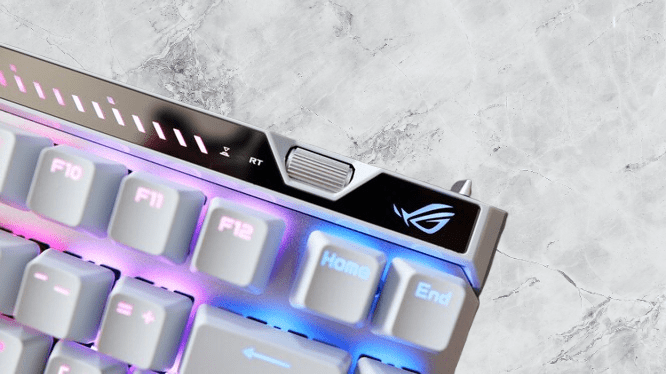
Asus didn’t touch the parts that make a Falchion a Falchion, though. The touch bar across the top is still here, and so is the roller in the top right corner. Both can be reprogrammed through the software for different functions.
You may also like: Best Acoustic Keyboards in 2026: Top Picks for That Perfect Thock Sound
That roller deserves a mention on its own. By default, it handles fine-tuning for actuation point and rapid trigger sensitivity, and you don’t need to open any software to use it. Adjustments happen right there on the keyboard. There’s also a physical toggle on the right side that turns rapid trigger on or off instantly, no menus involved.
Build quality is where this keyboard really shows its strength. Asus kept its usual mix of a plastic base and a metal top plate for durability. A full metal chassis would have felt more appropriate at this price point, and some competitors already do that, but there’s zero deck flex here, so the current approach still gets the job done.
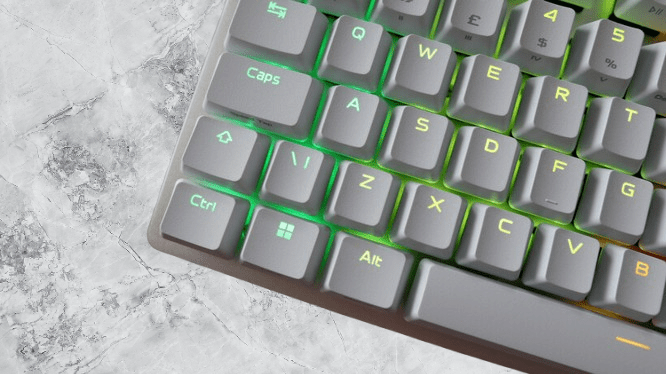
The keycaps add another point in its favor. They’re doubleshot PBT, which holds up much better over time than the ABS plastic still common on most keyboards, gaming or otherwise. PBT resists shine and wear far longer, making it the smarter pick if you want this keyboard to still look good years down the line.
Asus ROG Falchion Ace 75 HE Performance
The biggest upgrade is hidden inside the switches themselves. Asus ditched the older V1 HE switches for new HFX V2s, and the difference shows. Travel distance shrinks from 4mm down to 3.5mm, and that half millimeter is more noticeable in practice than the number suggests.
The magnet inside is also bigger now, which allows for finer customization, down to 0.01mm increments when setting your actuation or reset point.
Quick explanation for anyone new to Hall-effect switches: because the actuation point is adjustable, you get to choose exactly where in the keystroke an input registers. Set it high on the travel for fast, responsive inputs, useful for movement or reloading in shooters. Set it low if you’d rather avoid accidental key presses altogether.
You may also like: Cherry XTRFY K63W Pro Compact: UWB Wireless Gaming Keyboard
Actuation force dropped too, down to 32g from 40g on the original switches. That puts these among the lightest Hall-effect switches on the market right now, and combined with the shorter travel, they feel like some of the snappiest switches I’ve used recently.
Asus also switched to a lubricated POM stem, giving these switches a noticeably smooth, slick feel under your fingers, plus a redesigned block stem meant to cut down on wobble and add stability. Five layers of sound dampening sit inside the case to kill off rattle and ping, and the result is genuinely impressive acoustics.
Asus also lists this keyboard as hotswappable, meaning you can technically swap switches without picking up a soldering iron. The brand doesn’t spell out exactly which switches are compatible beyond its own HFX V2 and V2X models (the X version drops actuation force even further to 30g and adds an X-style stabilizer for extra wobble reduction).
Still, having hotswap support on a Hall-effect keyboard at all is pretty rare, since most HE boards lock you into their own switches rather than letting you drop in standard three- or five-pin MX-style ones.
There’s also Speed Tap on board, Asus’s version of SOCD-style strafing tech. In practice, it feels more like a checkbox on the spec sheet than something you’d actually want turned on for ranked play, since most competitive games flag it and hand out bans if they catch you using it.
You may also like: Best Mechanical Keyboards for Gaming and Work in 2026
Put together, all of this makes the ROG Falchion Ace 75 HE a genuinely strong gaming keyboard, with sharp, responsive inputs and rapid trigger sensitivity you can push pretty far. I ran it through my usual Counter-Strike 2 sessions and came away impressed with how fast movement and weapon switching felt.
This is a fully wired keyboard, which means a stable, low-latency connection and zero worrying about battery life.
You also get 8000Hz polling, well above what most standard gaming keyboards offer. That’s not something the average player will notice much difference from, but for the competitive crowd this board is built for, where every fraction of a second matters, it’s a meaningful addition.
Asus ROG Falchion Ace 75 HE Software and Lighting
With the Falchion Ace 75 HE, Asus finally moved away from Armoury Crate, a suite I never particularly liked, and replaced it with Gear Link, a browser-based alternative instead.
Running entirely in the browser makes it feel noticeably lighter and quicker to move around in. The feature set holds up well too, covering actuation and reset point tuning, rapid trigger settings, and deeper options like dynamic keystroke and mod tap for anyone who wants to fine-tune their inputs down to the smallest detail.
You may also like: Ducky OK-M-98 Review: Budget Mechanical Keyboard Done Right
RGB lighting is fully customizable here as well, and Gear Link also controls how the touch bar and roller behave, so you can assign them to whatever fits your setup best, whether that’s media controls, actuation adjustments, or custom macros. It’s genuinely enjoyable software to use, which honestly hasn’t always been true of Asus peripherals in the past.
Asus ROG Falchion Ace 75 HE Verdict
The Asus ROG Falchion Ace 75 HE lands as a genuinely excellent Hall-effect gaming keyboard. Sharper switches, a much stronger software suite, and a smarter, more functional layout all combine to make it a real step up from earlier Falchion models. It’s a great pick overall, though the premium price tag makes it worth checking cheaper Hall-effect competitors first before you commit.
Pros |
Cons |
| Snappy HFX V2 switches | Very expensive |
| Lightweight and functional software | Some may prefer a full metal build |
| Much better layout for productivity and gaming |
Final Thoughts
The Asus ROG Falchion Ace 75 HE turns out to be an excellent Hall-effect gaming keyboard overall, with sharper switches, much stronger software, and a layout that’s genuinely smarter and more useful than what came before it in the Falchion line. It’s a strong pick on the whole, though the premium price tag means it’s worth checking out cheaper Hall-effect rivals before committing.
And there’s no shortage of those rivals at this price point. The Wooting 60HE+ gives up some layout convenience in exchange for a machined aluminum chassis and a wider range of switch options.
The Sony Inzone KBD-H75 takes a similar path and matches this Asus board in size, though its software falls short by comparison, trading the extra features for raw speed and performance instead. The SteelSeries Apex Pro Mini Gen 3 splits the difference, packing fast switches into a smaller 60% layout.
Where Asus runs into trouble is price. It costs more than other Hall-effect keyboards offering comparable performance and build quality. But if that price doesn’t scare you off, this is a genuinely great gaming keyboard to own.