Microsoft just rolled out a small tweak to Windows 11, and honestly, it’s one I have been hoping for. The full-screen OneDrive backup prompt now shows a new “Opt out of backup” button. My desktop is almost 4 years old, and it nags me to turn on backup every few days without fail.
Before this change, the prompt only gave you two choices: enable backup, or click “Remind me in 3 days.” Even during Windows setup itself, your options were limited to “Continue” or “Skip for now.”
There was no real way to say no for good. That’s changing now. Windows 11 finally lets you opt out of OneDrive backup directly, instead of just delaying the request over and over.
Opt-Out Button for OneDrive Backup is finally here
Windows Latest picked up on this first. The new opt-out button is showing up on regular, stable versions of Windows 11, not some beta or preview build, and it looks like it’s built to shut the backup prompt down for good. The report says it appeared on two separate machines running Windows 11 25H2.
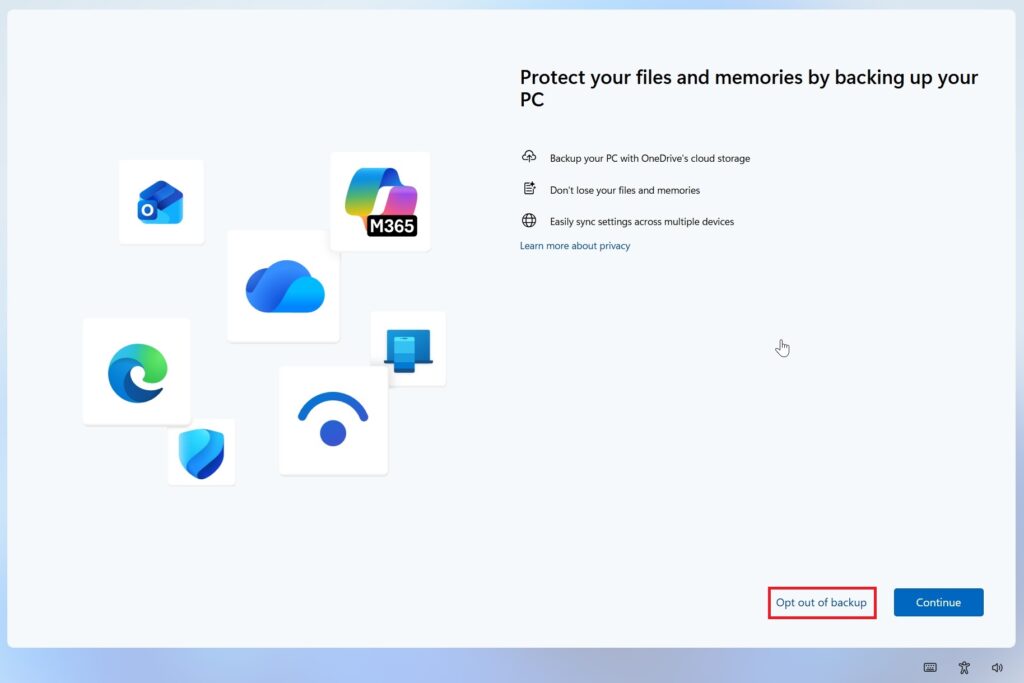
Before this, hitting the “remind me later” option didn’t actually fix anything. Windows would just turn around and show you the same OneDrive prompt again down the road, so you would end up stuck in a loop, pushing off something you never planned on turning on in the first place.
You may also like: Microsoft Copilot Suggested Rename Coming to OneDrive
To be fair, OneDrive backup isn’t useless. You get real advantages, like your files being backed up to the cloud and protected if something goes wrong with your PC. But most people have wanted a clean way to say no, and that request isn’t new.
This is a fix that should have shown up a long time ago. Part of the problem is that OneDrive tends to hook itself into core Windows folders like Documents and Desktop, and that can cause real headaches, especially for PC games that save their settings files inside the Documents folder.
Windows 11 is getting better with new updates
This update fits into a bigger effort Microsoft has been making lately to clean up the Windows experience. On the company’s last earnings call, Satya Nadella said Windows work is still focused on improving quality and getting the basics right.
On top of that, Microsoft has also been pulling back on how much Copilot shows up throughout the system, since it had been popping up in nearly every corner of Windows.
One thing to keep in mind: Microsoft hasn’t said when this button will roll out to everyone. So don’t be surprised if it takes a while to show up on your PC.