If you work in Word, Excel, or PowerPoint, you have likely seen that floating Copilot button sit at the bottom-right corner of your screen. It has been sitting there since December 2025, and for many users, it gets in the way more than it helps.
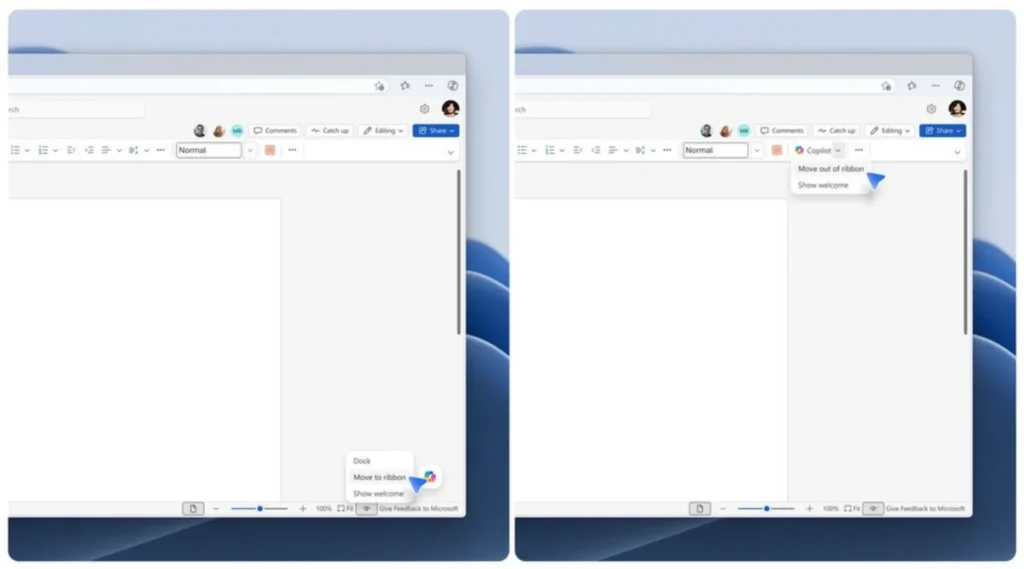
Microsoft is now addressing that. Starting the last week of May 2026, an update will let you move the button back to the ribbon, where it fits more naturally with the rest of your tools.
Reason why Microsoft added the floating Copilot button
The reason comes down to usage numbers. Only about 3.3% of Microsoft 365 users actually pay for Copilot, and that figure has stayed well below what Microsoft had hoped for.
To get more people engaging with the feature, Microsoft introduced what it calls the Copilot Dynamic Action Button, or DAB, and quietly pushed it out to all users by May 2026.
You may also like: Microsoft Copilot for Windows Gets a Major Update: Here’s What’s New
The thinking behind it was simple: as it put Copilot in front of more people, more people would use it. But it also sparked a flood of complaints. Excel users had it worst. The button floated right over spreadsheet cells, sitting on top of actual data with no simple way to get rid of it.
How to move the Copilot button on your screen
When the update arrives, moving the button is simple. Just right-click the Copilot icon and select the option to place it back in the ribbon. Microsoft is keeping all three placement options available, so you can choose between the floating button, the docked version, or the ribbon spot depending on what works best for your workflow.
You may also like: Microsoft Scales Back Copilot Across Windows 11 Apps and Features
Katie Kivett, partner group product manager at Microsoft, acknowledged that users were frustrated and confirmed the company is making near-term changes while working on a more permanent fix.
This is not the first time Microsoft has walked something back with Copilot. About a month ago, it started removing Copilot buttons from several Windows 11 apps after users pushed back in a similar way.
You may also like: Adobe Acrobat Now Lets You Edit PDFs in WhatsApp
A pattern is forming: Microsoft keeps placing Copilot where people did not ask for it, users complain, and Microsoft quietly scales it down. Visibility and usefulness are not the same thing, and that distinction seems to be sinking in slowly.