Google barely wrapped up renaming NotebookLM, and it’s already tackling one of the real pain points that comes with a growing research library.
Collections are now rolling out to everyone using Gemini Notebook. The feature lets you group related notebooks together while still keeping everything visible under My Notebooks. Your dashboard gets some actual structure, and you don’t have to tear apart the library you’ve already built to get it.
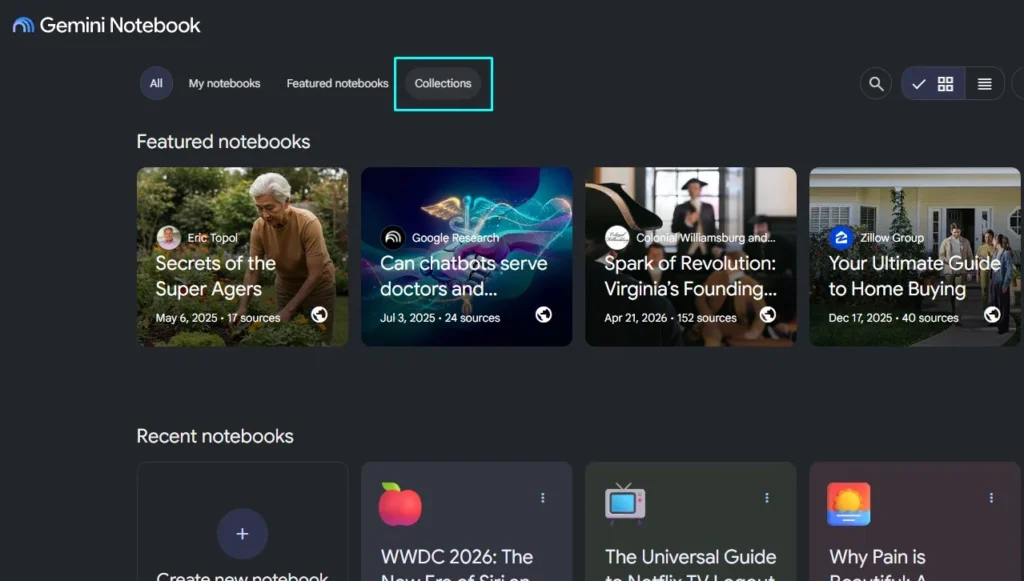
This timing isn’t random. Google’s tying the tool formerly known as NotebookLM more tightly into Gemini and Google Search, turning what used to be a standalone research app into something you can carry with you across more of Google’s AI products.
What differentiates Gemini Notebook Collections from folders
One notebook can live inside more than one Collection at the same time. So say you’ve got a research project for work; it can sit under a work-related collection and a broader topic collection at once, no need to duplicate it or pick just one home for it.
That makes Collections work more like labels or playlists than actual folders. And if something doesn’t need sorting, you can just leave it alone under My Notebooks, no forced organizing.
You may also like: Microsoft Edge Collections Shutdown: What You Need to Know
The whole setup stays simple on purpose. It gives a crowded dashboard some room to breathe without handing you a filing system you now have to maintain forever.
The importance of Organization Collections
Notebooks can now show up right inside the Gemini app itself. You can work with whatever you’ve uploaded alongside your past chats and any custom instructions you’ve set up. Any changes sync back to the standalone Gemini Notebook service too, so the same project follows you across both.
You may also like: Gemini App for Mac Adds Dictation and Screen-Aware AI
Google’s also folding Gemini Notebook into Search. And with notebooks now showing up in more places and piling up more information than before, leaving them all dumped into one crowded library would get old fast.
Collections step in to add a bit of order before that expansion turns the dashboard into a mess to navigate.
Gemini Notebook Adds Collections
There’s no word yet on nested Collections, automatic sorting, or anything close to a full file-management system. You can group notebooks together, but you can’t build out a detailed hierarchy, and you can’t hand the cleanup job over to Gemini either.
You may also like: Kindle Scribe Colorsoft Fig Color Launches January 28: Price, Features, and Where to Buy
That keeps Collections focused on one narrow task. They split a growing library into useful groups without duplicating any projects or pulling anything off the main dashboard.
If you’re already staring at a messy pile of notebooks, this might be all you need. But if you’re hoping for the control that comes with a real folder system, the new setup will still feel pretty basic.