Adobe just made dealing with PDFs in WhatsApp a lot less painful. Its new Acrobat integration lets you open a PDF and start editing it right inside the chat, no downloads or app switching required.
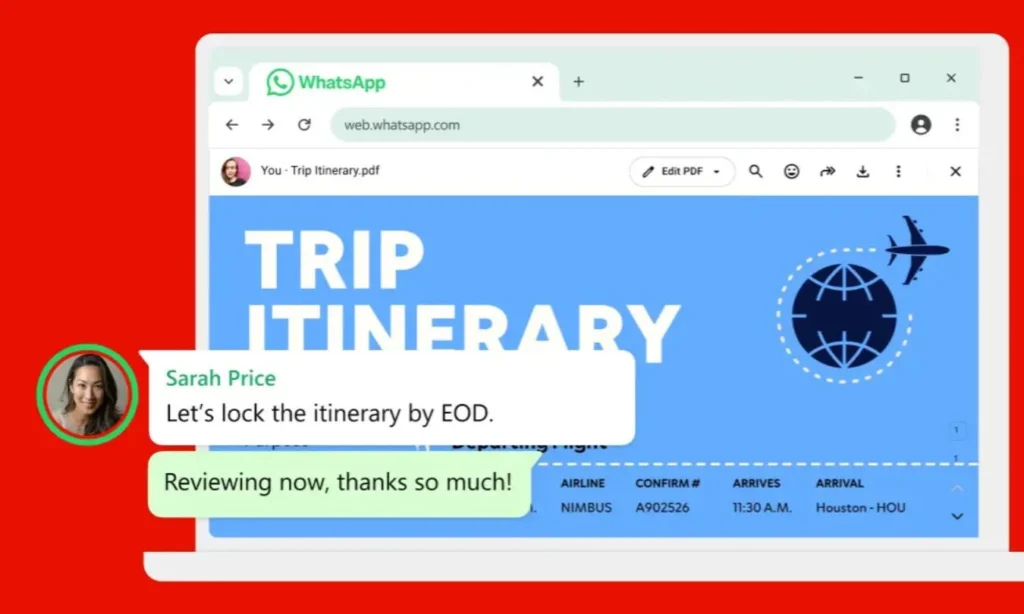
The feature works today through WhatsApp Web and the Windows app. One thing to know upfront: this isn’t full editing power. You can review a document and add annotations, but you can’t change the original text or rework the layout.
Edit PDFs in WhatsApp
PDFs now pop up right inside your WhatsApp chat. You can scroll through the pages and zoom in whenever the text gets too small to read comfortably.
You may also like: WhatsApp Web Now Supports Group Voice and Video Calls
Acrobat brings its basic annotation tools along for the ride too. Highlight a clause in a contract, cross out a line that’s no longer accurate, or just draw notes directly on the page before sending your feedback back through the chat.
That cuts out the annoying cycle of downloading a file, switching to another app, marking it up, then jumping back to WhatsApp. Just keep in mind that anything beyond quick markup still means pulling out a full PDF editor.
Edit PDFs in WhatsApp: How Secure is this?
Adobe confirms that password-protected PDFs stay locked down the same way when you open them through WhatsApp. And if you’re sharing files in a personal chat, WhatsApp’s end-to-end encryption still covers them.
So the convenience doesn’t come at the cost of security. Nothing about the file or the conversation loses its existing protection. That matters when you’re going over a contract or invoice with details you’d rather keep away from prying eyes.
Edit PDFs in WhatsApp Feature
Adobe is clearly going after people who already send documents back and forth on WhatsApp. Think of a small business reviewing an invoice in the same thread where they’re discussing payment, or a student marking up an assignment without hopping between apps every few minutes.
You can also read: You Can Now Move the Copilot Button Back to the Ribbon
This also fits into a bigger pattern for Adobe: bringing Acrobat tools into the platforms people already spend their time on. WhatsApp now joins a list that includes Chrome, Microsoft 365, ChatGPT, and Workday.
Adobe’s long-term strategy is a big swing, but the payoff right now is refreshingly simple. If you just need to glance over a PDF and jot a few notes, WhatsApp users on the web or Windows can handle it without ever leaving the chat.