
Whoop and Apple Watch both help you watch your health, track workouts and understand how your body performs. Choosing between them is not simple.
Does Whoop do anything that Apple does not? If you own one of the best iPhones, does that make an Apple Watch the better fit for you?
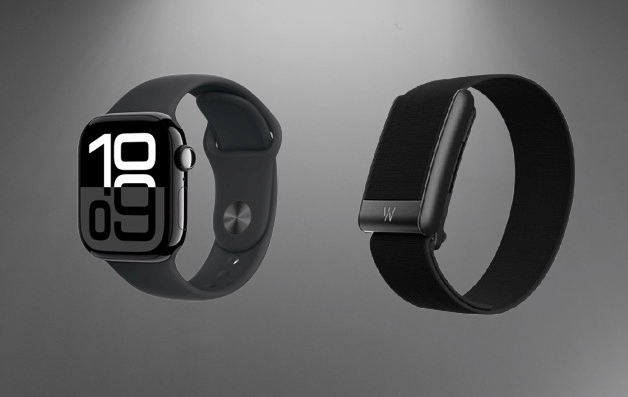
We have reviewed the Whoop MG, the Apple Watch Series 12 and the Apple Watch Ultra 4, so we can help you decide. Below, we compare the specs and features of Whoop and Apple Watch, so you can pick the one that suits you best.
Whoop vs Apple Watch: Price, Subscriptions and Availability
Whoop and Apple Watch are sold very differently. Whoop works only as a subscription. You pay an annual membership fee to use the app and its features. The strap comes with the membership at no extra cost. It is either the Whoop 5.0 or the Whoop MG, and you can pay extra for other band designs.
You can pick from three memberships: One, Peak and Life. One is the cheapest. It starts at $169 for 12 months and includes a Whoop 5.0, a charger, and a Jet Black CoreKnit band. It has no free trial.
You may also like: Whoop vs Garmin Smartwatch: Screen, GPS, and Tracking Accuracy Compared
Peak is the mid-range plan, starting at $229. It also comes with a Whoop 5.0, but you get a wireless PowerPack that charges the strap while you wear it, plus an Obsidian SuperKnit band. Peak adds features such as Healthspan with Whoop age, along with Stress and Health monitors.
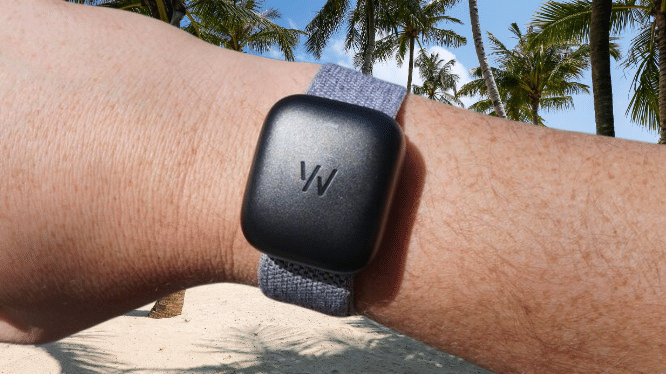
Life is the top plan at $349 per year. It comes with the Whoop MG strap, which can spot irregular heart rhythms, record an ECG, and give you blood pressure insights.
Right now, Whoop offers a one-month free trial if you want to test it first. The trial includes a certified pre-owned Whoop 5.0, one month of Peak membership, a basic wired charger, and a new SuperKnit band. It starts on Peak, but you can switch to Life or drop down to One before the trial ends.
This is a good way to try Whoop before you commit to a costly plan. You must enter valid payment details at checkout. The membership renews on a rolling basis, so cancel it if you do not want to keep going.
Buying an Apple Watch is simpler. You can add subscriptions, such as Apple’s Fitness Plus or third-party tools, but none are required. The watch works without any plan.
You may also like: Whoop vs Apple Watch: Full Comparison 2026
The Apple Watch SE 3 is the cheapest model, starting at $249. The Apple Watch Series 12 is the mid-range option, starting at $399. The Apple Watch Ultra 4 sits at the top of the range from $799.
Whoop vs Apple Watch: Which one should you buy?
Before the details, here are the main differences between Whoop and Apple Watch.
Whoop is a pure fitness tracker. It has no screen, so it does not work like a normal smartwatch.
You cannot use Google Pay or Apple Pay on it. You will not get phone notifications or play music from it either. Its job is to track your health stats and workouts, then give you advice based on your goals.
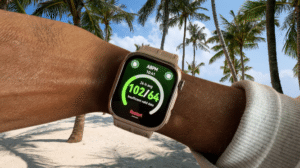
The Apple Watch does both jobs. It works as an extension of your iPhone, so you can get notifications, take calls, play audio, and pay with Apple Pay. It also tracks your health and workouts.
This is only an overview, and other differences may sway your choice. Still, if you use an iPhone and want a smartwatch that lets you leave your phone at home, the Apple Watch is the better pick. If you mainly want a health and fitness tracker and can live without smartwatch tools, Whoop is an easy choice.
Whoop vs Apple Watch: Design and Comfort
The biggest design difference is the screen. Whoop has none. The brand says this lets you focus on your health without distractions. The design will not suit everyone, but we found Whoop very good at keeping us motivated.
You may also like: Amazfit T-Rex Ultra 2 Launches with 30-Day Battery Life and Offline Maps for $549
Every Whoop strap also works with an external PowerPack. It slides onto the strap while you wear it, so you rarely need to take the band off to charge. That gives you a more complete picture of your health data. The cheapest One membership does not include the PowerPack, so you would need to buy it separately.
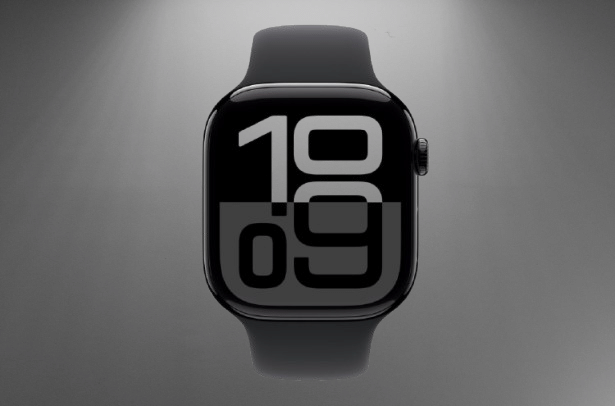
Every Apple Watch has a square touchscreen on top of the strap. Screen size depends on the model. The Apple Watch Series 12 comes in 42mm or 46mm. The Ultra 4 comes only in 49mm.
The display type also varies. The Apple Watch Series 12 and Ultra 4 both use wide-angle OLED panels with always-on displays. The Ultra 4 is brighter, with a peak of 3000 nits against 2000 nits on the Series 12.
The cheaper Apple Watch SE 3 also has an OLED panel, with a peak brightness of 1000 nits. It is the first of Apple’s budget watches to offer an always-on display, and that is a welcome addition.
Whoop vs Apple Watch: Health and Recovery tracking
All Whoop straps carry sensors that track heart rate variability (HRV), sleep and blood oxygen. The exact features depend on the model and membership you choose.
Both the Whoop 5.0 and the Whoop MG track sleep and recovery. Only the MG can take an ECG reading.
You may also like: Galaxy Watch 8 Hits $218.49, Lowest Price Since Launch
The Peak and Life memberships add Healthspan, which shows how your daily habits affect your health.
It gives you a Whoop age, which measures your physiological age rather than your actual age. It also shows a “Pace of Aging” figure, which tells you how fast that age is changing. You view all of your data in the Whoop app on iOS or Android.
Apple Watches cover similar ground. Every model tracks sleep, heart rate, and respiratory rate as standard. The more expensive Series 12 and Ultra 4 add a few extra features.
Both use Apple’s new Health Sensing System. It includes new optical and electrical heart sensors that Apple says give the most accurate heart rate readings in a wearable. The green LEDs in their heart sensors also measure your heart rate every five seconds.
The Series 12 and Ultra 4 can also monitor blood oxygen and take an ECG. They add Apple’s new readiness feature too. It looks at your recent activity, training load, vitals and sleep, then gives you a score from 0 to 10. A higher score means you can push harder in a workout.
Whoop has offered something similar for a long time with its Recovery percentage. It scores you from 0 to 100%. A higher number means you can push harder that day.
Whoop vs Apple Watch: Fitness and Workout Tracking
You can log workouts by hand in the Whoop app. The strap also detects activity on its own. It reads your heart rate, movement patterns and strain to work out when you started exercising.
The feature is mostly accurate, but you may need to fix some details after the workout is processed. It might label a Pilates session as yoga, for example.
You may also like: Amazfit Watches Get Runna App Support and Zepp App Redesign
Whoop has no built-in GPS. To track outdoor runs, rides or walks, you need to keep your phone nearby. Every Apple Watch has some form of GPS, and the Ultra 4 adds dual-frequency GPS for more precise tracking.
Apple also leads on step counts. The Series 12 and Ultra 4 run on the S11 chip, and Apple says they give the most accurate step tracking of any smartwatch.
Both options work with third-party apps. On an Apple Watch, you can install workout apps such as Strava and Peloton and follow your progress on the watch. Whoop connects to Strava too, and it shares your activities there automatically.
Apple also offers Fitness Plus, which gives you hundreds of guided workouts. You do not have to subscribe to use the watch.
Whoop vs Apple Watch: Features and Notifications
Whoop is not a smartwatch. It is built to be a fitness tracker. If you want to read notifications, take calls or pay with your digital wallet on the go, Whoop will not do that for you.
You may also like: Samsung Galaxy Watch 9 Review: Refined Health Tracking, Weak Battery
The Apple Watch works as an extension of your iPhone. You need a compatible iPhone to set one up, since it will not work without one. Once the two are paired, you can get notifications, use Siri and pay with Apple Pay from your wrist.
Whoop vs Apple Watch: Battery Life and Charging
Whoop beats every Apple Watch on battery life by a wide margin. Apple has made some gains. The Apple Watch Series 12 lasts up to 24 hours with normal use, and the Ultra 4 claims up to 50 hours. The Whoop 5.0 and the Whoop MG both promise more than 14 days on one charge.
Low power mode stretches the Series 12 and Ultra 4 a little further, but it only adds a few extra hours.
You may also like: Moto Watch brings Polar’s pro-tier fitness perks
Whoop also lets you charge without taking the strap off. The wireless PowerPack clips onto the top of the strap and charges it while you wear it.
Both the PowerPack and the strap are waterproof, so in theory you never have to remove the device. That means your health tracking never has a gap. It may sound extreme, but serious athletes will appreciate it.
Whoop vs Apple Watch: Verdict
Whoop and Apple Watch each have strengths, and each suits a different person, so there is no clear overall winner.
If you cannot decide, ask yourself three things. Do you want a full smartwatch or only a fitness tracker? Do you need a battery that lasts several days? Which health metrics matter most to you?
Choose the Apple Watch if you have an iPhone and want an all-in-one smartwatch that still tracks your health and fitness well. It also has no subscription. You pay for the watch and nothing more.
Choose Whoop if you want a device built only to track health and fitness, and you accept paying an annual fee to unlock its features.