Despite plenty of negative press and real safety concerns from the public, Meta pushed ahead and unveiled its third-generation Ray-Ban Meta Glasses.
According to Meta, this new pair brings longer battery life, new photography features, and new celebrity partnerships to the lineup. The real question is whether any of that addresses the safety concerns, or the general unease people have felt about these glasses.
I spent a morning testing the Ray-Ban Meta Glasses (Gen 3) for a couple of weeks. It wasn’t much time, but here are my first impressions of this divisive piece of tech.
Ray-Ban Meta Glasses Price and Availability
The Ray-Ban Meta Glasses (Gen 3) are available to buy right now, starting at £409/€449, a fairly steep price. That marks a notable jump from last year’s Gen 2 glasses, though it’s not entirely unexpected given how many products have seen price increases this year, big thanks to the ongoing RAM shortage.
Ray-Ban Meta Glasses Design
Meta deserves credit for variety; that much is clear. Alongside familiar staples like the Ray-Ban Wayfarer, Meta added Xena and Aviator styles to this third-generation lineup.
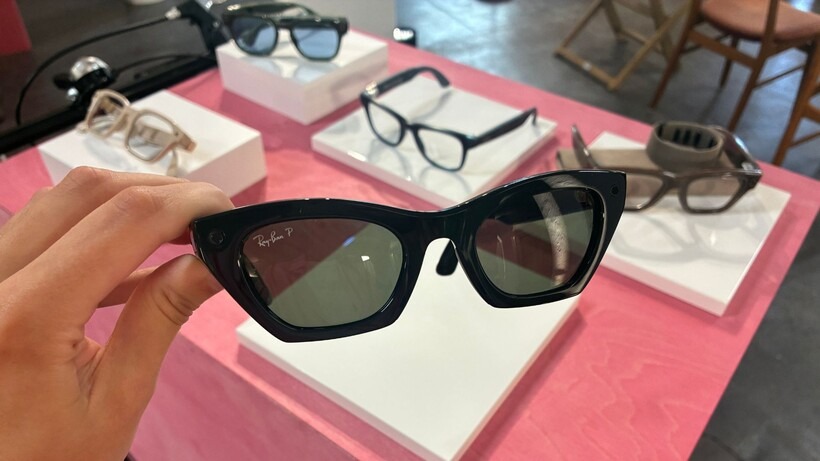
Every design looks genuinely good, and as someone who wears glasses regularly, I appreciate having options beyond a single silhouette. I spent most of my testing time in the Wayfarers, and they felt easy, comfortable, and natural on my face the whole time. They never once threatened to slide off, and they never felt uncomfortably tight either.
You may also like: Meta’s New AI Smart Glasses Are Finally Built for Prescription Wearers
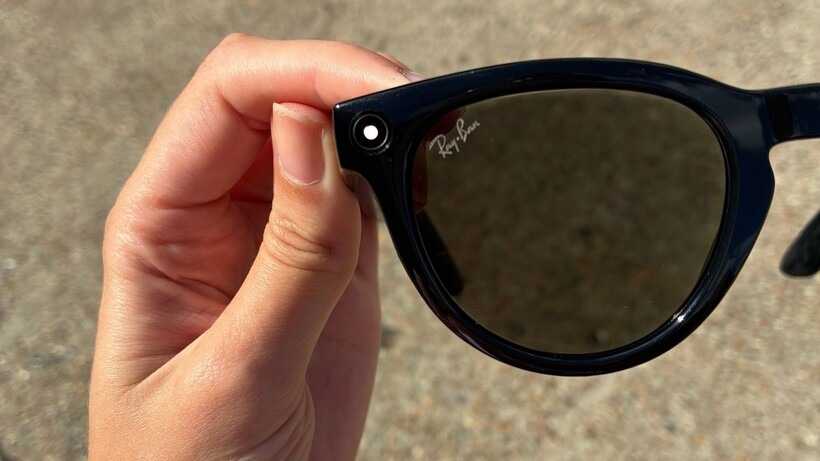
You will spot the Ray-Ban branding, depending on your chosen style, along with that camera lens people have been talking about. When you’re not actively shooting photos or video, the lens blends in well enough that it’s easy to forget it’s even there.
Control-wise, nothing’s changed drastically from earlier models. You can use your voice, your paired phone, or the touchpad built into the legs. That touchpad takes some getting used to, though; I kept accidentally starting or stopping audio just from adjusting the glasses on my face. There’s a new customizable action button this time too, which you can program as a shortcut to whatever feature you use most.
Ray-Ban Meta Glasses Features
The Gen 3 glasses bring a handful of new features, and Hearing Enhancement stands out as the most genuinely useful of the bunch.
Similar to what Apple does with the AirPods Pro 3, the Meta Glasses (Gen 3) now support people with mild to moderate hearing loss, functioning as a makeshift hearing aid. Worth noting, though, Meta hasn’t confirmed whether this meets medical-grade standards yet.
Meta also built its AI voice assistant, Muse, directly into the glasses. Like last year, Muse handles music playback, photo capture, recording, and live translation, all through simple voice commands.
My experience with live translation worked well overall, translating a menu into English accurately, though it did read every single item aloud, which felt a bit much in the moment. That’s probably on me for not giving a more focused prompt.
You may also like: Meta’s Camera-Free Luna Glasses: What to Know Before Connect
Muse also picked up quiet, under-the-breath questions without trouble and generally gave accurate answers. That said, it did fumble a couple of times, giving me the wrong answer even after I rephrased my question.
There’s also a Meta AI feature that lets you “restyle” images, and it worked reasonably well in testing, though I doubt most people will reach for it often. You essentially look at something, ask Meta to restyle it, and the result lands in the Meta app afterward.
Finally, Meta claims up to nine hours of battery life on this generation, an improvement over last year’s model. Since I only had a morning with the glasses, I can’t confirm whether that number holds up in practice yet.
Ray-Ban Meta Glasses Camera
The camera is such a small piece of hardware, yet it’s generated an outsized amount of controversy. I will get into the new camera features shortly, but first, let’s talk about what Meta’s actually done to make it safer.
An LED lights up whenever you’re using the camera, letting people around you know it’s active. During recording, it either flashes continuously or stays on good, and taking a photo triggers a quick flash.
At the event I attended, Meta called it “a light you can’t miss,” and I have to disagree. The flashing during recording catches the eye somewhat, but it’s still subtle enough to miss entirely, especially in bright sunlight or if someone simply isn’t paying close attention.
You may also like: Nothing Smart Glasses 2027: What We Know So Far
If you already know about smart glasses and know exactly where to look, spotting the light gets easier. The problem is that most people probably don’t know where to look in the first place.
The Gen 3 glasses also carry tamper protection, a feature Meta introduced back in July. Try covering the LED, and the glasses shut down. Even covering it midway through a recording stops the glasses from working temporarily.
Setting safety aside, the camera picks up landscape mode for 16:9 shots, which captures scenes much closer to how you’re actually seeing them and results in a more immersive shot overall. Dolby Atmos integration is new too, giving recorded video noticeably richer sound than before.
I didn’t get to test this myself with my own footage, but Meta showed examples comparing standard stereo against Dolby Atmos recordings, and the difference was obvious.
Final Thoughts
With new design options, hearing enhancement for people dealing with mild to moderate hearing loss, and support for landscape shooting plus Dolby Atmos, the Meta Glasses (Gen 3) genuinely improve on last year’s model. If you create content and want hands-free footage that’s actually worth using, these glasses make a solid case for themselves.
That said, the privacy concerns surrounding the Meta Glasses (Gen 3) aren’t going anywhere. Yes, the recording LED is bright and noticeable, but I suspect that’s partly because I already knew to look for it. Anyone unfamiliar with smart glasses could easily miss that light entirely.
One more thing, and this might just be my own take, but I’m still not convinced by Meta’s AI here. To be fair, I haven’t found any AI voice assistant I reach for regularly yet.
Most of the time, Googling something feels faster than talking to an AI assistant. Maybe spending more time with these glasses would change that, but so far, I haven’t found myself wishing I had them on while out running errands.