Garmin has joined the growing list of wearable brands putting out a screenless fitness tracker. Called the Cirqa, it’s built to track your key metrics and workouts quietly and accurately, without a screen pulling your attention away. But Whoop has led this space for years, and Google’s Fitbit Air just earned a five-star rating. So where does the Garmin Cirqa actually fit into all this?
Garmin Cirqa Full Specs
Garmin Cirqa Design
I’ve said plenty of times that screenless fitness trackers are the first kind that’s actually kept me consistent, so I jumped at the chance to try the Cirqa.
Like the Whoop and Fitbit Air before it, the Cirqa skips the screen entirely, tracking your health data and workouts quietly in the background and syncing everything to its app for you to review later. The thinking here is simple: you get fewer notifications pulling your focus and less temptation to check your stats mid-workout.
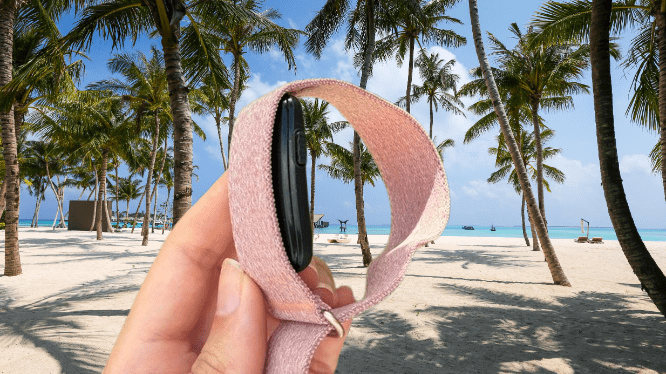
The module holding the battery and sensor, a Gen 4 sensor rather than the newer Gen 5, more on that shortly, sits underneath the fabric strap, with a physical button on the side. That button lets you start tracking a workout instantly without waiting on auto-detection or opening the app. You can only assign one activity to it, but even with that limit, it’s genuinely handy.
You may also like: Best Fitness Trackers 2026: Top Picks Tested and Ranked
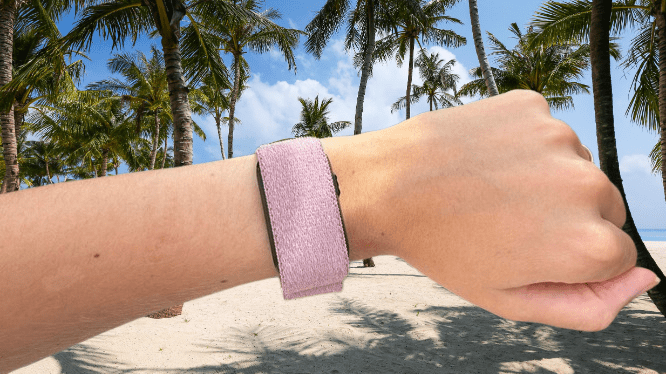
My real issue with the module isn’t the older sensor generation; it’s the fit. It doesn’t sit as flush under the small/medium strap as I’d like. Compared to the Fitbit Air and Whoop, the edges poke out slightly, even though the strap itself is noticeably thicker than the Fitbit Air’s at 24mm. It just doesn’t come across as sleek or low-key as I’d hoped.
On the strap itself, the included fabric band comes in four colors, and it leans sporty. That’s fine during a workout, but it doesn’t blend into everyday outfits particularly well.
This comes down to personal taste, admittedly, but I’d like to see Garmin offer strap options that don’t scream “gym.” Whoop sells sleek leather bands, and the Fitbit Air’s silicone straps look nicer than what comes with the Cirqa.
Garmin Cirqa Features & App
Unlike most Garmin watches, the Cirqa skips built-in GPS in favor of Connected GPS, meaning it pulls location data from your phone rather than tracking it directly. So if you want your running route mapped, your phone needs to come with you.
You may also like: Pixel Watch 5 vs Pixel Watch 4: What’s Actually New
That’s not really a downside for me personally. I bring my phone on runs anyway, for safety, music, and the occasional excuse to stop and photograph a sunset, roughly in that order of importance. But if you’ve gotten used to leaving your phone at home during workouts, this could be a dealbreaker.
That said, the location tracking itself held up well. Routes came through clearly and accurately in the Garmin Connect app. One walk into Canary Wharf did somehow show me wandering into the Thames instead of staying on the path beside it, but I’ve done that same route dozens of times since without a single issue, so I’m chalking that one up as a fluke.
Auto-workout detection works well most of the time. The Cirqa correctly picked up when I started and stopped both walks and runs. It did once decide I was walking while I was actually sitting on a train into London, which was odd, but that felt like a one-off rather than a pattern.
You may also like: Amazfit Active 3 Premium Review: Best Budget Running Watch
One of Garmin’s newer additions is Natural Cycles integration, an MHRA-registered fertility tracking app. It requires its own separate subscription, and it works by monitoring your skin temperature overnight to identify your fertile and non-fertile days, useful whether you’re trying to plan a pregnancy or avoid one.
I’ve used the standalone Natural Cycles band before to track overnight temperature, and even with reminders to put it on before bed, it’s easy to forget, especially on nights when your bedtime shifts around. That’s where the Cirqa makes a real difference. Since I wear it around the clock anyway, there’s no separate step to remember before falling asleep.
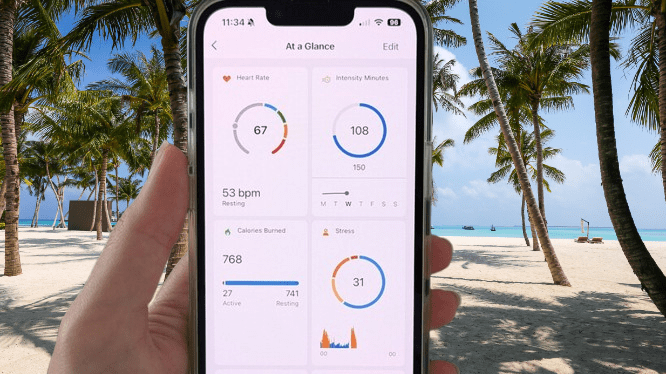
As a screenless tracker, the companion app carries a lot of weight, and Garmin Connect handles that well. Available on iOS and Android, it’s simple to use, with all your health and fitness data clearly organized. The At a Glance section is customizable too, so you can choose exactly which metrics show up front and center.
You may also like: Garmin Forerunner 70 Review: Small Watch, Big Upgrade
Unlike Whoop, you don’t need a subscription to get real use out of the Cirqa. But there is an optional Garmin Connect Plus plan if you want more. It unlocks Active Intelligence, Garmin’s AI feature that offers personalized insights, nutrition tracking, and access to Garmin Coach. That runs $69.99 a year or $6.99 a month, worth considering if Coach and AI insights appeal to you.
Garmin Cirqa Health & Fitness Tracking
Beyond the design, the real reason to consider the Garmin Cirqa comes down to how well it handles health and fitness tracking. The Gen 4 sensor covers heart rate, blood oxygen, stress levels, HRV, VO2 Max, and more.
That said, Garmin has already moved on to a Gen 5 sensor elsewhere in its lineup, which offers better responsiveness along with ECG readings and skin temperature sensing. Garmin’s reasoning for sticking with Gen 4 here comes down to size; the smaller sensor sits more discreetly under the strap than the newer one would.
I get the logic, and I wouldn’t want a bulkier sensor on this device either, but it’s still a bit disappointing to see the older tech here.
You may also like: Samsung Galaxy Watch 8 Classic Drops to $369 at Amazon
Despite that, the tracking held up well against my Whoop MG, which does include ECG. Both devices landed on nearly identical average HRV readings, between 74 and 75.
Sleep tracking is where things get genuinely interesting. Every morning, you get a score out of 100 reflecting how well you slept, along with a breakdown of your sleep stages, restless periods, and how much your Body Battery recovered overnight.
From there, the Sleep Coach tab tells you roughly how much sleep you should be aiming for. The numbers mostly matched what Whoop reported, though I did notice a few small inconsistencies around wake-up times and specific sleep stages.
You may also like: Samsung Galaxy Watch 9 Review: Refined Health Tracking, Weak Battery
Activity tracking is another good point for the Cirqa. Auto-detection worked reliably enough that I stopped bothering to reach for my phone to start a workout manually. Even without built-in GPS, it still pulls distance and location data from your phone’s GPS during auto-detected activities.
Whether you start a workout manually or let auto-detection handle it, you’ll get a GPS map overlay afterward showing your pace, heart rate, and elevation changes throughout the route.
I also tried it during a couple of light yoga sessions, and it gave accurate readings for heart rate and breathing rate. What surprised me was that only one pose got logged automatically. Turns out you’re expected to manually add each pose after the session yourself, which feels like a lot of extra effort for something that should just track on its own.
Training Readiness is also built in, and it gives guidance on how intense your workout should be that day. The score, out of 100, factors in last night’s sleep score, your acute training load, HRV status, and recent stress and sleep patterns.
You may also like: Nothing Smartwatch Leak: Price, Release Date, and Design
Through my testing, the score consistently matched how I actually felt day to day. Whether I actually listened to it and skipped that 10K run anyway is a separate story entirely.
Garmin Cirqa Battery Life
Garmin quotes roughly 10 days of battery life for the Cirqa, putting it right between the Fitbit Air’s 7 days and Whoop’s claimed 14.
Based on my own use, that number holds up. I last charged it 6 days ago, and I’m still sitting at 52%, which suggests it might actually stretch past 10 days and get closer to two weeks.
There’s a Battery Saver mode that could squeeze out even more runtime by turning off heart rate monitoring, auto-activity detection, the manual start function, and pulse oxygen tracking.
Honestly, though, I don’t think most people will need it. Even with every tracking feature switched on, battery life held up well throughout testing.
You may also like: Amazfit T-Rex Ultra 2 Launches with 30-Day Battery Life and Offline Maps for $549
My one wish is for on-wrist charging like Whoop offers, since that’s genuinely convenient. Instead, the Cirqa relies on Garmin’s usual proprietary charging cable, which took a little over an hour to bring it back to full.
Garmin Cirqa Verdict
The Garmin Cirqa gets a lot right, like reliable auto-activity tracking, long battery life, and a screenless design that keeps notifications and mid-workout stat-checking out of the picture. That combination makes it a genuinely good option for anyone who wants low-key monitoring.
Where it stumbles is the sensor module, which is bulkier than it should be, paired with strap options that don’t exactly blend in. Add in a price roughly £100 or $100 higher than the Fitbit Air, and it becomes a slightly tougher sell.
Pros |
Cons |
| Screenless design | Module is large and bulky |
| Up to 10 days of battery life | Strap selection is small |
| Accurate auto-activity tracking | No built-in GPS |
Final Thoughts
The Garmin Cirqa left a good impression on me. Going screenless makes real sense if you want thorough health and fitness data without the pull of checking a screen mid-workout, and Garmin Connect remains one of the most complete, easy-to-use companion apps out there.
Tracking accuracy held up well throughout testing, battery life is genuinely good, and skipping the mandatory subscription instantly makes this more appealing than Whoop for a lot of people. You still get detailed health, sleep, and activity data without an ongoing monthly cost hanging over you, which counts for a lot.
It’s not without flaws, though. The sensor module is bulkier than I’d like, the included straps feel too sporty for regular everyday wear, and skipping GPS could be annoying if you’re someone who likes leaving your phone behind.
It also can’t match the Fitbit Air on price or discretion, and that tracker remains a strong pick if you want something cheaper and screenless.
Still, if you’re already tied into Garmin’s ecosystem, or you just want a capable screenless tracker with good battery life and zero subscription requirement, the Garmin Cirqa is an easy one to recommend.