Google Chrome still holds the top spot as the world’s most used browser, but the competition is closing in. AI-focused browsers like Perplexity Comet and Dia are pushing Google to respond, so Chrome has been rolling out AI features to keep up. Most of those additions are reasonable, but this one crosses a line.
Here is what is happening. Open your file manager and search for a folder named “OptGuideOnDeviceModel”. If it is there, Chrome quietly installed it on your machine without asking. Inside that folder is a file called “weights.bin”. It is roughly 4 GB in size, and it contains Gemini Nano, Google’s on-device AI model.

Chrome used your storage to host its own AI model. No prompt, no permission request, no explanation.
Privacy professional Alexander Hanff caught this using macOS’s filesystem event logs, which record every file the operating system creates or modifies. These are low-level system logs, so there is no way to argue that the data was misread or taken out of context.
You may also like: Google AI Mode Shopping Prices Run Higher, Study Finds
What he found was direct. He created a brand new Chrome profile, did nothing with it, and let a tab sit open. Within 15 minutes, the full 4 GB model had downloaded and installed on its own. No clicks, no prompts, no user action of any kind.
Google Chrome Installs AI Model Without Your Permission
Chrome does not ask. There is no pop-up, no opt-in, no notification. The moment Chrome decides your hardware is capable enough, it downloads the model automatically, even if you have never touched a single AI feature in the browser.
You may also like: Grok Is Coming to CarPlay as AI Assistants Pile In
It gets worse. If you find the file and delete it, Chrome downloads it again the next time it runs. Hanff described it clearly that your deletion is not treated as a decision. Chrome sees it as a temporary error to fix, not an instruction to follow.
There is also a disconnect worth pointing out. The most visible AI feature in Chrome, the “AI Mode” button that appears in the address bar, does not even use this local model. That feature sends your queries directly to Google’s Gemini servers.
You may also like: Google I/O 2026: Gemini AI, Android 17 and What to Expect
The 4 GB file sitting on your drive powers smaller, less obvious features like “Help me write” in text fields and on-device scam detection. So Chrome is taking up a significant chunk of your storage for features most users will never knowingly use.
The impact and how to disable it?
Hanff points out that this goes beyond a personal storage issue. He estimates that if 500 million devices received this download, the bandwidth alone would produce around 30,000 tonnes of CO2. That is roughly the equivalent of 6,500 cars running for a full year, and that figure only covers the download itself, not what happens when the model actually runs.
You may also like: Acer Chromebook 311 and Spin 311 Specs, Durability, Price, and Release Date
Google should require user confirmation before any of this happens. That is a basic standard for software that consumes this much storage and bandwidth.
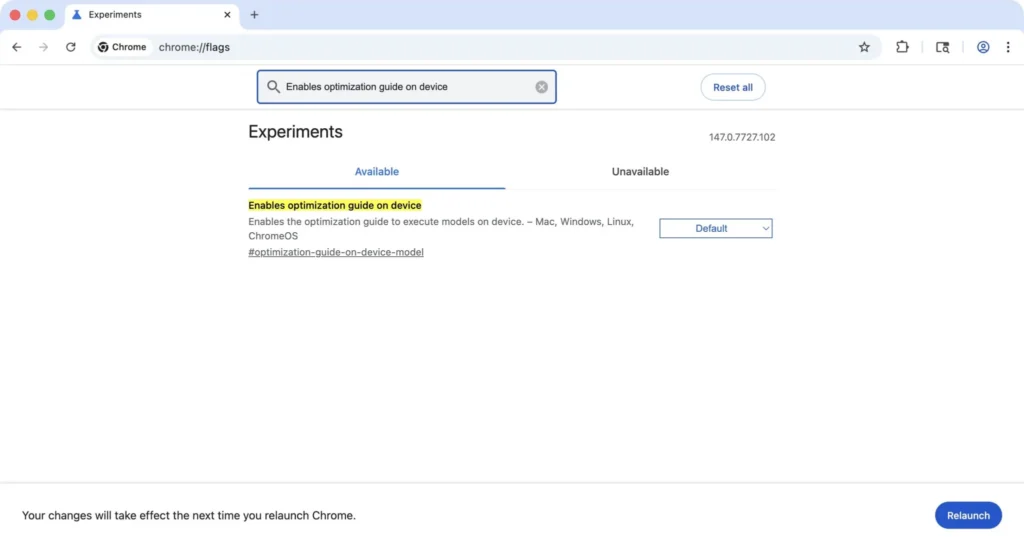
For now, you can stop it yourself. Type “chrome://flags” in your address bar and search for “Enables optimization guide on device”. Turn it off. It takes more steps than it should for something Chrome installed without telling you, but it does work.