The XGIMI Mogo 4 is a new category of projectors designed to make home projection more enjoyable. Like Samsung’s Freestyle series, this projector targets family and group experiences rather than home cinema purists.
The Mogo 3 Pro worked well, but it lacked a built-in battery. You can’t call a projector portable when it needs to stay plugged in. The Mogo 4 fixes that problem by adding a battery. But does this pico projector offer anything else new, or is it just the same device with a battery added?
Pros | Cons |
| Portable design | Not the brightest for HDR |
| Rich, appealing colours | Missing some HDR support |
| Solid sound | iPlayer and Channel 4 apps still AWOL |
| Built-in battery | |
| HDMI input |
XGIMI Mogo 4 Design
The Mogo 4 looks almost identical to the Mogo 3 Pro, just with a more orange color. The design still resembles a coffee thermos with its slim, cone shape and integrated stand.
The Mogo 4 tilts through a full 360-degree range. The Mogo 3 Pro only tilted 130 degrees. You can point this projector at the ceiling, the floor, or any angle in between. The positioning options cover every possible direction.
You can carry it around your house or take it outside easily. It weighs 1.3kg compared to the Mogo 3 Pro’s 1.1kg, so it’s slightly heavier but still portable. The package includes a small infrared remote control that switches the projector to Ambient Colour mode.
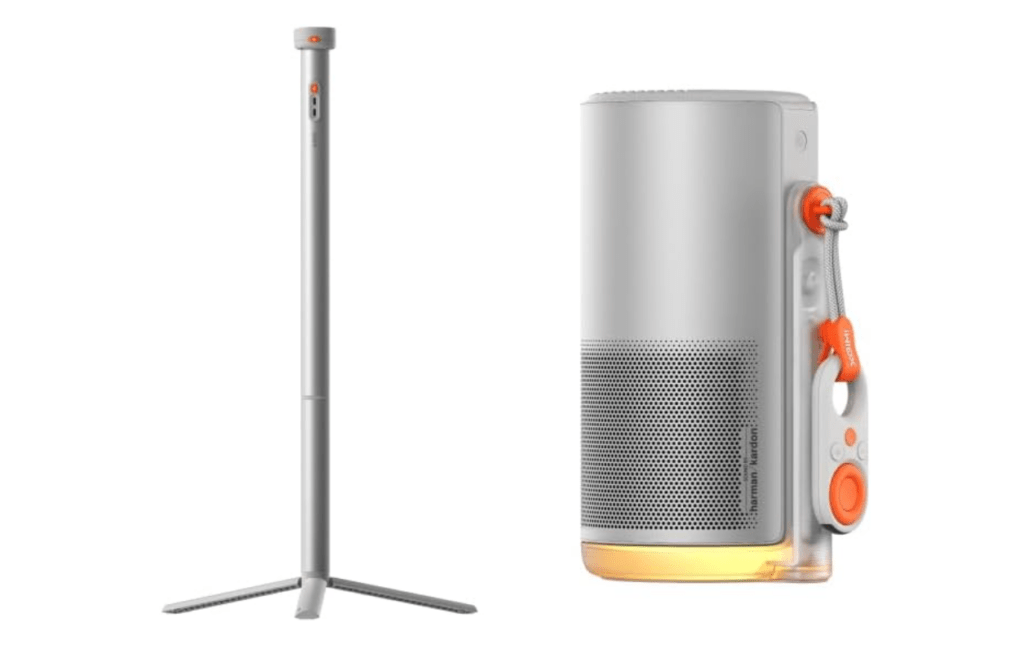
XGIMI doesn’t list an IP rating for water resistance. So keep this projector dry. The Mogo 4 has a built-in battery, making it truly portable. The Mogo 3 Pro needed to stay plugged in because it doesn’t come with a built-in battery. XGIMI also sells a separate PowerBase stand for the Mogo 4.
You may also like: XGIMI HORIZON Ultra 4K Projector Deal: 41% Off at $998.99 (Save $701)
The two models use different stands. You can’t use the Mogo 3 Pro stand with the Mogo 4, and the Mogo 4 stand won’t work with the Mogo 3 Pro.
The PowerBase works as a tripod stand. It has a mounting screw on the bottom for attaching to standard tripod mounts. The stand contains its own battery that adds up to 5 hours of runtime. The Mogo 3 Pro’s PowerBase only added 2.5 hours.
The Mogo 4 costs £509. The PowerBase stand adds another £109 if you buy it separately. You can buy both together for £579, which saves you £39.
XGIMI Mogo 4 User Experience
The Mogo 4 runs Google TV, just like the Mogo 3 Pro. But it doesn’t include BBC iPlayer or Channel 4 apps. You can work around this by casting from your phone.
The Google TV interface feels cleaner than Fire TV. It responds quickly and doesn’t bombard you with constant recommendations.
The projector takes about 43 seconds to boot up. That’s not the fastest startup time, but it beats the Mogo 3 Pro.
Google TV still struggles with curation and personalization. I’ve used Google TV on different devices for years, but it doesn’t understand what I like. It keeps showing me titles I already watched, even though it has access to my Disney+ and Netflix accounts.
The main remote feels light and easy to use. The buttons have good feedback when you click them. This remote responds faster than the one that came with the XGIMI Mogo 3 Pro.
The remote includes backlit buttons for watching in dark rooms. You also get a shortcut button and quick access buttons for apps like Prime Video. These features make navigation simpler.
XGIMI Mogo 4 Features
The Mogo 4 and Mogo 3 Pro have mostly the same features. Only a few areas differ between the two models. The projector only supports HDR10. It doesn’t support HLG, but this matters less since the BBC iPlayer app is missing anyway.
HDR support varies across streaming apps. Netflix and Apple TV work with HDR10. Disney+ doesn’t support HDR at all. Prime Video has HDR, but whether it activates depends on the specific title you’re watching.
You may also like: Anker’s new Nebula portable projector has removable wireless speakers
The Mogo 4 includes a Game Mode with 20ms latency. This isn’t the fastest response time you can get, but it works fine for casual gaming sessions.
The projector outputs Full HD resolution (1920 x 1080). Brightness matches the Mogo 3 Pro at 450 ISO lumens. You need to turn off the lights when watching indoors. If you take it outside, wait until dusk. The lamp lasts 25,000 hours before you need to replace it.
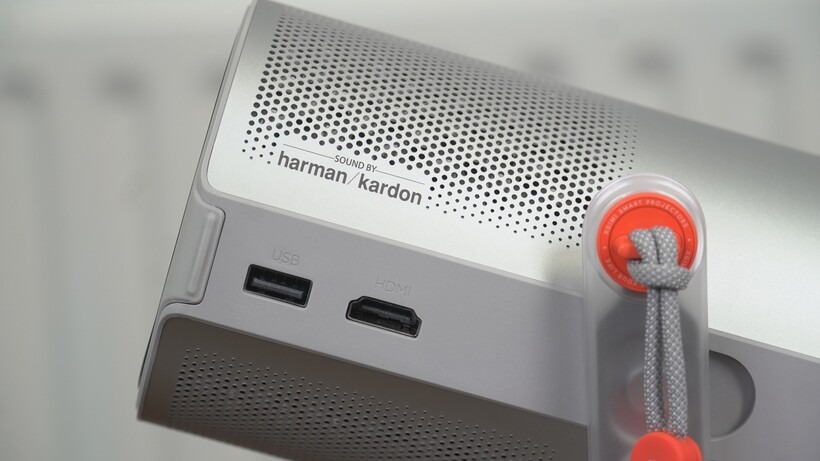
XGIMI upgraded the speaker system. The Mogo 3 Pro had a single 10W Harman Kardon speaker. The Mogo 4 uses two 6W speakers that support Dolby Audio, Dolby Digital, and Dolby Digital+.
The projector includes a full HDMI input with HDMI ARC support. You can connect a sound system if you want better audio. You also get USB 2.0 and USB-C for charging.
One important limitation is that the Mogo 4 doesn’t support HDR through HDMI connections. Any HDR content you send through HDMI plays in SDR instead.
You can stream content using Google Cast and DLNA over Wi-Fi. Bluetooth 5.1 lets you connect your phone and play audio through the Mogo 4’s speakers.
The Mogo 4 targets casual users, so setup features stay simple. The Auto Keystone creates a perfect square image shape automatically, and Auto Focus sharpens the picture based on the screen size. You can project images from 40 to 200 inches, but XGIMI recommends 120 inches as the best size.
Intelligent Obstacle Avoidance resizes the image when objects appear at the sides. The picture adjusts so nothing blocks your view. Intelligent Screen Fit detects when you’re projecting onto a screen and adjusts the image to match the borders.
Eye Protection dims the brightness when something passes in front of the projector. Your cat won’t get blinded if it walks past during a movie.
If you buy the Mogo 4 directly from XGIMI’s website, you get three Creative Optical Filters included. These filters attach to the lens and project colors and atmospheric effects.
Options include a lunar landscape or a dreamscape designed to help you sleep. These filters work well if you want the Mogo 4 to create ambiance instead of just showing movies.
XGIMI claims the fan produces 28dB of noise, quieter than the Mogo 3 Pro. My own testing measured 45dB, which is actually louder than the Mogo 3 Pro. The official specs don’t match what I found in real use.
XGIMI Mogo 4 Battery
XGIMI finally added a built-in battery to the Mogo series. This makes it truly portable, just like the Halo series. XGIMI says the battery lasts 2.5 hours. My tests showed different results. The battery ran for about 2 hours in Standard mode.
If you switch to Eco mode, you get around three hours of playback. The projector automatically switches to Eco mode when running on battery.
You may also like: Marantz AV 30 and AMP 30: Premium Home Theater Components Explained
Three hours gives you enough time to watch a long movie before the battery dies. This beats the Optoma Photon Go, which costs about the same but only lasts half as long.
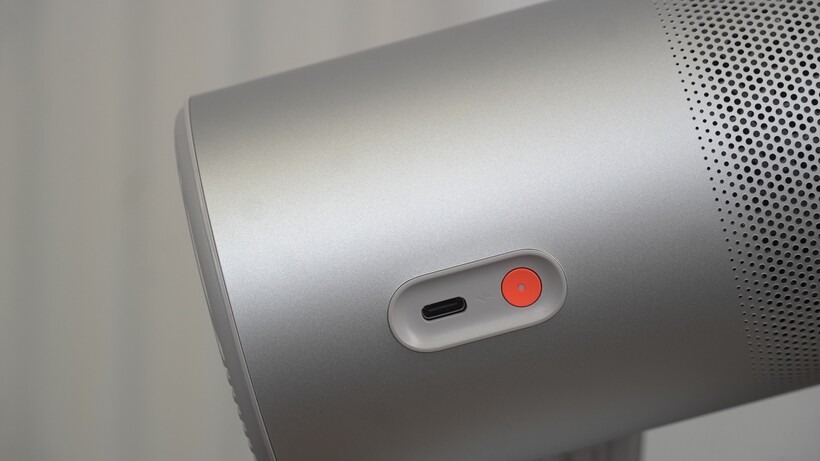
You can power the projector from a wall outlet using the USB-C connector. You can also use your own charger as long as it outputs 65W.
XGIMI Mogo 4 Picture Quality
Don’t expect the Mogo 4 to match a traditional projector’s performance. The brightness stays low, and the colors don’t look accurate right out of the box. But the Mogo 4 wasn’t designed for accuracy.
This projector produces rich, warm colors. Watch Avatar on Prime Video, and you see good detail with colors that pop. The colors look punchy and appealing. Accuracy doesn’t matter here.
The same thing happens when you stream Alien: Romulus on Disney+. Black levels look good, but they can’t match the depth you get from a TV.
Some edges look slightly crooked when you get close to the screen. The image isn’t the sharpest. But the film’s rich color palette stands out, even if the subtlety suffers.
The projector struggles with darker scenes. Watch Sandman on Netflix, and the black tones look acceptable. But the low brightness and shallow black levels create poor contrast.
In the Alien movie, Romulus, and Blade Runner 2049 show another problem. The darkest parts of the image lose detail. You can follow what happens in each scene, but you miss some of what you should see.
Sports content plays smoothly. Motion looks good. The colors stay rich and appealing. Football pitch greens pop with vivid color. The image looks attractive overall.
XGIMI Mogo 4 Sound Quality
The Mogo 4 sounds similar to the Mogo 3 Pro. Highs come through clearly. The audio tone sounds natural. You also get decent dynamics.
Dialogue stays clear with a slightly warm tone. I don’t hear any obvious audio processing. If you struggle to hear what characters say, turn on Dialogue Enhancer mode. You can choose from four main modes: Movie, Music, Game, and Sports.
The audio avoids the thin sound you get from some projectors. The Optoma PK31 had this problem recently. The Mogo 4 doesn’t deliver the clearest or sharpest sound possible. But you get nice energy, punch, and a sense of scale that surprises me for a projector this small.
You can use the Mogo 4 as a Bluetooth speaker. It performs decently in this role. It can’t beat a JBL Flip 7, but vocals sound clear and crisp. The bass falls short, though. Low frequencies sound thin and hollow.
Final Thoughts
The XGIMI Mogo 4 is what the Mogo 3 Pro should have been from the start. The built-in battery makes it actually portable. The design tilts through a full 360-degree range instead of just 130 degrees.
The sound system got stronger. You get an HDMI input now. These upgrades make the Mogo 4 the better choice, especially if you plan to use it outside your home.
The Mogo 4 improves on the Mogo 3 Pro. But if picture quality matters most to you, look at the Mogo 4 Laser instead. That model delivers better image performance.
The Mogo 4 offers good value for its price. You get one of the better portable projectors in this price range.