Samsung doesn’t typically emphasize software support for budget phones, but that’s exactly what it’s doing with the Galaxy A07, as evidenced by its recent listing on a regional website.
If you’re tired of buying cheap phones that feel outdated quickly, the Galaxy A07’s promise of six OS updates is the detail worth noticing.
Six major Android upgrades keep features, app compatibility, and security protections up to date for years. This won’t make the phone faster, but it keeps the device safer and less frustrating to use as technology evolves around it.
Most budget phones receive one or two major Android updates if you’re lucky. After that, you’re stuck with outdated software that can’t run newer apps properly. Security vulnerabilities go unpatched. New features never arrive. The phone still works physically, but feels increasingly obsolete.
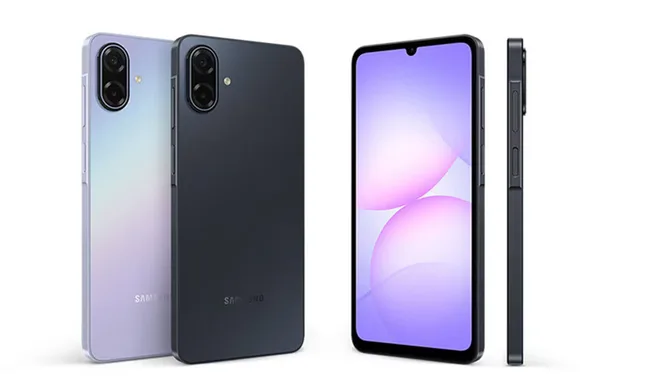
Six OS updates completely change this equation. If the Galaxy A07 launches with Android 15, six updates means it will receive Android 21. That’s support stretching into 2030 or beyond. Your budget phone stays relevant and secure for as long as flagship devices do.
This matters for practical reasons. Apps gradually stop supporting older Android versions. Banking apps, streaming services, and productivity tools eventually require newer operating systems. With six updates, you won’t hit that compatibility wall for years.
You may also like: Snapdragon 8 Elite Gen 6 Pro Leak: 6GHz Speed with Samsung Cooling Tech
Security updates matter even more. New vulnerabilities are discovered constantly. Without updates, your phone becomes increasingly exposed to malware, data theft, and security exploits. Six years of updates means six years of protection.
The rest of the specs deliver practical everyday functionality. You get a 6.7-inch display with a 90Hz refresh rate. The higher refresh rate makes scrolling and animations smoother than standard 60Hz screens. A 5,000mAh battery should easily last a full day of normal use. Samsung’s One UI 7 runs on top of Android right out of the box.
Six Upgrades for Six Years
For an entry-level phone, six major OS upgrades make a strong stand. Most budget Android phones get shorter support windows, which quietly pushes you toward buying a replacement sooner than you’d like.
Budget phone makers typically provide minimal software support because they want you to buy new devices regularly.
One or two Android updates, then you’re on your own. This creates a cycle where your phone becomes outdated, not because the hardware failed, but because the software stopped receiving updates.
You may also like: Samsung Galaxy S26 Privacy Display: AI-Powered Screen Protection Coming to All Models
Security support matters just as much as feature updates. Phones store bank accounts, payment apps, private messages, photos, and sensitive personal information. Security updates protect that data from becoming easy targets as new threats emerge regularly.
Hackers discover new vulnerabilities every month. Without security patches, your phone accumulates unprotected weaknesses. Each unpatched vulnerability is a potential entry point for malware, data theft, or account compromises. Six years of security updates means six years of active protection against evolving threats.
If you plan to keep the A07 for several years, this support commitment is the feature that matters most. It transforms the Galaxy A07’s six OS updates from a marketing line into something you’ll actually experience in year two or three, when competing budget phones stop receiving any attention from their manufacturers.
Year one, every phone works fine. Year two, differences start appearing. Phones without updates can’t install certain apps. Security warnings pop up. Features stop working as services drop support for old Android versions.
Year three and beyond, unsupported phones become frustrating. The Galaxy A07 will still receive new Android features, security patches, and app compatibility while competitors are abandoned.
Here is why you need support for your phone
Shopping for phones based on cameras, screens, or charging speed is easy. Those features are noticeable on day one. Software support is different. It’s a slow burn that determines whether the phone still fits your life two, three, or five years later.
You test the camera in the store and see great photos. You scroll through the display and notice the smooth refresh rate. You plug in the charger and watch the battery percentage climb quickly. These experiences are tangible and immediate. They influence your buying decision because you can evaluate them right now.
You may also like: The OnePlus Turbo 6 is here with a 9,000mAh battery
Software support doesn’t work that way. On day one, a phone with two years of updates feels identical to a phone with six years of updates. Both run the latest Android version, have current security patches, support all the same apps, but the difference only becomes apparent years later.
This creates a situation where the Galaxy A07 can outperform pricier phones in one narrow but meaningful way. A higher-end device with weaker long-term support can feel disposable sooner, even if its hardware is better. A phone with a flagship processor, an excellent camera, and a beautiful screen becomes frustrating when it stops receiving updates after 2 years.
You’ll still be using that phone in year three or four if it’s physically working fine. But outdated software makes it feel old. Apps stop working properly, security risks increase, and new features never arrive. You end up replacing a phone that still functions because the software became a liability.
The Galaxy A07 flips this equation. If Samsung follows through on six OS updates, you’re not just buying current specifications. You’re buying time. Time before the phone becomes obsolete. The time before you need to spend money on a replacement.
What you should do before you buy it
One problem with budget phone lineups is model confusion. A 4G version of the Galaxy A07 launched in September 2025, so don’t assume every A07 listing matches what you’re looking for.
Different regions often get different versions of the same phone model. One might support 5G while another only handles 4G. One might have more RAM or storage. They share the same name but deliver different capabilities and performance.
Check the exact model name on the box and the store page carefully. Model numbers usually appear in small print and include letters or numbers that distinguish between versions. For example, NM-A076G might differ from NM-A076H even though both are labeled Galaxy A07.
You may also like: Belkin’s Qi2 power banks and a Switch 2 charging dock
Confirm network support before you pay. Make sure the phone works with your carrier’s bands and technologies. A phone that looks identical might not connect properly to your network if it was designed for a different region. This matters especially for 5G support, which varies significantly by region and carrier.
Once you have the phone, turn on automatic updates immediately. Long software support only helps if you actually install the updates. Automatic updates ensure you receive security patches and new features as soon as Samsung releases them. You won’t need to remember to check manually or risk missing critical security fixes.
Keep backups running regularly. Six years is a long time to use one phone. Hardware can fail, phones can get lost or stolen, and water damage can occur. Regular backups to cloud storage or your computer mean you won’t lose photos, contacts, messages, and app data if something goes wrong.
These simple steps ensure the long support window works for you rather than being a marketing promise that doesn’t translate into real benefits.