The OnePlus Pad Go 2 targets the iPad directly more than most Android tablets do. Many tablet buyers prefer Apple’s option, and OnePlus clearly wants to change that. While the Go 2 makes a strong case, it runs into the same obstacles that hurt most mid-range tablets.
The OnePlus Pad Go 2 costs $399.99 without accessories. Add the $79.99 stylus and $44.99 folio case separately. The base iPad starts $50 cheaper at $349, but Apple’s accessories cost more. The total price ends up similar between the two. Given how many people buy iPads, OnePlus positioned this as direct competition.
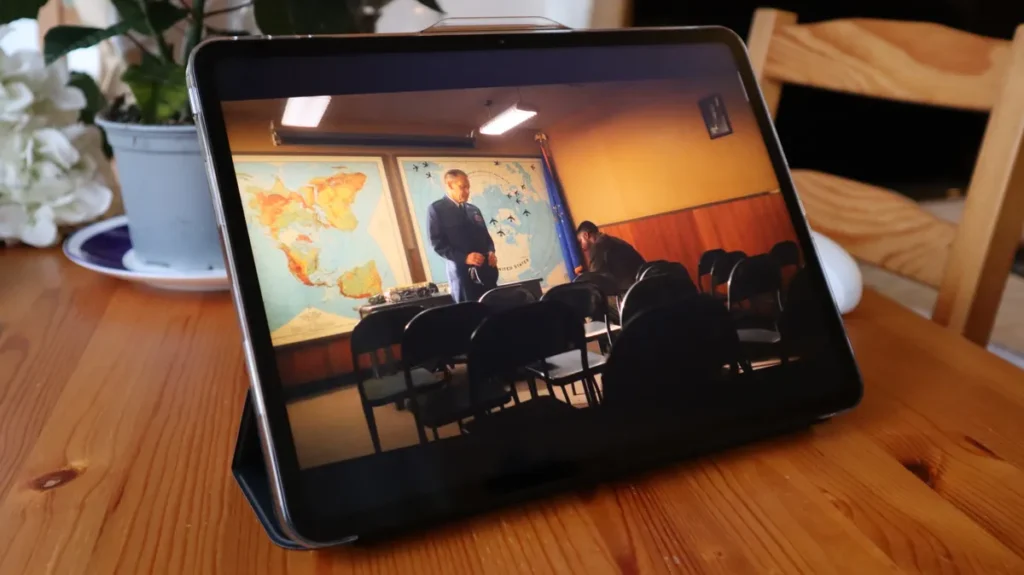
The OnePlus Pad Go 2 performs well when performing some specific tasks. The large widescreen display looks great for streaming movies and shows. The processor handles games smoothly, and the big battery makes it perfect for long trips. For people with clear, focused uses, the Go 2 might even beat the pricier OnePlus Pad 3 in value.
There seems to be a problem when you consider the software. Android simply doesn’t match iPadOS for large screens, despite OnePlus trying hard to optimize it. Navigation and gestures feel less natural.
Some apps and widgets either don’t exist or don’t work properly on the bigger display. The interface leaves awkward empty spaces across the screen that look unfinished.
When you’re switching between apps or adjusting settings instead of focusing on one task, the experience feels clunky and off.
You may also like: Xiaomi Redmi Note 15 Pro Plus 5G Review: Strong Battery and Sharp Display
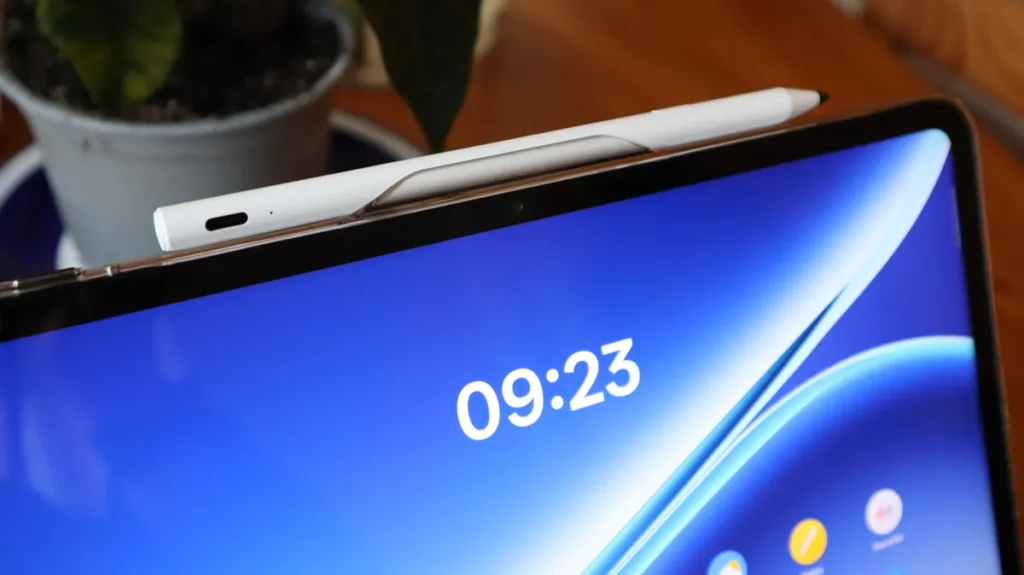
The accessories even make things worse. The folio case feels cheap and wobbles. It doesn’t fully cover the screen and can’t prop up the tablet as a stand. The stylus has no way to attach to the tablet when you’re carrying it around.
When you store the stylus in the folio, it blocks the volume buttons. For people who rely on accessories, these flaws matter, as the accessories feel like afterthoughts that might break before the tablet does.
These issues appear on most Android tablets. Compared to the competition, this comes close to matching the iPad. I initially rated it four stars, but after spending more time with it, the lack of any standout feature or unique angle keeps it from being essential. It’s good, but nothing about it demands your attention over an iPad or pushes it into a must-buy device.
Pros
- Competitive price
- Lots of power
- Nice big screen
- Affordable accessories
Cons
- Android feels awkward on a large screen
- Poor auto-brightness
- The battery should last longer
OnePlus Pad Go 2 specs
| Dimensions | 266.01 x 192.77 x 6.83mm |
| Weight | 597g |
| Screen | 12.1-inch LCD, 2800 x 1980 |
| Processor | MediaTek Dimensity 7300-Ultra |
| RAM and storage | 8GB / 128GB |
| Camera | 8-megapixel rear camera, 8MP front camera |
| Battery | 10,050mAh |
| Charging | 33W SUPERVOOC wired |
| Software | Android 16 with OxygenOS 16 |
| Colors | Black |
| Price | $399.99 |
OnePlus Pad Go 2 Display
The OnePlus Pad Go 2 doesn’t try to be slim or pocket-friendly. It prioritizes screen size for watching content over portability. The tablet weighs almost 600g and measures wider than an iPad to fit a larger display.
You may also like: OnePlus 16 Price Leak: Is the Flagship Killer Era Finally Over?
The physical design is simple with 4 speakers, volume buttons, a power button, and a USB-C port that sit where you expect them. The rear camera lens barely protrudes, so the tablet stays fairly stable when you lay it flat. I used a case during testing anyway for protection.
The accessories need work. The stylus doesn’t attach to the tablet magnetically like an Apple Pencil or Samsung S-Pen. You’ll constantly lose it at the bottom of your bag because there’s nowhere to clip it.
The folio case disappoints on multiple sides because it doesn’t function as a keyboard or sturdy stand. The plastic shell feels cheap, and the cover wobbles and bends instead of staying firm. I didn’t trust it to actually protect the tablet in my bag.
You should probably buy some kind of case because OnePlus gives this tablet no official IP rating. That means no guaranteed protection against water or dust. Spills or sand could damage it.
The screen measures 12.1 inches diagonally with a 7:5 aspect ratio. That wide format suits movies and TV better than documents or productivity work. The 2800 x 1980 resolution provides sharp visuals for games and video.
The 120Hz refresh rate makes motion smoother, but you need to manually enable it in settings. The default auto mode kept selecting lower refresh rates during my testing.
I spent most of my testing time watching content on this screen, and it mostly succeeds. My main complaint is that the automatic brightness constantly dimmed the display too much. Turning off auto-brightness fixed this, but then I had to adjust brightness manually throughout the testing.
You may also like: Kindle Scribe Colorsoft Fig Color Launches January 28: Price, Features, and Where to Buy
The LCD panel can’t match the contrast or color vibrancy of AMOLED screens found on premium Android tablets, but you won’t find AMOLED at this price point. You can only get an LCD that is standard for budget tablets.
OnePlus Pad Go 2 Performance
The OnePlus Pad Go 2 won’t win speed contests against flagship tablets, but most people won’t care. It uses a MediaTek Dimensity 7300-Ultra processor with 8GB of RAM.
Benchmark scores came in slightly below the Galaxy Tab S10 FE, which runs a similar Samsung chip. But numbers only tell part of the story. I spent significant testing time playing demanding games to see how it actually performs.
Games ran smoothly with minimal lag or stuttering as long as I avoided the highest graphics settings. Keeping games on medium or high settings instead of ultra produced excellent results. I never felt handicapped in online multiplayer matches where reaction time matters.
Single-player game loading times took longer than those of premium tablets I’ve tested. That’s the most obvious performance gap between this tablet and expensive alternatives.
Beyond gaming, the Pad Go 2 handles medium-intensity work well. Photo editing worked fine. I didn’t test video editing or heavy graphics rendering because the 7300-Ultra processor isn’t built for those tasks. For typical tablet activities such as browsing, streaming, light productivity, and casual gaming, performance is adequate.
Storage might frustrate some users. The base model includes 128GB, which fills up quickly if you download lots of games or store media locally. A 256GB model with 5G connectivity exists but isn’t sold in the US.
You may also like: Nothing Phone 4a and 4a Pro Specs and Pricing Leak Ahead of March 5 Launch
The microSD card slot saves the situation. You can expand storage without paying for a higher-tier model or relying entirely on cloud services. Buy a 256GB or 512GB card, and you’ve solved the storage problem cheaply.
This tablet targets people who want good performance for everyday tasks and gaming at reasonable settings, not professionals rendering 4K video or running intensive creative software.
OnePlus Pad Go 2 Software
Android tablets suffer from numerous software problems that make them feel less polished than iPads. You can blame Google more than OnePlus for this, but the result is the same. The OnePlus Pad Go 2 software experience feels unfinished.
My biggest frustration with Android tablets is that the interface wasn’t designed for large, wide screens. The quick settings menu that appears when you swipe down clusters awkwardly on one side.
The home screen leaves huge gaps between apps and widgets. Everything looks bad when you hold the tablet vertically in portrait mode. Icons and elements don’t scale properly for the extra screen space.
Android also lacks the smooth multitasking features that iPad users take for granted. OnePlus includes Open Canvas for split-screen work, but it’s not intuitive to use. The floating taskbar takes too long to show app menus and file options.
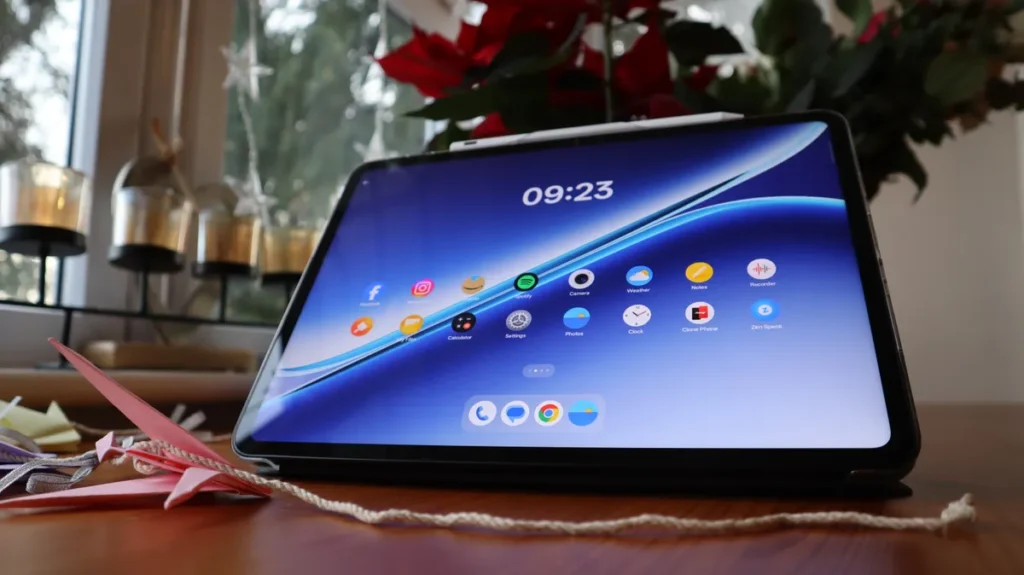
You have to swipe much farther than feels natural to access notifications, settings, or move between home screen pages. These tiny friction points add up during daily use.
OnePlus improved cross-device file sharing between their phones and tablets. Transferring files works quickly and easily. But I wouldn’t choose the Pad Go 2 for managing files or organizing photos anyway. The software experience makes those tasks more annoying than they should be.
These aren’t dealbreakers, as the tablet still functions and Apps work. You can watch videos and play games without issues. But compared to how smoothly iPadOS handles large screens and multitasking, Android feels like it’s constantly fighting against the hardware instead of working with it.
If you’ve only used Android tablets, you might not notice these problems. But anyone switching from an iPad will immediately feel the difference in polish and thoughtful design.
The OnePlus Pad Go 2 runs Android 16 with OxygenOS 16 layered on top. Most of the custom features involve AI tools built into the notes app.
You get writing generation, proofreading, polishing, formatting, and table creation. These features are turned off and uninstalled by default. If you don’t want AI bloat eating your storage space, you won’t deal with it.
Other AI features appear in specific apps. The Recorder app transcribes and summarizes audio. The Translation app offers live translation. The Photos app includes AI editing tools. Gemini comes pre-installed. These tools perform well just like AI features generally do, which means inconsistent results.
You may also like: iPhone 17e: Release Date, Price, Specs, and Everything We Know So Far
Transcription failed to capture words correctly during my testing. AI-generated writing produced the bland, generic text that is expected from these tools. Nothing impressive, nothing terrible. Just mediocre assistance that sometimes helps and sometimes wastes your time.
Android tablet users often complain about short software support periods. Companies abandon devices quickly, leaving them outdated and insecure. OnePlus addresses this concern directly with the Pad Go 2. The company promises 5 years of Android updates.
That support timeline reaches Android 21 in 2030. For context, that’s one year longer than OnePlus supports the OnePlus 15 phone. 5 Years of updates is genuinely praiseworthy. Your tablet stays secure and receives new features through 2030 instead of becoming obsolete in two or three years.
This extended support makes the Pad Go 2 a smarter long-term purchase. You’re not throwing away a perfectly functional tablet in 2028 because it stopped receiving security patches. The hardware will likely remain usable for the entire support period, assuming you take decent care of it.
OnePlus Pad Go 2 Battery
The OnePlus Pad Go 2 packs a 10,050mAh battery. That’s not the largest OnePlus has put in a tablet, but breaking 5 digits sends a clear message. This tablet should last a long time between charges.
For most activities, the battery delivers. I worked for hours and watched multiple TV episodes without worrying about running out of power. But gaming drains the battery surprisingly fast.
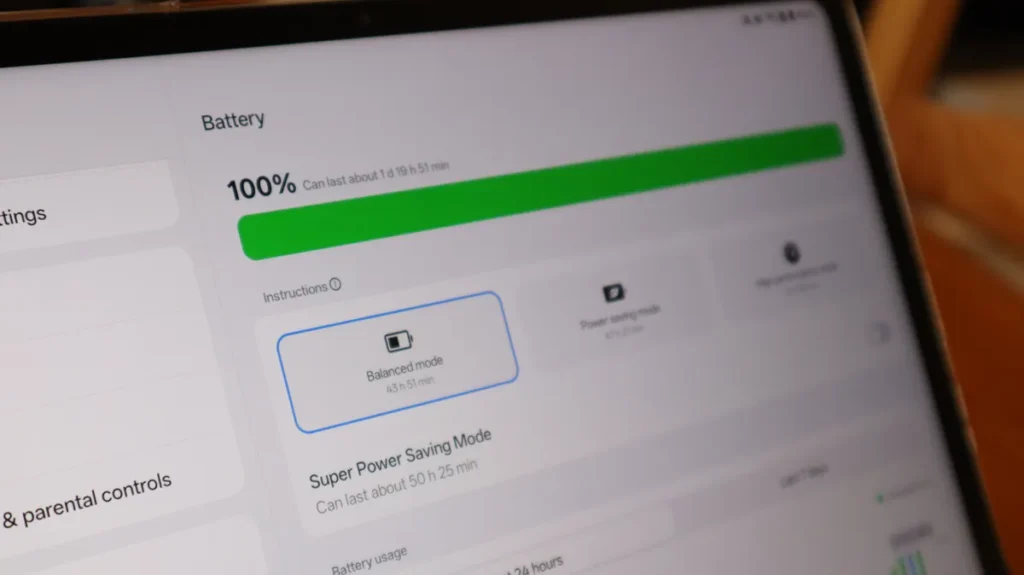
Multiple games I tested dropped battery percentage by 20-25% per hour. That’s higher than other tablets I’ve reviewed and higher than I expected from a device with this battery capacity.
The tablet only supports 33W charging. Some people will find that disappointing, given that OnePlus pioneered fast charging technology. The OnePlus 15 phone charges at 120W. Even the Pad 3 tablet hits 45W, but the Pad Go 2 is a budget device, so compromises are certain.
Given how quickly gaming drains the battery, I expected faster charging to compensate for that. Using the included charger for 30 minutes of charging took the battery from empty to 31%. That’s adequate but not impressive.
You can fully charge overnight without issues. But if you drain the battery during an afternoon gaming session and want to use the tablet again that evening, you’ll wait longer than you’d like for a meaningful charge.
This battery situation creates a specific use case limitation. It’s great for work, streaming, and casual use. Less ideal for extended portable gaming sessions away from power sources.
Should you buy the OnePlus Pad Go 2?
If you have around $400 to spend on a tablet and want the best option, you’re probably looking at iPads. I can’t claim the OnePlus Pad Go 2 competes with Apple’s tablets at this price point.
But if you specifically don’t want an iPad and prefer staying in the Android lineup, that’s where the OnePlus Pad Go 2 becomes relevant. If you own an Android phone and want a tablet that works seamlessly with it, this is a good choice.
This tablet works best for entertainment. Watching movies, browsing the web, casual gaming, and streaming shows. The screen looks good without being exceptional. The processor handles most tasks smoothly, though faster options exist if you spend more money.
You can use it for work, school, or creative projects. It’ll handle basic productivity tasks such as document editing, presentations, and note-taking. But OnePlus doesn’t offer an official keyboard accessory, which limits its usefulness as a laptop replacement.
Typing long documents on the touchscreen gets tiresome. Third-party keyboards exist, but then you’re adding extra cost and uncertainty about compatibility.
The Pad Go 2 fills a specific niche. Android users who want a large screen for media consumption and light productivity without spending flagship money.
It’s not trying to replace your laptop or compete with premium tablets. It aims to be a good enough secondary device at an affordable price.
If that describes what you need, this tablet delivers reasonable value. If you need top performance, the best screen quality, or serious productivity features, then look elsewhere or increase your budget.
How GadgetCV tested
I tested this tablet for 5 weeks before writing this review. That matches our policy of using products for extended periods before publishing reviews. During the testing time, I used the tablet for multiple purposes, including streaming shows, playing games, and writing articles.
My approach focused on real-world experience rather than just specs and benchmarks. I wanted to see how the tablet performed during actual daily use, not just in controlled tests. Toward the end of the testing period, I ran benchmark tests to gather technical performance data.
This testing method reveals issues that don’t show up in quick hands-on sessions or spec comparisons. Battery life problems become obvious after days of use. Software quirks emerge when you perform the same tasks repeatedly. Build quality concerns appear when you handle a device for weeks instead of hours.
Five weeks also lets you see how a device fits into your routine. Does it become something you reach for naturally, or does it sit unused? Do small annoyances fade as you adjust, or do they grow more frustrating over time? Does performance stay consistent, or does it degrade?
Short review periods might miss these patterns. A tablet that impresses during a three-day test might reveal deal-breaking flaws after 14days of actual use. Extended testing catches those problems before you waste money.
This five-week period gave me confidence that my experience reflects what you’ll encounter if you buy this tablet, not just my initial impressions during a honeymoon period with new tech.