Not many phone makers have a design philosophy as distinct as Nothing’s. The Nothing 4a Pro fits that mold, though it takes a slightly different direction from what the brand has done before.
It’s not perfect; a few areas fall short, but after carrying it around for several weeks, I can say the good outweighs the bad by a fair margin. Here’s my honest take.
Nothing Phone 4a Pro Specs
Nothing Phone 4a Pro Design
Nothing has built its reputation on transparent ideas. Every phone they shipped, including the standard 4a, carried that transparent signature look. The Nothing 4a Pro breaks that pattern entirely.
Instead of the usual see-through glass with components visible underneath, Nothing now went full metal. The 4a Pro has a good aluminium unibody, which is something you rarely see on Android phones anymore. The OnePlus Nord 4 tried it briefly, but outside of that, the material has largely been absent from the segment for years.
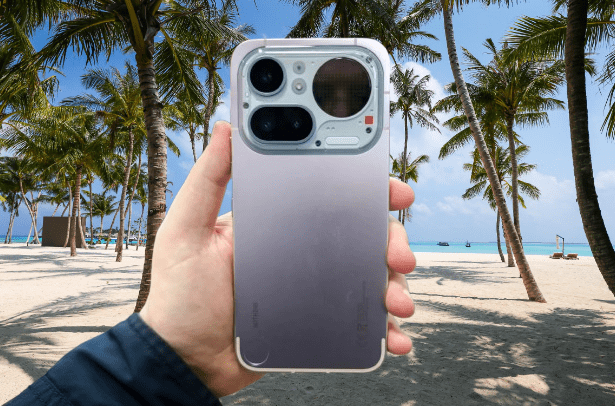
What that choice gives you is a phone that feels genuinely substantial. No flex, no creak, just a single piece of metal in your hand. Glass backs look great until they shatter on the first drop.
Aluminium doesn’t have that problem, and it’s less slippery too, so you’re less likely to drop it in the first place. After years of holding glass-backed phones, picking this up felt like a welcome change.
You may also like: Nothing Phone 4a and 4a Pro Specs and Pricing Leak Ahead of March 5 Launch
Nothing wasn’t going to drop its transparent aesthetic completely. Instead of applying it to the whole back, the company concentrated it on the camera size. That turns out to be a smart call.
Most phone makers treat the camera bump as a problem to solve. They make it as flat as possible, round the edges, and hope you stop noticing it. The result is usually forgettable at best and awkward-looking at worst.
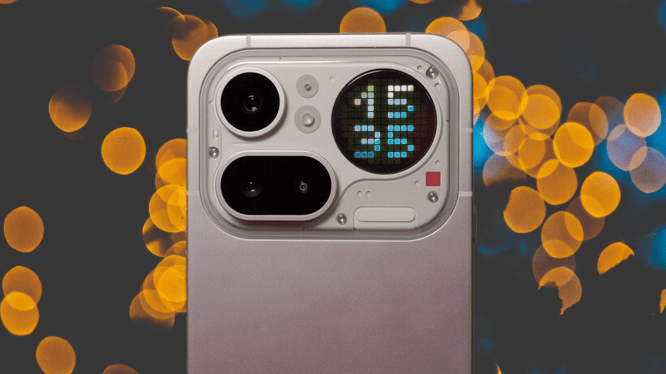
Nothing did the opposite. The camera island on the 4a Pro is genuinely interesting to look at. It mixes different textures, exposed screws, and a circular Glyph Matrix display, plus a small square LED that lights up when you record video or audio. It doesn’t feel like an afterthought. It feels like something the design team actually spent time on, and that attention shows.
The Glyph Matrix display here is similar to what Nothing introduced on the Phone 3, and it’s actually larger than that version. But larger doesn’t mean better in this case. A few features didn’t make the cut.
You still get useful functions: a countdown timer, notification flashes, and a basic selfie mirror that works in a pinch.
What’s missing are the Glyph Toys, the small interactive extras that made the Phone 3 a little more fun to pick up. On that phone, a physical button on the back let you spin a virtual bottle or shake a Magic 8 Ball. It was a small thing, but it added some personality.
The Nothing 4a Pro has no such button. There’s a small dimple in the bottom corner of the back that looks exactly like one, enough that you’ll probably press it instinctively the first few times, but nothing happens. It’s just a design detail, which makes it a bit of a tease. Glyph Toys aren’t completely gone. They just don’t respond to touch anymore.
You can set the Glyph Matrix to stay active with a passive display of your choice when you flip the phone face down. The digital clock, battery level, a solar path tracker, or a moon phase graphic give the phone a shake, and it can show a charging meter or display caller ID when someone calls.
Where it really earns its keep is in the customization options. The software lets you set your own rules for when the Glyph lights up. You can tie it to specific apps, particular contacts, or even keywords inside incoming messages.
You can also design your own graphic to appear with a specific notification. That level of control is more useful in daily life than a Magic 8 Ball, even if it’s less fun to show people at a party.
You could set a custom graphic to appear every time a specific person texts you. It takes some time to configure, but the payoff is a Glyph experience that’s actually tailored to your life rather than a generic out-of-the-box setup. It sits comfortably between the basic LED strip on the standard Nothing 4a and the more playful, interactive system on the Phone 3.
One thing worth knowing before you buy it is that the Nothing 4a Pro is rated IP65, which covers splashes and brief exposure to water. It is not waterproof. Don’t take it in the pool, don’t shoot photos in the rain for extended periods, and definitely don’t drop it in the sink. Splash resistance is enough for everyday situations, but it has clear limits.
You may also like: Nothing Headphone (a) Price and Release Date Leaked
The Nothing 4a Pro holds the title of Nothing’s thinnest phone, but don’t let that fool you. It’s a heavy device. The flat edges, wide frame, and solid metal construction add up, and you’ll notice the weight in your hand after a while. If you have smaller hands or prefer a phone that disappears into your grip, this one will take some getting used to.
Nothing Phone 4a Pro Screen
The display is where the Nothing 4a Pro punches above its price point most noticeably. It’s large, gets genuinely bright, and moves smoothly. Peak brightness hits 5000 nits for HDR content, which means even the darker scenes in HDR films hold their detail rather than turning into a muddy mess.
Refresh rate goes up to 144Hz when you enable the highest setting, and pixel density clears 400ppi, so text and images look sharp at normal viewing distances.
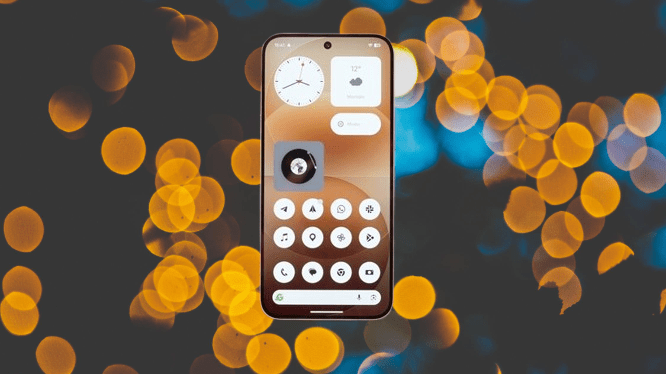
It also handles low-brightness situations well. The PWM dimming levels are competitive, which matters if you’re someone who reads on your phone late at night and finds cheaper displays cause eye fatigue after a while.
The one limitation is the panel technology. Without LTPO, the display can’t step through refresh rates in small increments automatically. Instead, it jumps between fixed rates, and if you look closely, you’ll catch a faint stutter when scrolling kicks in from a static screen. It’s a minor issue, but worth knowing if you’re particular about display smoothness.
Nothing calls this the best display in its lineup, and based on what I’ve seen, that claim holds up. At 6.83 inches with thin, even bezels on all sides, the screen takes up as much of the front as possible without feeling excessive. Watching a video on it feels genuinely immersive.
The one hardware complaint I have isn’t about the display. It’s the fingerprint scanner embedded in it.
Ultrasonic scanners have raised the bar. They’re fast, they work at odd angles, and you barely notice them. The optical scanner on the 4a Pro requires a slightly more deliberate press and takes a moment longer to respond. Coming from phones with ultrasonic sensors, the difference is noticeable at first.
You may also like: Xiaomi 17 Ultra Review: Best Camera Phone of 2026
That said, at this price point, optical scanners are the norm, not the exception. And in real daily use, it held up well. Across several weeks of testing, it failed to read my fingerprint exactly once. Reliability wasn’t the problem. Speed is the only area where it falls short compared to pricier alternatives.
Nothing Phone 4a Pro Cameras
For the price, three cameras on the back is a good package. In good light, all three lenses deliver sharp, well-colored shots. When a scene has bright backgrounds and darker subjects in the foreground, the HDR processing handles the balance competently without blowing out the highlights.
The weaknesses are predictable if you’ve used mid-range phones before. The ultrawide is the weakest of the three. Images shot during the day show some distortion toward the edges, and in low light, it pulls in noticeably less detail than the main camera. The 3.5x telephoto has similar low-light limitations; it’s a daytime lens first and foremost.
Zoom range goes up to 140x on paper, achieved through a combination of machine learning, processing, and digital cropping.
In practice, I stopped pushing past 30x. Beyond that point, images lose enough detail that the results aren’t worth using. If you need to zoom that aggressively, the phone will technically do it, but manage your expectations before you frame the shot.
Where the telephoto earns its keep is in mid-distance shots of small subjects: leaves, flowers, plants. It can’t focus at true macro distances, but it gets close enough to produce detailed, sharp images with a natural depth-of-field effect that separates the subject from the background cleanly. For that specific use case, it punches well above its weight.
The camera system does have a broader weakness that shows up across all three lenses. Motion blur and focus inconsistency were problems I ran into regularly enough to notice. The worst of it came at night, where the camera holds the shutter open longer for night mode shots.
You may also like: Xiaomi 17 Review: Best Compact Flagship of 2026
If anything in the frame moves during that exposure, or if your hand isn’t perfectly steady, the result comes out soft or blurred. It’s not a dealbreaker, but you’ll need to be more focused with your shots in low light than you would with a higher-end phone.
The gap between this phone and more expensive flagships I tested around the same time came down to one thing: consistency. On those pricier devices, pressing the shutter almost always produced a sharp, blur-free image instantly.
On the 4a Pro, that wasn’t always guaranteed. You need to keep your hands steady, so that the problem largely goes away, but it’s still a step behind what the top tier delivers.
On a more positive note, the camera app includes a set of photo styles that work similarly to filters. You can add grain, adjust contrast, or shift the color temperature to give your shots a specific look before you take them.
It’s the same feature found on the standard 4a, and it’s a nice creative option if you want something beyond the default output straight out of the camera.
Nothing Phone 4a Pro Software
Hardware design is only part of what makes Nothing feel distinct. The software carries equal weight.
Most Android manufacturers customize their OS, but the connection between the interface and the physical device usually feels loose.
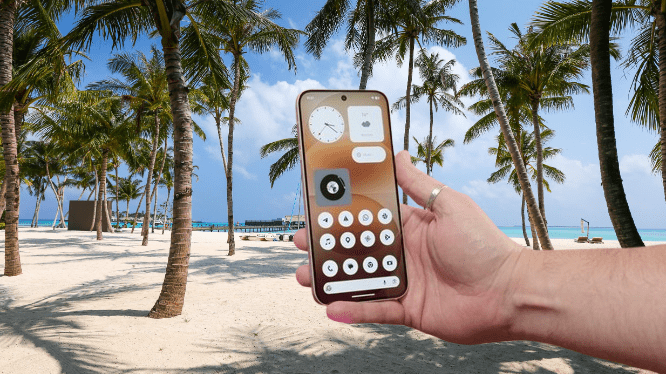
With Nothing, the two are clearly designed together. The same retro-futuristic aesthetic that defines the phone’s exterior runs consistently through every menu, icon, and screen. It doesn’t feel like a skin layered on top of Android as an afterthought. It feels like a deliberate extension of the same design language.
The widget library is extensive. Folders, app icons, and widgets all share the same visual language, so mixing and matching them on your home screen feels natural rather than clashing.
The monochrome flat design and dot-matrix fonts tie everything together, and many of the widgets respond to interaction rather than just sitting there as static displays.
One standout addition is Playgrounds, a section of widgets built by the Nothing community. Members submit their own creations, and the range is broad: clocks, F1 race calendars, mini games, and more.
You may also like: Xiaomi Redmi Note 15 Pro Plus 5G Review: Strong Battery and Sharp Display
The quality varies, but there’s enough in there to keep you browsing for a while. I came across a Pokémon hunting widget, and that was essentially the end of my productivity. Some discoveries you don’t recover from.
Essential Space is still here, unchanged from previous Nothing phones. The dedicated button on the side of the phone opens a personal capture tool where you can save screenshots and voice memos.
The built-in AI processes whatever you save: it transcribes voice recordings, pulls out action items, and describes the contents of screenshots. It’s a genuinely useful feature if you’re the type of person who collects information throughout the day and wants it organized without extra effort.
The software as a whole is one of the cleaner Android skins available right now. Nothing keeps the app list tight. You won’t find duplicate apps or filler software that exists purely to pad out the home screen.
There’s a Nothing-branded weather app, but beyond that, the company leaves Google’s default apps in place and steps back. That kind of restraint is rarer than it should be in this space, and it makes the phone feel cleaner from day one.
Nothing Phone 4a Pro Performance
The 4a Pro runs on a Snapdragon 7 Gen 4, which gives it a meaningful performance edge over the standard 4a. You can configure it with either 8GB or 12GB of RAM, depending on which spec you buy. It handles everyday tasks, multitasking, and casual gaming without issue.
You may also like: Honor Magic V6 Brings IP69 Protection and a 2,800 MPa Steel Hinge to Take On Samsung’s Fold 7
That said, it won’t satisfy serious mobile gamers. If graphics performance is a priority for you, there are better options at similar prices. Poco’s X8 Pro series is worth a look if that’s what you’re after.
Benchmark scores confirm what the specs suggest: this phone sits in the middle of the pack, not near the top. But raw numbers don’t tell the whole story. What the 4a Pro does well is maintain steady performance over extended periods without throttling heavily under sustained load. It won’t post impressive frame rate numbers, but it stays consistent.
For most people, that’s enough. Daily communication, social media, streaming, and lighter games all run without issues. I used it as my main phone throughout testing and had no complaints for those purposes. Where it falls short is at the demanding end, and if your usage stays away from that territory, you likely won’t feel the gap.
Nothing Phone 4a Pro Battery Life
Battery life varies depending on how you use the phone. Running the display at 144Hz, keeping the Glyph Matrix active, and moving around a busy city on 5G will drain the battery much faster than lighter usage in a low-signal rural area on 4G. That’s true of any phone.
From my time with it, I’d say even heavy users should get through a full day on a single charge. During testing sessions where I was actively shooting photos, recording video, and running benchmarks back to back, I still couldn’t drain it completely in a day. On typical days with normal usage, I regularly had more than half the battery left by the time I went to bed. That’s a comfortable margin.
You may also like: OnePlus 15T Launch Date: Specs, Battery and Price
My screen time typically runs under three hours a day, split across casual gaming, YouTube, news, social media, and messaging.
With that kind of usage, the battery lasted comfortably. The 5000mAh cell isn’t the biggest you’ll find at this price point, but the software manages it efficiently enough that capacity alone doesn’t tell the full story.
Charging speed sits at 50W, and a full charge takes just over an hour with a compatible charger. Worth noting that the charger is not included in the box, so factor that in if you’re upgrading from a phone that came with one.
Nothing Phone 4a Pro Verdict
The 4a Pro stands apart from the crowd of identical-looking glass slabs. The hardware, software, and feature set all come together in a way that feels intentional rather than assembled from a checklist.
If your daily phone use doesn’t push into heavy gaming or pro-level photography, this phone will more than hold its own. And if you’ve grown tired of phones that look and feel interchangeable, Nothing gives you a real alternative worth considering.
Pros |
Cons |
| Unique design and wonderful metal build | No interactive Glyph Toys |
| Glyph matrix can actually be useful | Inconsistent camera stabilisation performance |
| Strong battery life and a brilliant, big display | Not the fastest phone out there |
Final Thoughts
The Nothing 4a Pro occupies a space that no other phone currently fills. Nothing’s combination of hardware choices, software design, and small thoughtful details adds up to something genuinely different from everything else on the market at this price.
It’s not for everyone. If you push your phone hard with demanding games or need the best possible camera consistency, you’ll find better options elsewhere.
But if your usage is more typical and you want a phone that feels considered rather than generic, this one delivers. After weeks with it, the little details still hold my attention in a way that most mid-range phones don’t. That’s not nothing.