Honor has been putting out well-designed hardware for a while now, but the MagicPad 4 feels like the most complete product the company has made.
It’s a 12.3-inch tablet that’s thin and light, priced at $599, and still delivers an OLED display, all-day battery life, and enough productivity features to work as a laptop replacement for the right person.
It’s not the outright fastest tablet at this price. If raw performance is your main priority, there are other options worth considering. But the MagicPad 4 doesn’t need to win on speed alone.
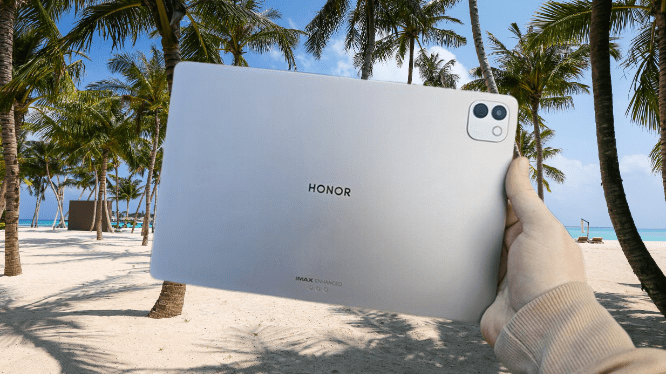
The combination of build quality, display, battery, and feature set makes this harder to dismiss than most Android tablets in this range. For anyone looking for a large-screen Android slate that doesn’t ask you to pay flagship prices, this one deserves a close look.
Honor MagicPad 4 Specs
Honor MagicPad 4 Design
Honor has a track record of building slim, well-designed hardware across its lineup, from the Magic V6 foldable to the MagicBook Art 14 laptop. The MagicPad 4 takes that further than anything the company has shipped before.
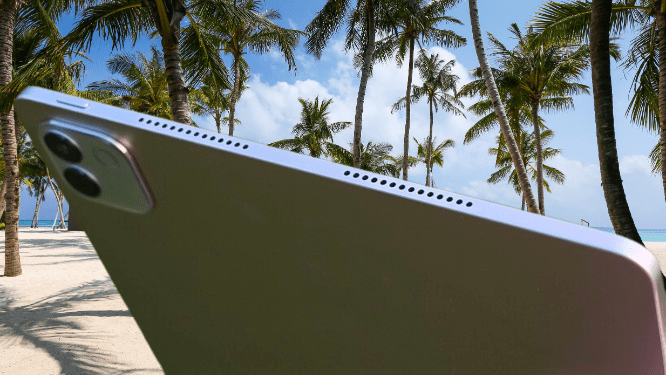
The tablet is 4.8mm thick. That number is worth sitting with for a moment, because it puts the MagicPad 4 ahead of some of the most expensive tablets on the market.
Apple’s iPad Pro M4, which the company positions as its thinnest tablet ever, measures 5.1mm. Samsung’s Galaxy Tab S10 Ultra comes in at the same 5.1mm. The MagicPad 4 is thinner than both, and it’s doing that with a 12.3-inch screen on the front and an aluminium back.
For a tablet at $599, competing with the products that cost significantly more is a genuine achievement. Thinness alone doesn’t make a tablet worth buying, but when it’s paired with the rest of what the MagicPad 4 offers, it adds to a hardware package that’s difficult to ignore at this price.
The weight tells the same story as the thickness. At 450g, the MagicPad 4 is noticeably lighter than most of its competition. The iPad Pro comes in at 579g. The OnePlus Pad 3, which is also thicker at 6mm, weighs 675g. That’s 225g more than the MagicPad 4, a difference you feel immediately when you pick it up.
You may also like: 11-Inch iPad A16 Deal: $299 for 128GB Model, $50 Off Regular Price
Weight matters more with tablets than with phones because of how you hold them. A phone sits in your hand for seconds at a time. A tablet gets held for extended reading sessions, video calls, or work stretched across an hour or more.
The heavier the device, the faster your hand and wrist fatigue. At 450g, the MagicPad 4 stays comfortable through long sessions in a way that heavier tablets don’t.
One-handed use, which is usually the first thing to suffer with a large-screen tablet, feels manageable here. The combination of low weight and thin profile means you can hold it comfortably without adjusting your grip every few minutes. For a 12.3-inch screen, that’s not a given, and it’s one of the more practical advantages the MagicPad 4 has over similarly sized options.
What makes the MagicPad 4’s dimensions more impressive is that Honor didn’t hollow out the specs to get there. The battery is substantial, the display is high-quality, and the performance holds up for everyday tasks.
The thinness and light weight are additions to a well-rounded package, not the result of cutting corners elsewhere. Most ultra-thin devices make you aware of what’s missing. This one doesn’t.
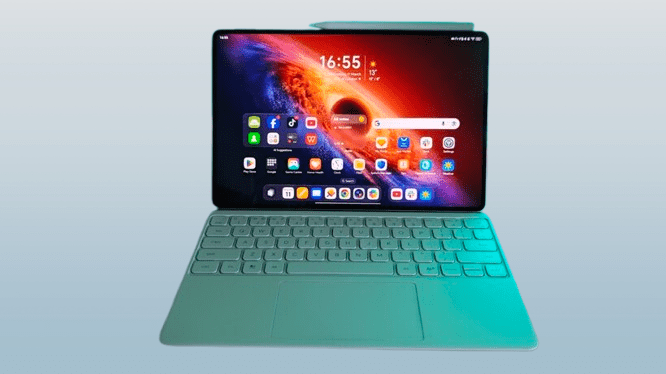
The optional keyboard case is worth mentioning separately. It adds 435g, which is almost exactly the weight of the tablet itself, so the combined setup comes in just under 900g. That’s still reasonable for a 12.3-inch productivity setup, and the case transforms the MagicPad 4 into something that functions genuinely close to a lightweight laptop.
If you buy the tablet with the intention of using it for work, the keyboard case makes that use case much more practical. It adds bulk, but the result is a portable workstation that travels lighter than most entry-level laptops.
The keyboard is full-sized, which means your hands don’t have to adjust to a cramped layout. Key travel is short, but the feedback is satisfying enough that typing for extended periods doesn’t feel like a chore.
The trackpad adds to that laptop-like experience, and when you combine it with a software feature I’ll cover shortly, the whole setup starts to feel less like a tablet with a keyboard attached and more like a proper portable computer.
The Magic Pencil 4s is the other accessory worth considering. It works with the 12.3-inch display for note-taking and drawing, with low latency that makes handwriting feel close to pen on paper.
It reads pressure and angle, so the line weight adjusts naturally as you write or sketch. There’s also a shortcut button built into the barrel that switches between pen and eraser quickly, and it doubles as a remote shutter for the camera when you need it.
Storage is simple. The stylus snaps magnetically to the side of the tablet when you’re not using it and charges wirelessly from there.
You may also like: iPad Air M4: Price, Specs, and Release Date
If your budget is tight, the keyboard case is the more essential purchase of the two. But for anyone doing creative work, sketching layouts, annotating documents, or taking handwritten notes, the Magic Pencil 4s earns its place quickly.
Honor MagicPad 4 Screen
The screen is one of the strongest parts of the MagicPad 4, and it’s where the $599 price starts to feel like a genuine bargain.
At 12.3 inches, it’s not the largest display in this category. Apple, Samsung, and OnePlus all offer bigger screens at comparable or higher prices. But size isn’t the whole story here. The MagicPad 4 uses an OLED panel, and that’s a meaningful advantage over most tablets in this price range.
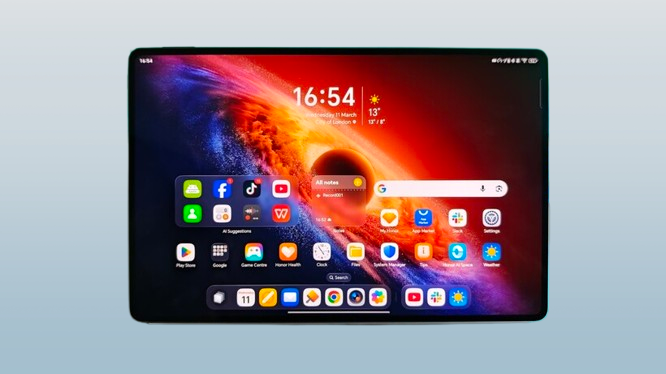
OLED screens have typically been reserved for top-tier products like the iPad Pro and Samsung Galaxy Tab S10 Ultra. Seeing one in a $599 tablet is not something you’d expect, and Honor actually walked away from OLED on last year’s MagicPad 3 before bringing it back here. That reversal was the right call.
The difference between OLED and a standard LCD panel is one you notice without needing any technical knowledge to explain it. Colors on this screen are vivid and accurate. Black areas look genuinely black, not the dark grey that LCD panels produce when the backlight bleeds through.
The contrast is sharp, and everything from photos to video content benefits from it. You look at the screen, and it immediately reads as high quality. That’s the clearest way to describe it.
The 3:2 aspect ratio works well for the MagicPad 4’s strengths. It’s a good fit for watching films and video content, giving the picture more vertical space than a widescreen format while still feeling cinematic.
It sits between the wider 16:10 ratio of the Samsung Galaxy Tab S10 Ultra and the more square 7:5 ratio of the OnePlus Pad 3. That middle ground means it handles both media consumption and productivity work without feeling like it was optimized for one at the expense of the other.
The resolution comes in at 3K, which keeps text sharp and images detailed at this screen size. Nothing looks soft or pixelated, even at close range.
The refresh rate sits at 165Hz, and you feel that smoothness when scrolling, swiping between apps, or navigating the interface. It’s not an LTPO panel, so it doesn’t drop to a lower refresh rate to save power when the screen is showing static content, but the fluidity it delivers during regular use is immediately noticeable.
For gaming, 165Hz means the screen can technically keep pace with frame rates up to 165fps. In practice, very few mobile games are optimized to push anywhere near that ceiling, so it’s more of a future-facing spec than a daily advantage right now. The bigger benefit is simply how smooth everything feels in everyday use.
Honor includes 5280Hz PWM dimming on the MagicPad 4, which reduces the screen flicker that causes eye strain during long sessions. It’s a spec that doesn’t show up in marketing headlines often, but if you spend hours reading or working on a tablet, it makes a noticeable difference in how your eyes feel afterward.
You may also like: Kindle Scribe Colorsoft Fig Color Launches January 28: Price, Features, and Where to Buy
There’s also a range of additional eye care settings in the menu if you want to adjust things further, including the option to change the overall color profile of the display. The default setting is bright and vivid, and it’s hard to argue with it.
The speaker setup is genuinely surprising. Eight IMAX Enhanced speakers in a tablet this thin is not something you’d expect, and the audio output backs up the spec. Volume goes high without distorting, and the detail across the frequency range holds up at higher levels.
The bass is the most unexpected part. Ultra-thin devices usually sacrifice low-end response because there’s not enough physical space to produce it. The MagicPad 4 manages meaningful bass output despite the 4.8mm profile, which makes watching films or listening to music without headphones a much better experience than most tablets in this price range can offer.
It’s not going to replace a dedicated Bluetooth speaker when you need to fill a room with sound. But you’ll likely find yourself reaching for that speaker less often than you used to.
Honor MagicPad 4 Performance
Honor chose the Snapdragon 8 Gen 5 for the MagicPad 4 rather than the full Snapdragon 8 Elite, which is the chip OnePlus put inside the Pad 3, a tablet that actually costs less.
On paper, that looks like an odd decision. In practice, it suggests Honor made a deliberate trade-off, prioritizing the OLED display over squeezing in the premium processor. Given how good that screen is, the reasoning holds up.
The more important question is whether that chip choice affects daily use, and the answer is that it largely doesn’t. Running the 12GB/256GB MagicPad 4 alongside the OnePlus Pad 3 as a daily driver, the performance gap between the two chips doesn’t show up in normal tasks.
Apps open at the same pace, multitasking feels equally fluid, and nothing about the MagicPad 4 feels held back during regular use. The difference between these two processors only becomes relevant in sustained heavy workloads, and for most people using a tablet day to day, that scenario rarely comes up.
Both tablets handled everything thrown at them without any signs of struggle. Apps opened quickly, switching between multiple windows at once stayed smooth, and rendering 4K video in CapCut ran without any noticeable slowdown. For gaming, it told the same story.
The OnePlus Pad 3’s Elite chipset does carry a stronger GPU on paper, and in theory, that translates to higher frame rates in demanding games.
In actual use, both tablets deliver a strong gaming experience with high-quality graphics and very little thermal throttling during extended sessions. The theoretical GPU advantage of the Pad 3 doesn’t translate into a meaningfully better experience when you’re actually playing.
For the vast majority of Android games available right now, both tablets have more than enough power to handle them comfortably.
Honor blocked benchmarking apps on the review unit, which makes it harder to put hard numbers on the performance gap. Based on the chip specs, the MagicPad 4 would likely fall behind the OnePlus Pad 3 and Apple’s M-series iPads in CPU and GPU tests. That’s a reasonable expectation.
For most people using a tablet for everyday tasks, though, the MagicPad 4 has enough processing power to handle what you need, and the OLED screen makes everything you do on it look better than it would on a faster tablet with a lesser display.
Connectivity covers the current standards with Wi-Fi 7 and Bluetooth 6, so network performance and wireless peripheral support are both current generation. The one gap worth flagging is that there’s no cellular option anywhere in the MagicPad 4 range. It’s Wi-Fi only. If you need mobile data connectivity built into your tablet, you’ll need to look elsewhere.
You may also like: iPad Air M4: Price, Specs, and Release Date
Apple’s iPad lineup supports cellular across most models, and even more affordable options like the OnePlus Pad Go 2 offer it. For anyone who relies on a tablet away from Wi-Fi regularly, that’s a limitation worth factoring into the decision.
Honor MagicPad 4 Software
MagicOS on Honor’s smartphones has never been a personal favorite. The hardware Honor produces is consistently impressive, but the software on the phone side has always felt like it gets in the way rather than adding to the experience. That’s what makes the MagicPad 4’s software a genuine surprise.
MagicOS 10, built on Android 16, is clearly designed with a large screen in mind, and the difference shows. The standout feature is PC Mode, which activates automatically when you connect the keyboard case.
The interface shifts into a windowed layout that looks and behaves similarly to a desktop operating system. Windows float, resize, and overlap the way you’d expect on a laptop. The whole setup feels closer to Windows than it does to a typical Android tablet interface.
What makes it work is how broadly it’s supported. Resizable floating windows aren’t limited to Honor’s own apps. A wide range of third-party apps support the format too, which makes the mode actually useful rather than a feature that only works in controlled demos.
Switching between multiple apps in this layout feels more natural than the standard Android split-screen approach, which has always felt like a workaround rather than a proper solution. PC Mode feels like it was built for the way people actually use a tablet when they’re trying to get work done.
Honor’s Notes app has been rebuilt into something genuinely useful in MagicOS 10. The audio recorder is now built directly into the app, which means you can record a meeting and take written notes in the same window at the same time.
The recording transcribes in real time, so you end up with both a written record and an audio file when you’re done. From there, you can use the built-in AI tools to clean up the document or generate a mind map from the content.
For students, journalists, or anyone who sits through a lot of meetings, that workflow saves a meaningful amount of time.
The Mac compatibility is another area where Honor has put in real work. The level of integration on offer is closer to what Apple provides between its own devices than what you’d typically expect from an Android tablet.
Through the Honor Workstation app, you can access your tablet from your Mac and your Mac from your tablet, transfer files between the two, and use the MagicPad 4 as a secondary display for your Mac. That last feature alone adds practical value for anyone who works from a laptop and wants more screen space without buying a dedicated monitor.
It’s a feature set that makes the MagicPad 4 feel less like a standalone device and more like part of a broader productivity setup.
The cross-device features work with Windows 11, too, even though most of Honor’s marketing focuses on the Mac side. If your main computer runs Windows, the same connectivity options are available to you.
The overall software experience is polished and clearly takes some inspiration from iOS. The visual style, particularly the translucent UI effects, draws an obvious line to Apple’s design language. That’s not a criticism; it makes the interface feel clean and approachable, and there are enough customization options to make the experience feel personal rather than generic.
You may also like: OnePlus Pad Go 2 review: Better than all mid-range tablets
AI features are spread throughout the OS, a mix of Honor’s own tools like Magic Portal and Google’s additions, including Circle to Search. The range is broad, but how much you actually use them depends on your habits and workflow. In regular daily use, most of them don’t come up often. They’re there if you want them, but the tablet doesn’t push them on you constantly, which is the right approach.
Samsung sets the bar at seven years of OS updates for the Galaxy Tab S10 Ultra, which is hard to match. Honor commits to six years of updates for the MagicPad 4, which carries it through to Android 22.
It falls one year short of Samsung’s promise, but six years is still a strong commitment for an Android tablet at this price, and long enough that the software won’t become a reason to replace the hardware anytime soon.
Honor MagicPad 4 Cameras
Tablet cameras have never kept pace with smartphone cameras, and the MagicPad 4 doesn’t change that pattern. The single 13MP rear camera with an LED flash handles practical tasks well enough. Scanning documents, capturing a whiteboard, or grabbing a quick reference photo all work fine.
For anything beyond that, your phone will do a better job. It’s not a camera you’d choose over a dedicated device for photos that actually matter, but it covers the basic use cases that come up when you’re working on a tablet throughout the day.

The 9MP front camera follows the same pattern. It’s adequate for video calls and online meetings, but it won’t replace your phone for anything where image quality matters.
It also lacks the automatic framing feature that Apple includes on its iPads, which keeps you centered in the frame when you move around during presentations or calls. That’s a noticeable omission if you spend a lot of time on video.
Where Honor shifts the focus is on editing rather than capturing. The native Gallery app includes a set of AI editing tools that let you remove reflections, adjust overall image quality, and swap out backgrounds.
You may also like: Google Pixel 10a Release Date Leaked: Launching February 17 at Lower Price
The features work as advertised, though none of them are particularly new at this point. Most competing platforms offer similar tools, so it fills a gap without standing out as a reason to choose the MagicPad 4 over anything else.
Honor MagicPad 4 Battery life
The MagicPad 4 packs a 10,100mAh battery into a 4.8mm chassis, which is an impressive engineering achievement on its own. The slightly smaller OLED panel compared to the OnePlus Pad 3 and iPad Pro 13-inch also works in the battery’s favor, since less screen real estate means less power draw during regular use.
In practice, the battery life holds up well. With a mix of browsing, streaming, and occasional gaming spread across a typical week, the MagicPad 4 lasted seven days before needing a charge. That’s light use by most standards, and heavier daily workloads will bring that number down significantly.
But even under sustained use, including running multiple apps in PC Mode throughout a working day, it consistently makes it to the end of the day without running out. For anyone using it as a laptop replacement during work hours, that’s exactly the reliability you need from a device you’re depending on to get things done.
Charging is where the MagicPad 4 runs into a real problem. The tablet supports 66W wired charging, which is a respectable speed for a battery of this size. The catch is that you need an Honor-branded charger to reach those speeds, and Honor doesn’t include one in the box.
That would be a minor inconvenience if the tablet supported standard USB-C Power Delivery charging as a fallback, the way most devices do. But in testing, that wasn’t the case.
When connected to an Anker Prime 250W Desktop charger, a unit powerful enough to fast charge almost anything, the MagicPad 4 pulled somewhere between 5W and 10W. That’s not a slow charging speed. That’s barely charging at all.
For a tablet with a 10,100mAh battery, those numbers translate to a very long wait to get back to full charge. In 2026, shipping a device that charges this slowly on anything other than its own proprietary charger is a frustrating oversight, and it’s the kind of thing that becomes a daily annoyance rather than a one-time inconvenience.
If you buy the MagicPad 4, budget for the Honor charger with it, because relying on third-party charging equipment will test your patience quickly.
To put the third-party charging speed in concrete terms: 15 minutes on the Anker charger added a single percentage point of battery. One percent in fifteen minutes on a 2026 flagship tablet is a result that’s difficult to explain away.
The assumption was that some background battery protection setting was limiting the charge rate, because of the kind of toggle some manufacturers include to extend long-term battery health. There was no such setting. It simply charges that slowly on anything other than Honor’s own hardware.
Switching to an older 120W Honor charger from a drawer changed the picture completely. Fifteen minutes brought the battery to 28%. Thirty minutes reached 53%. A full charge took just over an hour. Those are reasonable numbers for a battery this size, and they show the hardware is capable of charging properly when given the right equipment.
You may also like: Honor Magic V6 Brings IP69 Protection and a 2,800 MPa Steel Hinge to Take On Samsung’s Fold 7
The frustration isn’t the charging speed itself. It’s that the charger required to achieve it doesn’t come in the box. You’re paying $599 for the tablet and then discovering you need to spend more to charge it at a usable rate. That’s a detail Honor should address, either by including a compatible charger or by adding proper USB-C PD support so third-party chargers actually work.
Honor MagicPad 4 Verdict
The Honor MagicPad 4 brings together a 12.3-inch OLED display, a design that’s thinner and lighter than most competing tablets, and a productivity feature set that holds up in real daily use.
If you want a large-screen Android tablet that delivers premium hardware without the premium price tag that Apple and Samsung attach to their equivalents, this is the good option in that space right now.
Pros | Cons |
| Impressively thin and light | Not the fastest chip for the money |
| Gorgeous 12.3-inch OLED screen | You need a Honor-branded charger for fast charging |
| PC Mode offers a Windows-style desktop |
Final Thoughts
The Honor MagicPad 4 stands out in the Android tablet market not because it tops every spec sheet, but because it gets the balance right across the things that matter most in daily use.
The design is the first thing you notice. At 4.8mm thick and 450g, it’s more comfortable to hold and carry than anything else at this screen size, and it achieves that without cutting corners on battery life, build quality, or everyday performance. Add the keyboard case and stylus, and the whole package works genuinely well as a productivity setup.
You may also like: Samsung Galaxy Z Fold 8 Display Upgrade: 20% Crease Reduction With Dual UTG Technology
The 12.3-inch OLED display carries the experience. Deep blacks, accurate and vivid colors, and a 165Hz refresh rate that makes everything feel smooth, whether you’re reading, working, or watching something.
The eight-speaker system supports that by delivering audio that’s loud, detailed, and surprisingly good on bass for a device this thin. For films, games, and general entertainment, it punches well above what you’d expect at $599.
MagicOS 10 feels like it was built with a large screen in mind, which hasn’t always been true of Honor’s software. PC Mode is the highlight, turning the MagicPad 4 into a workable laptop alternative when paired with the keyboard case.
The improved first-party apps, Mac integration, and Windows compatibility round out a software experience that’s more capable than the phone version of MagicOS suggests it would be.
For anyone who wants an OLED display, a genuinely portable form factor, and good productivity features without paying Apple or Samsung prices, the MagicPad 4 makes a strong case for itself at $599. The charging situation is a real frustration that Honor needs to fix, but it doesn’t undermine what is otherwise one of the better value propositions in Android tablets right now.