Google Messages may soon let you share your location with someone directly inside a conversation. Based on what’s been found in the app’s code, the feature would show your location in real time and update as you move, so the other person always knows where you are at that moment.
The folks at Android Authority spotted this while digging through an APK teardown of Google Messages. The code points to a built-in location sharing tool that works much like what you already get in WhatsApp or Telegram.
Nothing is live yet, but the groundwork is clearly there, and it suggests Google is moving toward making this a native part of the messaging experience rather than leaving users to rely on third-party apps for something this basic.
You may also like: Google Turning Now Playing Into Dedicated App for Pixel Users
A static location pin only shows where you were at one specific moment. This feature works differently. It tracks and shares your movement continuously for as long as you choose, so the person you’re sharing with can follow along in real time as you travel from one place to another.
How Real-Time Location Sharing in Messages would work
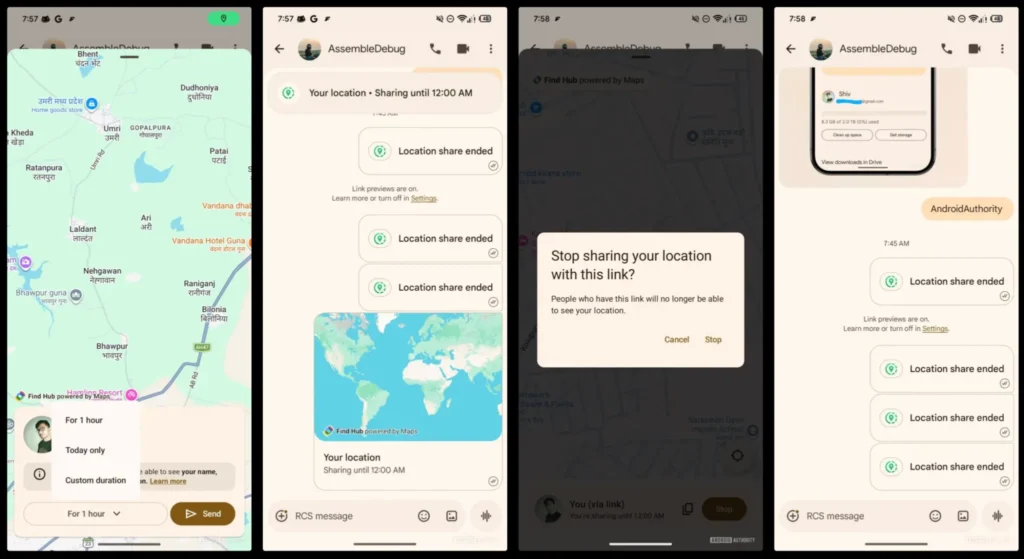
When you open the attachment options inside a conversation, you’ll see the new Real-time Location option listed there. Tapping it kicks off the sharing process.
You may also like: Google Android 17 Beta Reveals a Smarter Way to Charge Your Phone
If you haven’t given Google Messages permission to access your location yet, the app will ask for that before anything starts.
Once you grant access, you choose how long you want to share. The available options are one hour, the rest of the day, or a custom time frame you set yourself. For as long as sharing is active, a banner stays visible at the top of the conversation, so both you and the other person always know the session is still running.
One thing worth noting is how the shared location shows up on the other end. The recipient doesn’t need to have the feature enabled on their device to see it. They get a link that opens the live location feed regardless.
You may also like: ChatGPT Age Prediction System Now Rolling Out to Identify Teen Users
If they have the Google Find Hub app installed, the link goes there. If not, it opens straight in their browser and still updates in real time as you move.
You can stop sharing at any point by tapping the banner at the top of the chat and selecting Stop. Google hasn’t announced a public release date for the feature yet.
You may also like: Android 17 File Sharing Feature Leaks: Full Details
That said, the direction is clear. Google is pushing Messages toward being a more complete app for everyday communication.
Recent updates have already added scam text warnings and tools to keep your messages from getting buried in busy group chats, and live location sharing fits right into that pattern.