If you often work with data that starts as a text file or CSV, Microsoft Excel now has new built-in tools that make it easier to pull that information into a spreadsheet.
The update introduces two new functions: IMPORTTEXT and IMPORTCSV. These functions let you bring external data directly into Excel cells using formulas. Instead of going through the traditional import wizard every time, you can now load files straight into a worksheet and keep that data connected to its source.
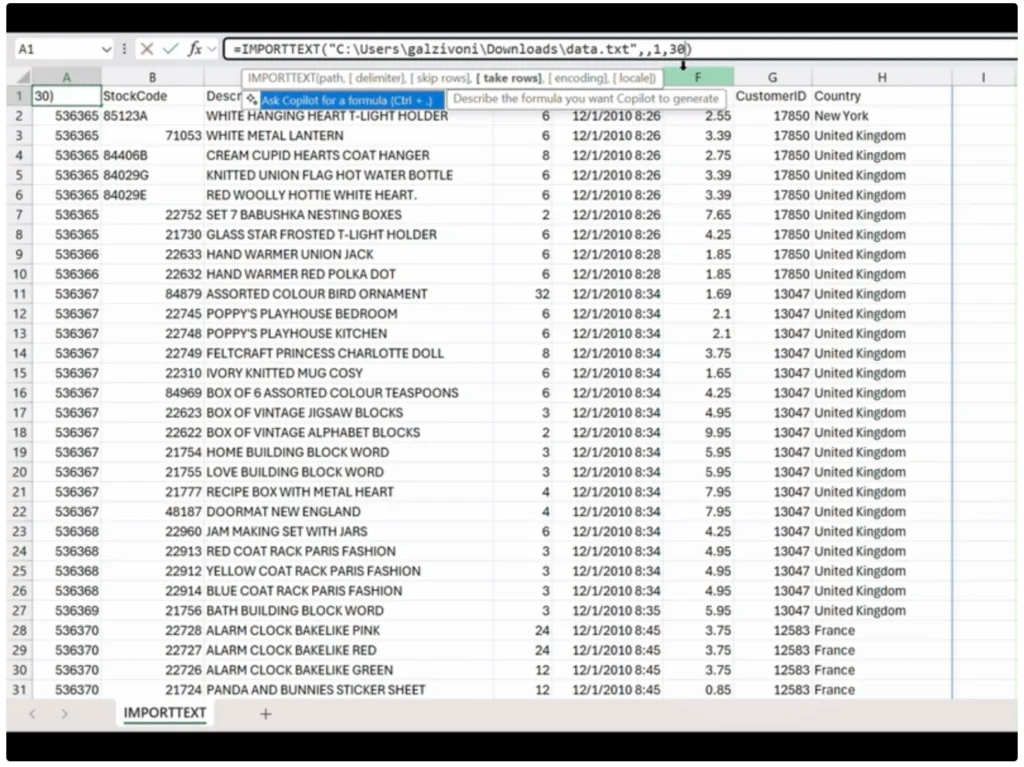
How the Excel IMPORTTEXT and IMPORTCSV functions work
The IMPORTTEXT function lets you import data directly into Excel from text files like TXT, CSV, and TSV. You can tell Excel exactly how to read the file. You choose the delimiter, define text qualifiers, and set the encoding. This helps ensure the data appears correctly as soon as it loads into your sheet.
When the data comes in, Excel places it into a dynamic array. That means the results automatically expand or shrink based on the file content. You do not need to manually adjust rows or columns each time the file changes.
You may also like: Windows 11 26H1 Build 28000: Everything New in Microsoft’s Arm-Focused Update
For simpler tasks, IMPORTCSV is often the faster choice. It is built specifically for CSV files and assumes standard formatting. This makes it ideal for files exported from apps, databases, or online tools where the structure is already predictable. You can write the formula quickly and move on without extra setup.
Both functions support local file paths and other supported locations. More importantly, they can refresh the data when the source file updates. If the file changes, Excel can pull in the new version without having to repeat the entire import process.
Microsoft explains that these functions are designed to reduce repetitive manual work. You set the formula once, and after that, Excel handles future updates automatically.
Since the import rules are inside a formula, you can see exactly how the data is handled. This makes it easier to review, adjust, or fix issues compared to older import tools, which hide these steps behind menus.
The new import functions are now rolling out to Microsoft 365 Insider users. They are not meant to replace Power Query. Instead, they provide a simpler, formula-based option for everyday data imports where you do not need complex transformations.

You can also use these import functions together with the =COPILOT function. Once the data is in Excel, you can ask Copilot questions about it directly. You get summaries, patterns, and insights without leaving your worksheet or setting up extra tools.
You may also like: New Windows 11 Update Comes With Taskbar Network Speed Test, Emoji 16.0, and Built-in Sysmon
This update is part of Microsoft’s wider plan to make Copilot more useful inside Office apps. The goal is to turn it into a practical assistant that works with your data, not something you switch to in a separate step.
It also supports Microsoft’s ongoing effort to make Excel faster and easier to use. With features like keyboard shortcuts and simple workflow habits that many users depend on, these new functions help reduce stress and save time during routine tasks.