What’s interesting about DJI’s first 360 camera drone is where the design started. They didn’t build a camera and figure out how to make it fly. They took the Avata, an FPV platform they’d already proven in the field, and built 360 capture around it.
That’s a different starting point than the Antigravity A1, which came at the same concept from the camera side first. The gap shows in how each drone performs. The Avata 360 flies faster, holds up better in wind, and responds more precisely to your inputs. You also get more options for how you want to control it.
When you don’t need 360 footage, you can switch to standard forward-facing 4K recording, and it behaves like a regular camera drone. That flexibility matters.
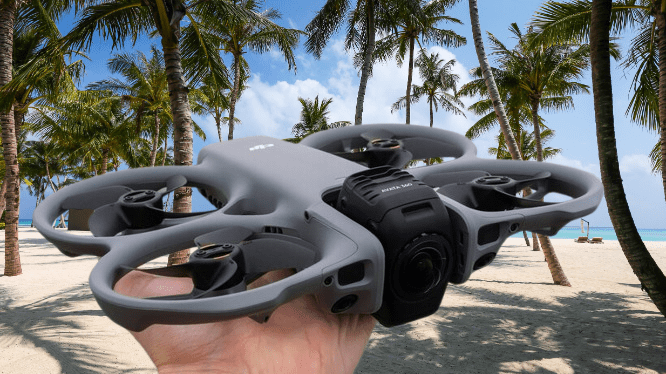
I have been putting the Avata 360 through its paces for several weeks. I flew it using both the RC 2 controller and the full FPV setup, in conditions that ranged from calm early mornings to windy afternoons along the coast.
DJI Avata 360 Camera Drone Price and Availability
DJI gives you four ways to buy the Avata 360, which helps if you already own some of their gear. The aircraft-only package starts at $409 and is aimed at people who already have a compatible controller. Add the RC 2, and the price moves to $639.
If you’re starting from scratch, the Fly More Combos make more sense. Both are priced at $829 and include three batteries, a charging hub with 100W fast-charge support, spare propellers, a landing mat, and a carrying bag. The difference between the two is the controller: one pairs with the RC 2, the other comes with Goggles N3 and RC Motion 3.
When you compare it with the competition, the value becomes clear. The Antigravity A1 Standard Combo, even after recent discounts, runs well past $1,000 and comes with less in the box.
You may also like: 4K DJI Mini 3 Drone Fly More Combo Deal: $575 (20% Off Limited Time)
The one significant gap is US availability. DJI is still working through regulatory issues in American markets, so the Avata 360 won’t get an official US release. That’s a real loss for American buyers, who are left on the sidelines while this category moves forward without them.
DJI Avata 360 Camera Drone Design and Build
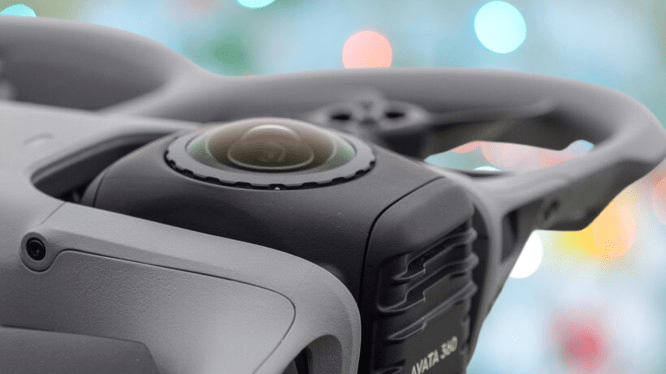
The Avata 360 shares the same flat quadcopter shape DJI used on the Avata 2 and Neo, with one clear difference, which is that the camera has two lenses mounted on opposite sides rather than a single forward-facing one.
The built-in prop guards, a defining feature of this design, do two jobs at once. They protect the propellers during impacts and add structural strength to the frame.
The drone comes in at around 455g, which puts it above the old 250g registration threshold. That said, recent UK CAA updates introduced the UK1 class designation, which changes how this weight category is handled.
That certification matters in practice. It opens up more flying locations for drones in this weight range, letting you operate within 50m of uninvolved people and across residential and commercial areas without jumping through extra hoops.
During my testing, that translated directly into access. I flew in suburban parks and along the coast without needing special permission for either location.
The added weight works in its favor. The Avata 360 feels good in a way the lighter A1 simply doesn’t.
The trade-off is ground clearance. There’s very little of it, and there’s no landing gear, so you need a flat, clean surface to take off and land from. The collapsible mat included in the Fly More bundles isn’t just a bonus item. If you’re launching from grass or uneven ground, it’s something you’ll actually need.
You may also like: Canon RF 14mm F1.4L VCM and RF 7-14mm Fisheye Hands-On Review
The camera lenses can be swapped out by the user, which is a practical decision given how exposed they are. Scratches are more likely here than on a traditional drone camera, and being able to replace the lens is far cheaper than a full repair.
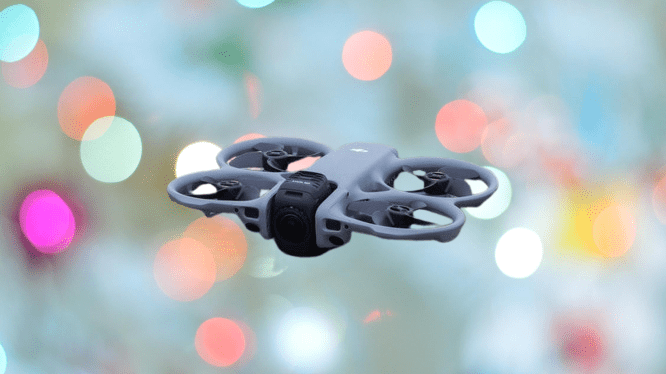
For connectivity, the Avata 360 has a USB-C port for charging and file transfers, along with a microSD slot if you need more than the 42GB of built-in storage.
Cards up to 1TB are supported. The batteries slide into the rear of the aircraft. DJI claims around 23 minutes of flight time, though in my testing, 15 minutes was closer to what I actually got.
The controller options are where the Avata 360 earns its flexibility. The RC 2 gives you traditional twin-stick control with a built-in screen, which works well when you’re flying solo.
The FPV setup, using the Goggles N3 and RC Motion 3 (though Goggles 3 and FPV Remote Controller 3 also work), puts you in a first-person view that’s a different experience entirely.
On a practical note, the Goggles N3 fit comfortably over glasses, which is something the Antigravity headset couldn’t manage for me.
DJI Avata 360 Camera Drone Flight Performance
Flight performance is where the Avata 360 differs from the A1 more than any spec comparison could show. During the windier coastal sessions in my testing, it held its position, responded quickly, and stayed precise throughout.
The A1 gets the job done, but it flies conservatively. The Avata 360 has a different character. It moves through tight spaces with confidence, takes sharp turns cleanly, and the gap between your input and the drone’s reaction is minimal. It feels responsive in a way the A1 doesn’t.
Sport Mode is worth calling out specifically. When you turn off the obstacle sensors, the Avata 360 will hit around 40mph (18m/s). It’s a noticeable shift in character.
Cine and Normal modes offer a more measured progression, with omnidirectional obstacle avoidance covering you through a combination of vision sensors, front-facing LiDAR, and down-facing infrared detection.
The O4+ transmission held up consistently across two weeks of testing. No dropouts, no stuttering, no latency issues even at extended range. Return-to-home worked every time I tested it.
Subject tracking works for both people and vehicles, and it runs in automated flight mode as well as automated 360 framing mode.
You set the altitude, distance, and approach angle, then let it do the work whether you’re walking, cycling, or driving. The obstacle avoidance stays active during tracking, too, so the drone routes around trees and fences on its own without losing you in the process.
The control flexibility changes how you can actually use this drone day to day. With the RC 2, you’re flying solo using the same twin-stick setup you’d find on any mainstream DJI drone. No spotter needed, and if you’ve flown a Mini, Air, or Mavic before, there’s nothing new to learn. It’s the practical option for quick sessions or times when bringing someone along isn’t an option.
FPV mode asks for more from you. You need a spotter with you by law since the goggles block your vision, and the motion controller takes some time to get comfortable with. Once you’re there, though, the experience is different in a meaningful way. You’re seeing from the drone’s perspective, and that changes how flying feels.
The motion controller makes FPV accessible if you’ve never tried it before. That said, full manual FPV flight isn’t available, and DJI confirmed to me they have no plans to add it.
DJI Avata 360 Camera Drone Camera Performance
The Avata 360 uses two 64MP sensors positioned on opposite sides of the nose-mounted gimbal, each behind an ultra-wide lens. Together they cover the full sphere and record up to 8K at 60fps with 10-bit colour.
That already puts it past the Antigravity A1, which caps at 8K 30fps. But the bigger difference shows up in the footage itself. The larger sensors and higher bitrate produce cleaner images with better dynamic range, and that’s visible when you’re reviewing your clips.
D-log M support is useful if you handle your own colour grading. I spent time working with the 10-bit D-log files in DaVinci Resolve, and they held up well under colour correction and exposure adjustments. .
It’s not Mavic 4 Pro image quality, but for a 360 platform, the Avata 360 delivers more than you’d expect at this price point.
Working with 360 footage means you can’t skip post-production, and that will put some people off. After each flight, you take your footage into either DJI Fly on mobile or DJI Studio on desktop to reframe it.
Both apps follow the same basic process, which is to pick your viewpoints, set them as keyframes, and let the software build smooth transitions between them. If you’ve worked with 360 cameras before, you’ll find your footing quickly. If this is new to you, there’s a learning curve, but it’s not a steep one.
If editing isn’t something you want to deal with, single-lens mode skips all of that. It uses only the forward-facing camera and records standard 4K at 60fps, the same as any conventional drone. At that point, the Avata 360 just works like a regular aerial camera.
DJI Avata 360 Camera Drone Verdict
DJI didn’t set out to make a 360-degree camera that can fly. They built a performance drone that also shoots spherical video, and that distinction runs through everything about the Avata 360, from how it handles in the air to the range of ways you can control it.
You’ll need to edit your 360 footage, and other DJI drones will give you cleaner traditional video. But if you want a single drone that can fly aggressively through tight spaces and also pull off cinematic reframed shots, nothing else currently does both as well.
Pros |
Cons |
| Dual 64MP sensors deliver strong 10-bit 8K 60fps video | Air 3S and Mavic 4 Pro produce better image quality |
| Fly solo with RC controller or bring FPV goggles for immersion | Buying both controller systems gets expensive |
| Fast, nimble flight even in windy conditions and its significantly cheaper than the Antigravity A1 |
Final Thoughts
DJI took a different approach to the 360 drone category than Antigravity did with the A1, and it shows across every area that matters. The Avata 360 flies better, gives you more ways to control it, costs less, and produces better footage.
If you’re willing to put in some editing time with 360 footage, and you understand that DJI’s dedicated camera drones will still outperform it for standard video, you’ll get a lot out of this drone.
If you want something that can fly fast through tight spaces one day and shoot immersive spherical footage the next, nothing else on the market right now offers that combination at this price.