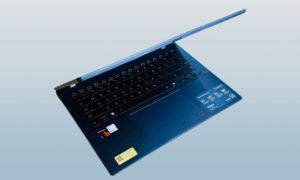
Dell’s Alienware laptop lineup has seen quite a bit of change over the past few years. The Area-51 made its comeback, and the 2026 portfolio is shaping up to give gaming fans more to choose from, with fresh designs and more accessible price points entering the mix.
The Aurora series sits at the more affordable end of that lineup. It brings the main Alienware experience to a lower price without stripping out the features that make the brand worth considering in the first place.
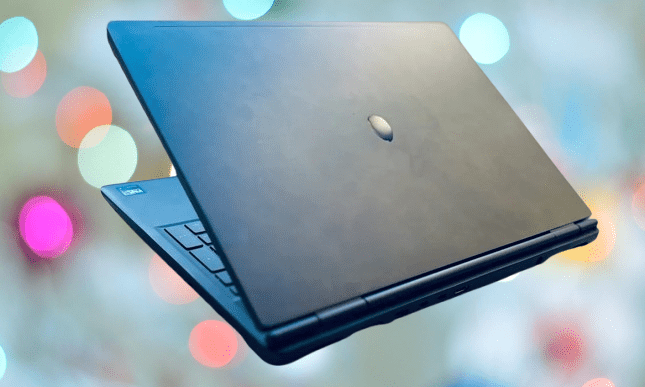
The Alienware Aurora 16X is the clearest example of what that approach looks like in practice. It’s been available for a few months now, but in a market where laptop prices keep climbing, and some companies are pushing subscription models, it stands out as a genuinely competitive option on value.
It might even be one of the last of its kind from a brand with this level of reputation. Going into this review, the expectation was a familiar story of aging hardware with little to offer. It turned out to be more surprising than that in several areas.
Dell Alienware 16X Aurora Specs
| Processor | Intel Core Ultra 7 255HX / Ultra 9 275HX / Ultra 9 290HX Plus |
| Graphics | NVIDIA GeForce RTX 5060 / RTX 5070 / RTX 5070 Ti |
| Memory | Up to 32GB DDR5 |
| Storage | Up to 2TB PCIe SSD (Gen4 NVMe) |
| Display | 16-inch WQXGA (2560 × 1600), up to 240Hz, 100–120% DCI-P3, G-SYNC, optional OLED |
| Ports | 2 × USB-A 3.2 Gen 1, 1 × USB-C 3.2 Gen 2 (PD), 1 × Thunderbolt 4 (DP 2.1 + PD), 1 × HDMI 2.1, 1 × RJ45 Ethernet, 1 × 3.5mm audio jack, DC-in |
| Wireless | Wi-Fi 7 (802.11be, 2×2), Bluetooth 5.4 |
| Chassis | Interstellar Indigo finish |
| Dimensions | 356.98 × 265.43 × 19.2–23.4 mm |
| Weight | Starting ~2.57 kg |
| Keyboard | AlienFX RGB (1-zone) |
| Touchpad | Precision touchpad |
| Webcam | 1080p FHD RGB-IR HDR |
| Microphones | Dual-array |
| Speakers | Stereo, 2W × 2 (4W total) |
| Battery | 96Wh (6-cell) |
| Charging | Dedicated high-watt adapter |
Dell Alienware Aurora 16X
There’s no getting around what this laptop is. It’s a gaming machine through and through, which means it’s heavy and bulky. What’s slightly unexpected is how restrained it looks. The aggressive RGB light show you would typically associate with a gaming laptop is largely absent here. Without the reflective Alienware logo on the lid, it could reasonably pass for a large workstation or professional-grade laptop.
You may also like: Asus Vivobook 14 Review: A $649 Copilot+ Laptop That Challenges the MacBook Air
It weighs around 5.7 pounds, and that’s before you factor in the chunky charging brick that comes with it. If you plan to carry this anywhere, a large bag with proper shoulder support is a practical requirement rather than a suggestion.
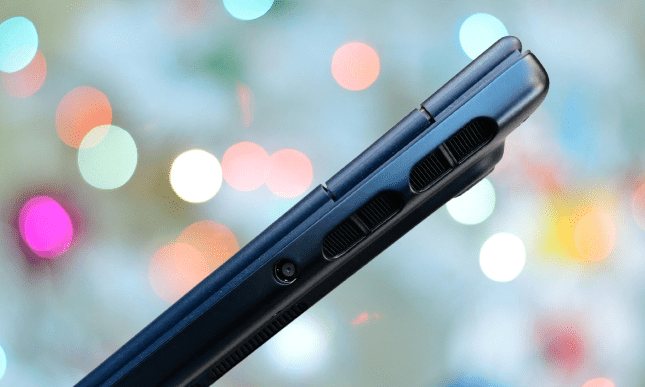
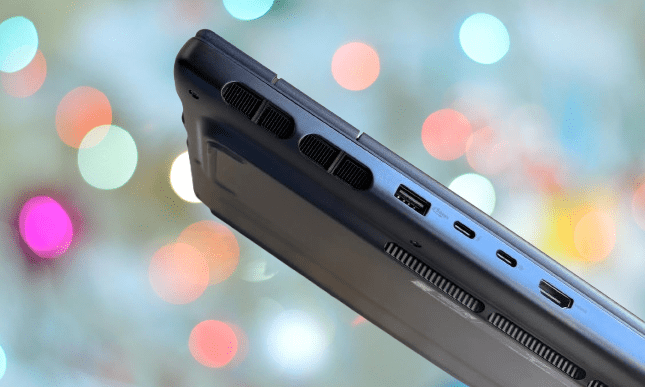
The understated look works in its favor. The main giveaway that this is a gaming laptop is the port placement, which sits along the rear under the hinge. That positioning means you’ll need to shift the laptop or move things around on your desk before plugging anything in, which gets old quickly.
On the port selection itself, you get two USB-A ports running at 5Gbps and 10Gbps respectively, two USB-C ports at 5Gbps and Thunderbolt 4 at 40Gbps, an HDMI output, and a full-sized RJ45 Ethernet port. The one noticeable gap at this price is the absence of Thunderbolt 5. That would have been a welcome addition and feels like a missed opportunity.
The Aurora 16X has more rounded edges than most gaming laptops tend to offer. The hinge follows a pill-shaped design, the base is curved rather than angular, and the vent cutouts continue that same rounded approach throughout.
The hinge itself is stiff with some flex on the lid, and it opens all the way back to nearly 180 degrees, sitting almost flat against the desk. It’s not a feature most gamers will ever use, but it’s a detail you don’t often see on laptops in this category.
The keyboard is a mixed experience. Fitting a full numpad onto the deck meant the individual keycaps had to shrink, which affects the overall typing feel. The keys are well-spaced and offer decent resistance, but the feedback isn’t particularly crisp, and the vertical travel falls short of what comfortable extended typing requires. After several weeks of regular use, hitting a consistent typing speed never quite happened.
Keyboard lighting can be adjusted through the Alienware Command Center, but customization is limited to zone-based control rather than per-key RGB. For most people, that won’t matter, and the cleaner look that comes with zoned lighting is actually preferable to the chaotic multicolor effect that per-key RGB setups often produce.
The touchpad gets the job done without standing out in any particular way. It’s nowhere near as large as what you’d find on an Asus Zephyrus G-series laptop, and it doesn’t come close to the smoothness of a MacBook trackpad. Touch sensitivity and gesture recognition are acceptable, but the physical click buttons at the bottom feel clunky compared to what’s available elsewhere.
You may also like: HP Victus Gaming Laptop Drops to $999.99 for Presidents’ Day (RTX 5060, 16GB RAM)
Dell is capable of producing much better touchpads than this. Anyone who has used an XPS or Precision series laptop will notice the difference immediately. It’s a strange area to cut corners on, given what Dell can deliver when it wants to.
Dell Alienware Aurora 16X Sound and Display
The display is the hardware highlight of the Aurora 16X. It carries one of the better IPS panels currently found on a gaming laptop at this price level. The 16-inch screen at 2560 x 1600 pixels delivers strong color coverage and accuracy, but what stands out most is the viewing angles.

This is the first gaming laptop in this price range tested in a while that shows no color distortion even at extreme angles. The image stays accurate, well-saturated, and sharp regardless of where you’re sitting relative to the screen. Brightness is also better than expected, outperforming the M4 MacBook Air in that regard, and glare is handled well enough that extended sessions don’t cause eye strain.
Gaming on this display is a genuinely enjoyable experience, and the screen deserves a lot of the credit for that. The 240Hz refresh rate pairs well with the QHD resolution, giving you smooth, high frame rate gameplay without having to drop down to a lower resolution to get there. That added smoothness carries over to everyday work tasks too, where it makes a noticeable difference.
The biometric unlock system sits along the top edge and uses infrared face recognition. It performed reliably in testing, picking up faces quickly and unlocking without much hesitation. The webcam is a different story. It’s not the worst on a gaming laptop, but sharpness is average, and low-light performance needs work. It gets the job done for occasional video calls, but won’t impress anyone who uses it regularly.
Going into the audio testing with some optimism turned out to be a mistake. The speakers are a disappointment. Volume is adequate, but the soundstage feels flat and lacks any real energy. Instrumental separation is decent enough, but nothing about the listening experience feels engaging.
The MacBook Air’s speakers sound better, which is not a comparison that reflects well on a gaming laptop at this price point.
You may also like: Acer Predator X27U Deal: 280Hz QD-OLED Gaming Monitor Just $399.99
The biggest gap is bass. Laptop speakers generally struggle with low frequencies, but most compensate with a livelier midrange or cleaner highs. The Aurora 16X doesn’t make up for it elsewhere. It handles streaming and in-game audio at an acceptable level, but put on music you actually care about, and the limitations become hard to ignore.
Alienware 16X Aurora Battery Life
Dell fitted the Aurora 16X with a 6-cell 96Whr battery. In an offline video playback drain test, it lasted just over five and a half hours, which comes in roughly 15% ahead of the 16-inch Asus ROG Zephyrus under the same conditions.
Push the CPU and GPU with real-world work, and that figure drops to around 3 hours. Video editing, combined with some local AI processing on medical files, drained the battery to 15% in just over two hours while running in balanced mode. For lighter use like YouTube at 50 to 60 percent brightness, you can reasonably expect seven to eight hours of screen time per charge.
The short version is that you won’t want to stray far from a power outlet for extended sessions. If gaming is the primary use case, plugging in is necessary to get full performance out of the hardware anyway. For a gaming laptop, the battery life here is exactly what you’d expect. Nothing remarkable, nothing concerning.
Dell Alienware Aurora 16X Performance
Now for the part that matters most for a gaming laptop. The review unit came equipped with an Intel Core Ultra 9 275HX processor paired with an Nvidia GeForce RTX 5070 GPU. That 24-core Intel Core Series 2 chip and Nvidia’s mid-tier graphics card sit alongside 32GB of RAM and 1TB of storage. For gaming, that’s a capable combination that should hold up well for the next few years.
You may also like: Samsung Odyssey OLED G9 49-Inch Ultrawide 240Hz Monitor at $999
In testing, the only laptop that outperformed this configuration was the Lenovo Legion 5 Pro running the same Intel processor, and even then the gap was marginal.
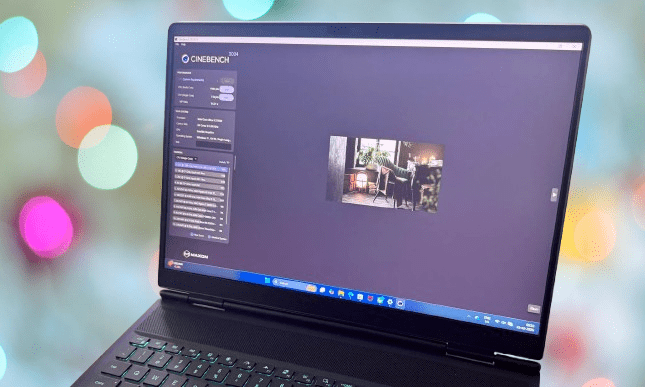
Starting with CPU performance, the Intel Core Ultra 9 275HX scored over 30% higher than comparable laptops running AMD’s Ryzen AI 9 HX-series processor in Cinebench benchmarks, and roughly 20% higher than the Intel Core Ultra 7 255HX.
That last comparison is worth keeping in mind since Dell also offers the Aurora in a lower-spec configuration with the Core Ultra 7 and RTX 5060. The SSD performance was equally strong, with CrystalDiskMark results placing it among the fastest drives available in this price bracket.
On the graphics side, the RTX 5070 outpaced the RTX 4070 by around 10 to 12 percent on average across 3DMark runs. Compared to other current-generation laptops running the same RTX 5070 GPU from brands like Asus and Lenovo, the Aurora 16X held a consistent lead in graphics performance.
Moving to real-world gaming performance, Cyberpunk 2077 runs at around 45fps at just below the native QHD resolution with ray tracing set to Ultra. Stick closer to 1200p and most current titles run comfortably near 60fps without needing any frame upscaling to get there.
If hitting an exact frame rate target isn’t a priority, you can push into the 60 to 90fps range at 1200p with peak graphics settings and expect a smooth experience without noticeable stuttering.
When you turn on the most demanding visual settings with full ray tracing, though, the laptop generates significant heat along the sides of the keyboard deck and underneath. That’s worth knowing before committing to long sessions with everything maxed out.
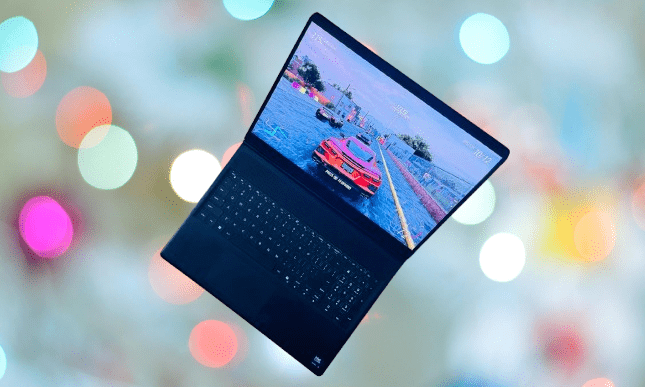
Forza Horizon 5 defaults to Extreme graphics settings on this hardware. With shaders at extreme and most other settings at ultra, the game runs in a smooth 50 to 52fps range at native resolution. The display makes a real difference here, bringing out sunlit reflections on car surfaces and environmental details with impressive clarity. Enable DLSS Super Resolution and Frame Generation, and the frame rate climbs well above 100fps without much effort.
You may also like: Acer’s Predator XB273U F6 gaming monitor with a 1,000Hz refresh rate
Gears 5 and Call of Duty: Black Ops 6 performed in a similar range at maximum graphics settings, with resolution sitting between 1200p and 1600p. Black Myth: Wukong delivered a smooth 45 to 50fps at QHD resolution, and Wuchang: Fallen Feathers landed in roughly the same territory.
At the Extreme preset and native resolution, Wuchang ran in the 100fps range, dropping no lower than 88fps during testing. Doom: The Dark Ages was another strong performer. Running at QHD with DLSS Super Resolution on Performance mode, Frame Generation at 2x, Ultra settings, and ray tracing enabled, the Aurora 16X held steady around 115fps without any signs of strain.
Overall, the performance is good without being exceptional. What separates the Aurora 16X from a lot of competitors in this category is consistency. Thermal throttling, dropping frame rates mid-session, or degrading gameplay over time was rarely an issue, which is something many gaming laptops at this price still struggle to manage reliably.
3DMark’s stress test returned a frame stability score above 99% across three separate 20-loop runs, which is an impressive result for a laptop in this category. Overdrive mode was tested to see what extra performance the hardware could produce, but the default balanced mode delivered a better overall experience by keeping thermals in check without giving up meaningful frame rate gains.
Pros | Cons |
| Surprisingly good 240Hz screen | Mediocre keyboard and touchpad |
| Dependably fast performance | Speakers could’ve been better |
| Minimal throttling tax, sleek and understated looks, decent port selection, and an upgrade-friendly outing | Noisy fans even without stress, no screen upgrade option, and no Thunderbolt 5 |
Alienware 16X Aurora Verdict
The Alienware Aurora 16X sits in an interesting position. It occupies the mid-tier of the performance hierarchy and delivers the main Alienware experience without the loud aesthetics or top-end hardware that typically comes with the brand’s higher price points.
You may also like: CORSAIR M75 Wireless Gaming Mouse Deal
On its own terms, it’s a capable machine. The Intel Core Ultra 9 275HX and RTX 5070 combination produces good gaming output that handles demanding titles without breaking down under pressure.
The 240Hz display is one of the better non-OLED panels available on a gaming laptop right now. It’s bright, handles glare well, and stays accurate at wide viewing angles. Even at the most demanding settings, 1080p gaming runs smoothly, and with some adjustment to graphics quality, QHD and 1200p gaming with ray tracing is achievable without a significant hit to frame rates.
There isn’t much to fault here beyond a few minor issues that are fairly standard across the gaming laptop category. What stands out most is that the Aurora 16X makes a genuine effort to avoid the price premium that typically comes with the Alienware name, and it largely succeeds.
If you’re weighing alternatives, the Asus ROG Strix G16 offers comparable performance at around $2,300 but with a weaker display. The Lenovo Legion Pro 7i Gen 10 steps things up with an OLED screen but asks roughly $2,600 for the privilege.
At its current asking price of $2,250, the Aurora 16X holds its own against both. If you can find it at a discount, the decision becomes simple. Newer options with Intel’s Core Ultra 200HX chips are on the way, but they’ll cost more. For anyone looking to spend close to $2,000 on a capable gaming laptop right now, this one is hard to argue against.