What makes a laptop good? The answer depends on who you ask, but here’s a simple take: a good laptop handles your daily tasks without draining your bank account, turning into a hot plate on your lap, or dying halfway through the day and sending you scrambling for a charger.
Apple figured this out with their MacBook Air. They nailed the formula so well that people happily buy models that are two or three generations old.
Windows laptops have struggled to match this consistency, mainly because the market is so fragmented with different manufacturers, processors, and designs.
Intel tried to solve this problem with their Evo certification program for Windows PCs. The goal was to guarantee certain performance and efficiency standards. But these machines still couldn’t match the battery life and performance balance you get from a MacBook. Then Qualcomm entered the picture with Snapdragon chips designed for Windows laptops. These new machines carried the Copilot+ label and promised to compete with MacBooks across different price ranges.
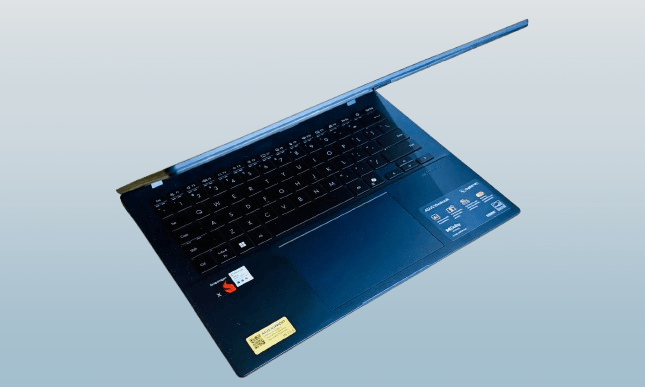
We’re now seeing the second wave of Qualcomm-powered Windows laptops hit the market. I decided to test one myself, stepping away from my M4 MacBook Air to try the cheapest Copilot+ laptop I could find. That laptop was the Asus Vivobook 14, currently priced at $649 on Asus’s website. The price drops even lower during sales.
You may also like: HP Victus Gaming Laptop Drops to $999.99 for Presidents’ Day (RTX 5060, 16GB RAM)
The Vivobook 14 impressed me more than I expected, though the experience came with some important lessons about what these new Windows laptops can and can’t do.
Pros | Cons |
| Solid trackpad and decent keyboard | The display could’ve been better |
| Sufficient selection of ports | Plastic flexes on the lid and deck |
| Decent performance for the price | The fan can get noisy |
| Reliable battery with fast charging | Random performance hiccups |
Asus Vivobook 14 Specs
| Color | Cool Silver, Quiet Blue |
| Operating System | Windows 11 Home (ASUS recommends Windows 11 Pro for business) |
| Processor | Snapdragon X (X1 26 100) (30MB Cache, up to 2.97GHz, 8 cores, 8 Threads) |
| Neural Processor | Qualcomm Hexagon NPU (up to 45TOPS) |
| Graphics | Qualcomm Adreno GPU |
| Display | 14.0-inch LED Backlit, 60Hz, 45% NTSC, Anti-glare (87% screen-to-body ratio) |
| Memory | 16GB LPDDR5X on board (Max 16GB) |
| Storage | 512GB M.2 NVMe PCIe 4.0 SSD |
| I/O Ports | 2x USB 3.2 Gen 1 Type-A; 2x USB 4.0 Gen 3 Type-C; 1x HDMI 2.1; 1x 3.5mm Jack |
| Camera | FHD camera with IR function (Windows Hello) and privacy shutter |
| Keyboard | Backlit Chiclet Keyboard, 1.7mm Key-travel, Precision touchpad |
| Audio | Smart Amp Technology, Built-in speaker, Built-in array microphone |
| Connectivity | Wi-Fi 6E (802.11ax) + Bluetooth 5.3 |
| Battery | 50WHrs, 3S1P, 3-cell Li-ion |
| Power Supply | 65W AC Adapter (Type-C) |
| Weight | 1.49 kg (3.28 lbs) |
| Dimensions | 31.52 x 22.34 x 1.79 ~ 1.99 cm |
| Weight | 1.49 kg (3.28 lbs) |
| Dimensions | 31.52 x 22.34 x 1.79 ~ 1.99 cm |
Asus Vivobook 14 Storage
Let’s talk about value first. Asus gives you more storage than Apple does at this price point. Both machines come with 16GB of memory, but the Vivobook 14’s base model includes 512GB of storage. If you plan to keep your laptop for five years or more, this storage capacity is the minimum you should consider.
I do my media editing on an iPad Pro with a lower storage capacity, and it’s always had a problem. Operating system updates take up space, and apps accumulate over time.
You may also like: Acer Predator X27U Deal: 280Hz QD-OLED Gaming Monitor Just $399.99
Before you know it, you’re running out of space faster than you’d like. If you need a laptop for work or school, Asus gives you more value per dollar compared to a similarly priced MacBook.
Asus Vivobook 14 Ports
The MacBook Air looks sleek, but that design choice costs you connectivity options. You basically need to buy a dongle to make a MacBook Air work with most peripherals. The Asus laptop doesn’t match Apple’s slim profile, but it makes up for that with a better selection of ports.
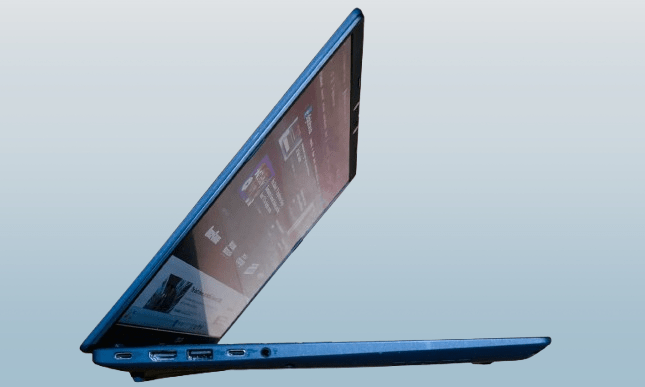
You get two USB-C ports, two USB-A ports, an HDMI port, and a 3.5mm headphone jack. You might not use every port every day. But when you need to connect an external monitor, charge your laptop, plug in a storage drive, and use a wireless mouse all at once, you’ll appreciate having these options built in.
Asus Vivobook 14 Camera and Keyboard
The laptop includes an IR camera for Windows Hello face unlock. At this price point, you should expect this feature. Biometric login has become more important now that passkeys are replacing traditional passwords for account security. Having face unlock makes logging in even faster and more convenient.
The keyboard performs well. The keys have good travel distance, and the spacing feels right. I actually preferred typing on this keyboard over my MacBook Air’s.
You may also like: Samsung Odyssey OLED G9 49-Inch Ultrawide 240Hz Monitor at $999
The keys give you a springy response when you press them, and there’s enough resistance to make typing feel satisfying. The keyboard deck has a bit of flex in the middle section, but it doesn’t affect your typing experience in any meaningful way.
Asus Vivobook 14 Display
The display quality varies depending on your environment. The 14-inch screen offers Full HD resolution, which is standard for a laptop at this price. But outdoor visibility is a problem.
I work in a dim room most of the time, so the screen brightness works fine there. When I took the laptop to a coffee shop or the park, I had to push the brightness to 100%. Even at maximum brightness, the screen struggled to stay visible in direct sunlight or bright indoor lighting. If you work outdoors frequently or in well-lit spaces, this will frustrate you.
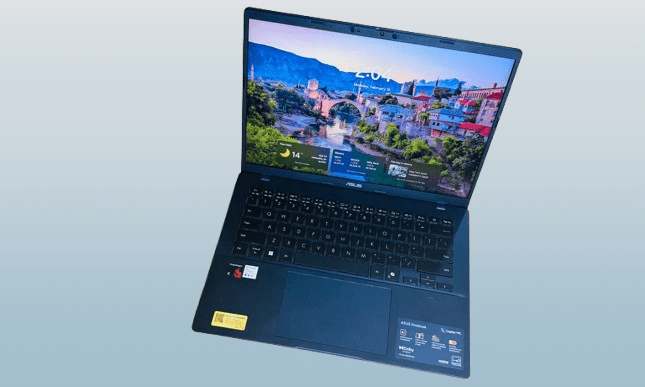
The screen has a matte finish, so glare and reflections are minimal. However, the display comes with a strange color tint right out of the box. I had to manually adjust the color temperature to get it looking neutral. The saturation also feels weak compared to what you’d see on higher-end displays.
The Asus laptop includes a useful feature in the MyAsus app called E-reading mode. This mode switches the entire screen to black and white.
You can adjust the grayscale level to your preference. There’s also an eye-care mode with five levels of blue light filtering.
I switched between these two modes regularly because they noticeably reduced eye strain during long work sessions. The monochrome mode also helped me stay focused when reading documents or articles.
The trackpad has another feature worth mentioning. It works fine for standard navigation, but the edge gestures add real functionality. You can slide your finger along the left or right edge to control volume and brightness.
You may also like: Acer’s Predator XB273U F6 gaming monitor with a 1,000Hz refresh rate
The top edge handles media playback controls. These gestures feel natural after using them once or twice. They’re not gimmicks that you forget about after the first week. I actually used them regularly because they made common adjustments faster than reaching for keyboard shortcuts or clicking through menus.
Asus Vivobook 14 Performance
The Snapdragon X processor delivers mixed results. When you compare it to Apple’s M2 chip (which is three generations old at this point), the Snapdragon matches it pretty closely in multi-core performance on Cinebench tests. But in single-core tasks, the Oryon cores fall behind.
This creates an interesting situation. Apple’s M-series chips perform well enough that people still use their M1 MacBooks from years ago without feeling the need to upgrade.
The Snapdragon X has its own advantage over older MacBook chips, which is good news for the price. When you look at Windows laptop processors, the Vivobook 14 beats Intel’s Core Ultra 5 226V and the equivalent 12th Gen Intel processors in Geekbench testing.
With 16GB of RAM and a fast SSD, the Asus laptop can handle typical workloads without problems. I ran Slack, Microsoft Teams, Chrome with about two dozen tabs open, and Copilot at the same time.
You may also like: Dell Alienware Aurora 16X Review: Gaming Value Tested
The machine kept up without slowdowns. If you need a laptop for school or office work using Google Workspace or Microsoft Office apps, this processor has enough power for those tasks.
The biggest problem with this laptop, and most Windows on Arm machines I’ve tested, is inconsistency. Some days, the Asus Vivobook 14 runs smoothly without any issues. Other days, it crashes randomly when you have a few Chrome windows open.
System updates cause another recurring headache. The laptop sometimes freezes on a blank screen during updates, forcing me to hard restart the machine.
Qualcomm needs to improve the integrated Adreno GPU, especially when you compare it to Intel’s Arc graphics or AMD’s Radeon options.
I ran 3DMark Steel Nomad three times and averaged around 9fps. An in-game benchmark only hit 18fps. Gaming on this laptop isn’t realistic. Your only option for playing games is using cloud services like Xbox Cloud Gaming or GeForce Now.
The fan noise bothers me more than it should. Even during basic web browsing and document work, you can hear the fans spinning.
The laptop doesn’t get dangerously hot or uncomfortable on your lap, which is good news. Whisper mode reduces fan noise, but I avoided using it. The laptop throttles performance when it overheats, so I kept the fan profile set to Full-Speed mode to prevent that. I used earbuds to block out the fan noise while working.
When I edited videos in Filmora, the upper section of the keyboard got noticeably warm. That’s not ideal, but the real problem was how the laptop managed resources.
I had two windows open with a total of nine apps running. The system was already using 80% of the available memory. That’s way too high for such a light workload. Meanwhile, the CPU sat comfortably under 18% usage.
You may also like: CORSAIR M75 Wireless Gaming Mouse Deal
This tells you the laptop struggles with memory management. Nine apps shouldn’t push memory usage that high when the processor is barely working. If you open more browser tabs or run additional programs, you’ll hit the memory limit quickly and experience slowdowns.
Asus Vivobook 14 Battery life
Battery life was one of the biggest surprises with this laptop. I expected average performance at best, but the Vivobook 14 delivered strong results. With the power mode set to balanced and screen brightness around 60%, the laptop lasted about 11 hours during my most recent test.
Switching to high-performance mode still gave me eight to nine hours of continuous use before the low battery warning appeared. The entry-level Snapdragon X chip clearly prioritizes efficiency over raw power. For a laptop like the Vivobook 14, this trade-off makes sense.
I’ve tested more than 20 Windows laptops over the past year. This Asus model delivered the best battery life among Snapdragon-powered machines in its size class. It also outlasted Intel-based laptops from competing brands at similar price points.
If your budget caps out around $700, you probably have realistic expectations about performance. You’re not expecting desktop-class power or gaming capability.
What you want is a laptop that handles daily tasks and lasts through a full workday without needing a charger. The Vivobook 14 meets that requirement better than most alternatives at this price.
The Asus Vivobook 14 doesn’t exceed expectations, but it handles battery efficiency well for typical tasks. Problems show up when you push the laptop harder. During high-performance creative work, the battery drains much faster than you’d want. The drop-off feels inconsistent and happens quicker than the regular usage patterns suggest.
The MyAsus app includes some useful battery management tools. There’s a battery care mode that caps charging at 80%, similar to what iPhones do.
This helps extend the battery’s lifespan over several years of use. Constantly charging to 100% degrades lithium batteries faster, so limiting the charge level makes sense if you plan to keep the laptop long-term.
When you need full battery capacity for travel or extended work sessions when you are away from an outlet, you can temporarily disable the 80% limit.
You may also like: Tianma 27″ QHD 610Hz Oxide Display monitor for your fastest games
The override lasts for 24 hours and lets the battery charge to 100%. After that period, the laptop returns to the 80% limit automatically. This gives you flexibility without forcing you to permanently choose between battery longevity and maximum capacity.
Asus Vivobook 14 Verdict
The Asus Vivobook 14 is not good in some areas, but it surprises you in others. The design looks good without being flashy. What stands out is the MIL-STD 810H military-grade durability rating.
If you commute daily with your laptop for school or work, this build quality can save you hundreds in repair costs when accidents happen.
Battery life performs well. The laptop charges fully in about an hour, which helps when you forget to plug it in overnight and when you need to leave soon.
The Copilot+ certification might not matter to most people, but if you want the AI features, this laptop qualifies for that. You get on-device translation, AI image editing tools, and Windows Recall at this price point.
Performance matches what you’d expect for $649. The laptop won’t break any speed records, but it handles daily tasks without major problems. What you get in exchange for modest performance is a good package of features.
The port selection covers most needs without requiring dongles. The trackpad is large and includes those practical edge gestures I mentioned earlier.
Face unlock with Windows Hello works reliably, and there’s a physical privacy shutter for the webcam. The speakers do their job for video calls and casual media consumption, but they won’t impress audiophiles.
At $649 from Asus directly (and lower during sales), the Vivobook 14 delivers good value for students and office workers. PC prices are increasing due to ongoing memory shortages affecting the industry.
In that context, finding a capable Windows laptop at this price feels like catching a break during rough market conditions.