If you want to refresh your PC setup without building a whole new computer, or swap out your monitor. This deal makes a bigger difference than most people expect, particularly when you use one screen for everything from gaming to daily work.
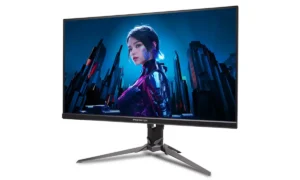
Right now, you can grab the Acer Predator X27U for $399.99. The regular price sits at $649.99, so you save $250.
What makes this deal stand out? You get premium specs at a price point where most monitors are just okay. The 27-inch screen uses QD-OLED technology with WQHD resolution.
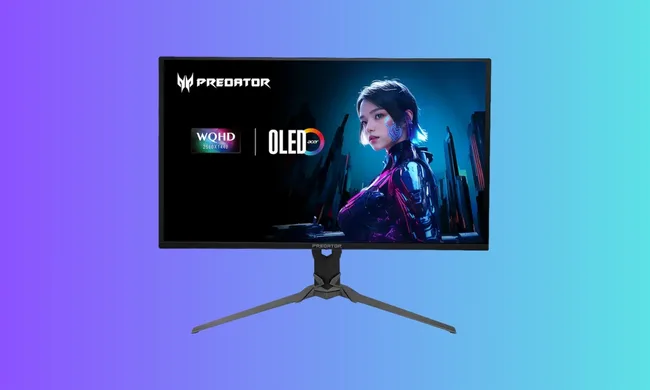
Colors look vibrant, and blacks stay deep. The 280Hz refresh rate keeps motion smooth during fast games. The 0.03ms response time means almost zero lag between your actions and what you see on screen.
You may also like: HP Victus Gaming Laptop Drops to $999.99 for Presidents’ Day (RTX 5060, 16GB RAM)
Most monitors at $400 offer basic IPS panels with 144Hz refresh rates. This Acer puts OLED quality and competitive gaming speeds in the same package. That combination usually costs over $600, which is why this price drop matters if you’ve been waiting to upgrade.
Acer Predator X27U QD-OLED Gaming Monitor Features
The Acer Predator X27U is a 27-inch gaming monitor with a 1440p QD-OLED panel. It balances competitive gaming performance with visual quality that looks stunning outside of games, too.
Here’s what the specs actually do for you:
The 280Hz refresh rate updates your screen 280 times per second. This makes movement smoother when you play fast games. You can track enemies better because each frame shows you more current information. The difference from 60Hz or even 144Hz is noticeable once you try it.
You may also like: Samsung Odyssey OLED G9 49-Inch Ultrawide 240Hz Monitor at $999
The 0.03ms response time means pixels change color almost instantly. When you move your mouse or spin around in a game, you won’t see trailing or smearing behind moving objects. This keeps your image clean during action.
FreeSync Premium Pro syncs the monitor’s refresh with your graphics card. Your screen updates exactly when your GPU sends a new frame. This stops screen tearing, where the top and bottom halves of your image don’t line up. Games look smoother without stuttering.
HDR400 support and OLED contrast work together for better image depth. Dark areas in games stay truly dark instead of looking washed-out gray. Bright highlights pop without blowing out details. This matters in games with lots of shadows or when you watch movies.
You may also like: Dell Alienware Aurora 16X Review: Gaming Value Tested
The 1440p resolution at 27 inches gives you sharp text and detailed images without crushing your GPU. You can hit high frame rates with a mid-range graphics card. Going up to 4K on a 27-inch screen makes things sharper, but your GPU works much harder for gains you might not notice at normal viewing distance.
Why Acer Predator X27U QD-OLED Gaming Monitor worth buying
QD-OLED technology sets this monitor apart from typical gaming screens. The panel produces vibrant colors and deep contrast that you notice right away.
Story-driven games look more immersive. Night maps in shooters show real darkness instead of muddy grays. Cinematic cutscenes display the way developers want them to display.
But good visuals alone don’t make this a gaming monitor. The 280Hz refresh rate puts it in competitive territory. When you play shooters or fast-paced games, the high refresh rate gives you clearer motion.
You can track moving targets better. Your reactions feel more connected to what happens on screen. Players who take competitive gaming seriously will appreciate this speed paired with OLED image quality.
You may also like: Acer’s Predator XB273U F6 gaming monitor with a 1,000Hz refresh rate
The benefits extend beyond gaming, too. Your daily computer use gets better with this monitor. Text renders sharply at 1440p resolution. You can read documents for hours without strain.
Photo editing shows accurate colors, video editing displays smooth playback, and even basic web browsing feels more pleasant when everything looks crisp.
If you are using an older 1080p monitor, you will notice this difference immediately. You gain 78% more pixels than 1080p, which means sharper details across your whole screen.
Upgrading from a standard IPS panel reveals what OLED can do. IPS panels show decent colors, but can’t match OLED’s perfect blacks. IPS backlights glow in dark scenes. OLED pixels turn completely off, creating true darkness.
The change affects how you use your computer every day. Games look better. Work becomes easier on your eyes. Movies and shows display with theater-like contrast. You get all of this in one screen instead of needing separate displays for different tasks.
Final Thought
The $399.99 price makes the Acer Predator X27U a good buy for specific users. You need to consider how you actually use your computer.
You may also like: Tianma 27″ QHD 610Hz Oxide Display monitor for your fastest games
If you only do office tasks and never play games, cheaper monitors are fine for you. A basic 1080p IPS panel costs $150 and handles spreadsheets, email, and documents just fine. Spending $400 on features you won’t use doesn’t make sense.
Gaming changes the calculation completely. A fast refresh rate matters when you play competitive shooters or action games. OLD contrast improves every game you launch, from atmospheric horror titles to bright racing simulators. The 1440p resolution gives you detail without requiring a top-tier graphics card.
Think about your typical day at your computer. Do you spend evenings playing games after work? Do you watch movies or shows on your monitor? Do you edit photos or videos where color accuracy matters? If you answered yes to any of these, the X27U delivers value at this price.
The discount won’t last forever. Monitor deals at this level usually run for a few days or until stock runs out. If you’ve been planning a monitor upgrade and want both speed and image quality, buying this monitor now makes sense. Waiting means either paying full price later or settling for a lesser monitor at the same budget.
Your current monitor also affects this decision. Upgrading from a 60Hz 1080p screen gives you major improvements.
Moving from a recent 144Hz 1440p IPS panel offers smaller but still noticeable gains in contrast and color. Only you know if those gains justify $400 based on how much time you spend looking at your screen.